
Crear un nuevo board: UI
Contenido del curso


Integración entre UI y API


Drag and Drop


Boards


Cards


Listas


Backgrounds


Próximos pasos

Crear un nuevo board: UI
Crear un nuevo board: UI
Contenido del curso

Adrian Silva

Camilo Del Valle Ledesma

Luis Jose Marquez Gonzalez

Arlin Holguin
Mi solución al reto:
<input id="sky-radio" type="radio" value="sky" name="backgroundColor" formControlName="backgroundColor" class="hidden peer" /> <label for="sky-radio" class="inline-flex items-center justify-center w-8 h-8 text-transparent border border-gray-200 rounded cursor-pointer bg-sky-700 hover:bg-sky-500 peer-checked:text-white" > <fa-icon [icon]="faCheck"></fa-icon> </label>
board-form.component.html
<form [formGroup]="form" novalidate class="space-y-4" (ngSubmit)="doSave()">
<div>
<div class="flex flex-wrap">
<div class="flex items-center mr-4">
<input
id="sky-radio"
type="radio"
value="sky"
name="backgroundColor"
formControlName="backgroundColor"
class="w-4 h-4 text-sky-600 bg-gray-100 border-gray-300 focus:ring-sky-500 dark:focus:ring-sky-600 "
/>
<label
for="sky-radio"
class="ml-2 text-sm font-medium text-gray-900 "
>Sky</label
>
</div>
<div class="flex items-center mr-4">
<input
id="yellow-radio"
type="radio"
value="yellow"
name="backgroundColor"
formControlName="backgroundColor"
class="w-4 h-4 text-yellow-600 bg-gray-100 border-gray-300 focus:ring-yellow-500 dark:focus:ring-yellow-600 "
/>
<label
for="yellow-radio"
class="ml-2 text-sm font-medium text-gray-900"
>Yellow</label
>
</div>
<div class="flex items-center mr-4">
<input
id="green-radio"
type="radio"
value="green"
name="backgroundColor"
formControlName="backgroundColor"
class="w-4 h-4 text-green-600 bg-gray-100 border-gray-300 focus:ring-green-500 dark:focus:ring-green-600 "
/>
<label
for="green-radio"
class="ml-2 text-sm font-medium text-gray-900"
>green</label
>
</div>
<div class="flex items-center mr-4">
<input
id="red-radio"
type="radio"
value="red"
name="backgroundColor"
formControlName="backgroundColor"
class="w-4 h-4 text-red-600 bg-gray-100 border-gray-300 focus:ring-red-500 dark:focus:ring-red-600 "
/>
<label
for="red-radio"
class="ml-2 text-sm font-medium text-gray-900"
>red</label
>
</div>
<div class="flex items-center mr-4">
<input
id="violet-radio"
type="radio"
value="violet"
name="backgroundColor"
formControlName="backgroundColor"
class="w-4 h-4 text-violet-600 bg-gray-100 border-gray-300 focus:ring-violet-500 dark:focus:ring-violet-600 "
/>
<label
for="violet-radio"
class="ml-2 text-sm font-medium text-gray-900"
>violet</label
>
</div>
<div class="flex items-center mr-4">
<input
id="gray-radio"
type="radio"
value="gray"
name="backgroundColor"
formControlName="backgroundColor"
class="w-4 h-4 text-gray-600 bg-gray-100 border-gray-300 focus:ring-gray-500 dark:focus:ring-gray-600 "
/>
<label
for="gray-radio"
class="ml-2 text-sm font-medium text-gray-900"
>gray</label
>
</div>
</div>
</div>
<div>
<div class="relative">
<input
formControlName="title"
placeholder="Enter title"
type="text"
class="w-full rounded bg-gray-100 border-gray-300 border-2"
/>
</div>
</div>
<div>
<app-btn typeBtn="submit" color="success"> Create </app-btn>
</div>
</form>
Para hacer más dinámico el selector de colores, he hecho lo siguiente:
He creado un array de colores para los boars
export const BOARD_COLORS: string[] = ['sky','green', 'violet', 'yellow', 'gray'];
En el ts del componente he creado una variable que contiene esos valores y una función para que tailwind agregue las clases correspondientes:
colorList: string[] = BOARD_COLORS; getcolorClass(color: string): string { return COLORS[color as Colors]; } ```Si los estilos están un poco rotos, hay que agregar las clases variantes para los hover, focus y checked: ```js checked:bg-sky-500 focus:bg-sky-500 checked:focus:bg-sky-500 hover:checked:bg-sky-500
3. En el HTML he utilizado el siguiente código para generar los inputs en forma de rectángulos:
<div class="grid gap-2 mb-4 relative" [ngClass]="'grid-cols-5'" > @for(color of colorList; track color){ <div class="relative mb-4"> <input formControlName="color" type="radio" placeholder="Board color" class="border-0 cursor-pointer h-10 w-full rounded bg-gray-100 p-2 border-gray-300 checked:border-2 checked:border-gray-400" [ngClass]="getcolorClass(color)" [value]="color" > </div> } </div> ```Este ha sido el resultado: 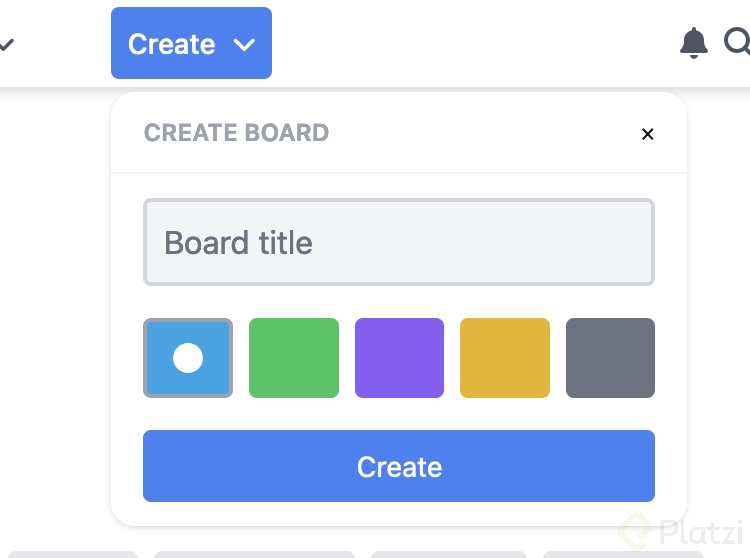
ng g c modules/layout/components/board-form --skip-tests --style=none