




Jorge Cruz Perez
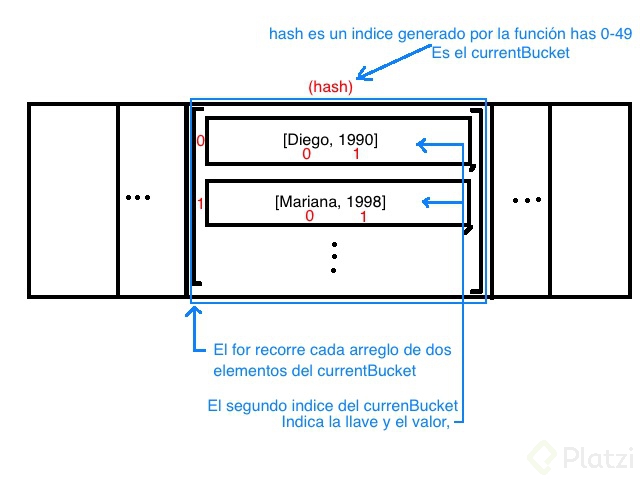
De forma grafica como se llega a cada elemento dentro de los buckets, y del currentBucket, a que arreglo de arreglos de clave, valor:

Jimmy Buriticá Londoño
Super

Christian Velázquez
Gracias.
Aprende a implementar y depurar el método get en una hash table en JavaScript con seguridad y claridad. Verás cómo calcular la address a partir del key, recorrer el bucket correcto y devolver el value adecuado incluso cuando hay colisiones. Todo con ejemplos simples y código listo para usar.
¿Qué resuelve get en una hash table?
El método get permite recuperar el value asociado a un key. La idea central: el hash es determinista, por lo que un mismo key siempre genera la misma address. Con esa address accedemos al bucket (un array de arrays), donde cada elemento es una pareja [key, value].
Así, get ubica el bucket correcto y hace una búsqueda lineal hasta encontrar el key y devolver su value.
¿Cómo implementar get con manejo de colisiones en JavaScript?
La implementación se basa en cinco pasos: calcular la address, obtener el bucket, validar su existencia, recorrer con for y comparar el key en cada sublista. Si no hay coincidencia, se retorna undefined.
class HashTable { constructor(size) { this.data = new Array(size); } hash(key) { // implementación existente del hash. } set(key, value) { // implementación existente del set. } get(key) { const address = this.hash(key); const currentBucket = this.data[address]; if (currentBucket) { for (let i = 0; i < currentBucket.length; i++) { if (currentBucket[i][0] === key) { return currentBucket[i][1]; } } } return undefined; } }
this.hash(key).this.data[address].for.currentBucket[i][0] === key en cada pareja [key, value].currentBucket[i][1] al encontrar coincidencia.undefined.¿Cómo recorre el loop for el bucket?
Cada bucket es una lista de listas. El índice i apunta a una sublista. En cada iteración se valida: si el elemento cero de esa sublista ([0]) es el key buscado, se regresa el elemento uno ([1]), que es el value. Si no, el loop continúa.
¿Qué retorna si el key no existe?
Si el bucket está vacío o no se encontró coincidencia durante el recorrido, la función regresa undefined. Esta señal es clara para indicar ausencia del elemento.
¿Cómo validar y probar con ejemplos usando set y get?
Primero, crea una instancia con un tamaño fijo para visualizar los buckets y posibles colisiones. Por ejemplo, 50 buckets para tener un espacio limitado y notar cuándo varios keys caen en la misma address.
const table = new HashTable(50); table.set('Diego', 23); // ejemplo ilustrativo. table.set('Mariana', 98); // puede colisionar con Diego. table.set('Adriana', 2000); // otro par key-value. console.log(table.get('Diego')); // 23 console.log(table.get('Mariana')); // 98 console.log(table.get('Adriana')); // 2000 console.log(table.get('X')); // undefined
[key, value] y el for localizará la correcta.[['Diego', 23], ['Mariana', 98]]. Cada sublista es una pareja.¿Qué retos siguen: delete y keys?
[key, value] al recibir un key.Comparte tu solución en comentarios: será útil ver distintos enfoques para estas operaciones y cómo optimizas el recorrido por buckets.
Jorge Cruz Perez
De forma grafica como se llega a cada elemento dentro de los buckets, y del currentBucket, a que arreglo de arreglos de clave, valor:
Jimmy Buriticá Londoño
Super
Christian Velázquez
Gracias.

Fernando Quinteros Gutierrez
Jimmy Buriticá Londoño
Me gusto tu opción del método remove(), las otras soluciones no están bien, porque no desplazan el índice cuando en un hash hay varios elementos.
Fernando Quinteros Gutierrez
¡Gracias por el comentario Jimmy! es un placer 😉
getKeys() { return this.data.reduce((instance, value) => { const keys = value.map(([key]) => key); return instance.concat(keys) }, []); }

Miguel Angel Hernandez Colombo
me perdi :( pero seguire!


carlos eduardo Bustamante Mangas
aaaaaeee, riri

Carlos Eduardo Gomez García

David Granados
Si haces delete solo del value, te van a quedar keys sin values que no hacen nada, deberías hacer el delete de currentBucket[i] completo, no solo del value [1]

César Antonio Solís Utrilla
Como dice David, solo estas borrando el key y dejando el value solo. De. igual forma, lo que dice David tampoco está correcto, ya que si haces el delete de currentBucket[i] estarías eliminando ambos valores pero dejando un espacio vacío, lo cual no queremos. Lo más optimo sería usar splice para cortar ese espacio de memoria y no agregar vacío.

Jorge Méndez Ortega
mm no veo aun el potencial de este curso, veo muchas cosas repetidas de otros

Carlos Mario
En que otro u otros cursos de JS enseñan estas estructuras de datos?

Julia Gabriela Nieva Paredes
¿Es en serio?

Nahim Terrazas Parada
Julia Gabriela Nieva Paredes
¡Excelente! Se me había olvidado splice

Omar Flores Grimontt
Hay un detalle con la función de set, es que si haces dos veces un set de la misma llave entonces sólo lo vas a añadir al arreglo y cuando trates de hacer un get te devuelve el primer valor y nunca los que se añadieron de manera posterior, estuve viendo que en la implementación de Hash Table que tiene Java lo que hacen es sobreescribir el valor de la llave con el nuevo, más info al respecto acá). Para emular este comportamiento cambié un poco el método, y quedó así:
set(key, value) { const address = this.hashMethod(key); if (!this.data[address]) { this.data[address] = []; } if (this.data[address].find((element) => element[0] === key)) { for (let i = 0; i < this.data[address].length; i += 1) { if (this.data[address][i][0] === key) { this.data[address][i][1] = value; } } } else { this.data[address].push([key, value]); } return this.data; }
También les comparto mis notas sobre éste módulo acá 😁.

Rony Porraz Vargas
// RECIBE LA LLAVE QUE BUSCAMOS CON SU VALOR get(key){ // LLAMAMOS LA FUNCION QUE NOS DEVUELVE UN HASH const address = this.hashMethod(key) // EL ADDRESS EN DONDE SE ENCUENTRA LA INFORMACIÓN const currentBucket = this.data[address] // SI ES TRUSTY if( currentBucket ) { // DESDE 0 HASTA EL LARGO DE EL CURRENT BUCKET for( let i = 0 ; i < currentBucket.length; i++ ) { // SI LA POSICION 0 DE EL ARREGLO ES IGUAL EL // KEY QUE NOS PASARON if( currentBucket[i][0] === key) { // DEVOLVEMOS LA POSICION 1 QUE APUNTA A SU VALOR return currentBucket[i][1] } } } // DEVOLVEMOS UNDEFINED return undefined }

Luis Felipe Medina Rodriguez
me ayudaste a entender gracias :D

Alver Alexander Grisales Ortega

Omar Daniel Centeno
¡Hola!
El uso del return responde más al caso de uso o la necesidad que tengas, este ejemplo funciona muy bien cuando estás buscando un valor dado con el for y, al encontrarlo, evitas que el ciclo continúe con el return. Puedes regresar entonces el valor buscado.
¡Saludos!
Omar Daniel Centeno
¡Hola!
El uso del return responde más al caso de uso o la necesidad que tengas, este ejemplo funciona muy bien cuando estás buscando un valor dado con el for y, al encontrarlo, evitas que el ciclo continue con el return. Puedes regresar entonces el valor buscado.
¡Saludos!

Nicolás Agustín Lupo


Oliverio Velázquez Cayata
Me ayudo mucho tu ejemplo, el unico error que vi es que sigue creado el bucket, con el hash ya creado, solo que vacio. Lo que yo hice es verificar si existen mas elementos en el bucket, en caso de que no, lo borro.

Hector Zurga Ramos

Alexei Alvarez
Esta es mi propuesta al método para obtener todas las keys de una hastable.
getKeys() { let keys = []; for (let i = 0; i < this.data.length; i++) { if (this.data[i]) { for (let j = 0; j < this.data[i].length; j++) { keys.push(this.data[i][j][0]); } } } return keys; }
Agradeceria su feedback

Sebastian Galindo
Yo lo hice exactamente igual hahah.

Vicente Millan
Aunque se entiende que en el metodo get, se hace una iteración por posibles colisiones, lo correcto es hacer la hash funcion lo más óptima posible, para evitar colisiones.
Hay que entender que lo que intenta solucionar la hash table, es que a la hora de tu buscar un elemento en la matriz, no tengas que integrar todos los elementos para buscar un solo valor, la idea es que gracias a la hash funcion ya tu recuperes ese elemento directamente, sin iterar.
Lo que se hace en el video es con fines didácticos y está bien, pero si hacen un for para buscar un valor en una hash table en un ámbito real, está mal.

David Moreno

Juan Carlos García Esquivel
Les comparto mi solución al reto:
delete(key) { const address = this.hashMethod(key); const currentBucket = this.data[address]; for (let i = 0; i < currentBucket.length; i++) { if (currentBucket[i][0] === key) { const deleted = currentBucket[i][1]; this.data[address].splice(i, 1); return deleted; } } return undefined; } getKeys() { let keys = []; for (let address of this.data) { if (!address) { continue; } for (let [key, value] of address) { keys.push(key); } } return keys; }

Jefred Bedoya
delete(key){ const address = this.hashMethod(key) const currentBucket = this.data[address] console.log(`El elemento a borrar es: ${currentBucket}`) if(currentBucket){ for(let i = 0; i < currentBucket.length; i++){ if(currentBucket[i][0] === key){ currentBucket.splice(i, 1) return true } } } return false } getAllElements(){ const elements = [] for (const bucket of this.data) { if(bucket){ for(const pair of bucket){ elements.push(pair) } } } return elements }

Andres Felipe Vargas Gonzalez
Esas coalisiones son random?

Fabián Romero
He visto los cursos recomendados antes de tomar este, pero no entiendo como resolver los retos :/

Joalin Pineda
¡Hola! Puedes compartirnos tus avances así no lleges a la solución y acá la comunidad te ayudará, también puedes ver como lo han resuelto otros estudiantes en los aportes y tratar de hacerlo por tu cuenta.
👩💻👨💻 Código de la clase y solución al reto de Remove y getAllKeys
class HashTable { constructor(size) { this.data = new Array(size); } hashMethod(key) { let hash = 0; for (let i = 0; i < key.length; i++) { hash = (hash + key.charCodeAt(i) * i) % this.data.length; } return hash; } set(key, value) { const address = this.hashMethod(key); if (!this.data[address]) { this.data[address] = []; } this.data[address].push([key, value]); return this.data; } get(key) { const address = this.hashMethod(key); const currentBucket = this.data[address]; if (currentBucket) { for (let i = 0; i < currentBucket.length; i++) { if (currentBucket[i][0] === key) { return currentBucket[i][1]; } } } return undefined; } getAllKeys() { const keys = []; for (let i = 0; i < this.data.length; i++) { if (this.data[i]) { for (let j = 0; j < this.data[i].length; j++) { keys.push(this.data[i][j][0]); } } } return keys; } remove(key) { const address = this.hashMethod(key); const currentBucket = this.data[address]; if (currentBucket) { for (let i = 0; i < currentBucket.length; i++) { if (currentBucket[i][0] === key) { const deletedValue = this.data[address][i]; this.data[address].splice(i, 1); return deletedValue; } } } return undefined; } }
Dejo el código del delete (Es prácticamente lo mismo que el get, pero en esta ocasión lo elimina con delete), le puse remove para que el linter de JS no me diera problemas ^^
remove(key) { const address = this.hashMethod(key); const currentBucket = this.data[address]; if (currentBucket) { for (let i = 0; i < currentBucket.length; i++) { if (currentBucket[i][0] === key) { const element = currentBucket[i][1]; delete currentBucket[i][1]; return element; } } } return undefined; }
My solucion para el metodo getKeys y delete
/* eslint-disable no-restricted-syntax */ /* eslint-disable no-plusplus */ class HashTable { constructor(size) { this.data = new Array(size); } hashMethod(key) { let hash = 0; for (let i = 0; i < key.length; i++) { hash = (hash + key.charCodeAt(i) * i) % this.data.length; } return hash; } delete(key) { const address = this.hashMethod(key); const currentBucket = this.data[address]; if (currentBucket) { for (let i = 0; i < currentBucket.length; i++) { if (currentBucket[i][0] === key) { const value = currentBucket[i]; currentBucket.splice(i, 1); return value; } } } return undefined; } keys() { const keys = []; this.data.forEach((bucket) => { bucket.forEach((keyPairValues) => { keys.push(keyPairValues[0]); }); }); return keys; } set(key, value) { const address = this.hashMethod(key); if (!this.data[address]) { this.data[address] = []; } this.data[address].push([key, value]); return this.data; } get(key) { const address = this.hashMethod(key); const currentBucket = this.data[address]; if (currentBucket) { for (let i = 0; i < currentBucket.length; i++) { if (currentBucket[i][0] === key) { return currentBucket[i][1]; } } } return undefined; } } const myHashTable = new HashTable(50); myHashTable.set('franz', 1997); myHashTable.set('laura', 1998); myHashTable.set('mama', 1966); myHashTable.set('elena', 2000); myHashTable.get('franz'); myHashTable.keys(); myHashTable.delete('mama'); myHashTable.keys();
Es buena practica hacer un return en el for o se puede asignar ese valor a una variable y despues del for retornarlo, algo así
get(key) { const address = this.hasMethod(key); const currentBucket = this.data[address]; let value = undefined; if (currentBucket) { for (let i = 0; i < currentBucket.length; i++) { if (currentBucket[i][0] === key) { value = currentBucket[i][1]; } } } return value; }
Resuelto el reto 😁
Añadí un método findPair a la clase y lo que hace es abstraer la lógica de búqueda del método get, para poder usarla a la vez en el método de delete, y no repetir código.
Y para aplicar la lógica de si buscar un value o eliminar, recibe un callback como segundo parámetro que inyecta el valor del currentBucket y del index actual
class HashTable { constructor(size) { this.data = new Array(size); } hashMethod(key) { let hash = 0; for (let i = 0; i < key.length; i++) { hash = (hash + key.charCodeAt(i) * i) % this.data.length; } return hash; } set(key, value) { const address = this.hashMethod(key); if (!this.data[address]) { this.data[address] = []; } this.data[address].push([key, value]); return this.data; } get(key) { return this.findPair(key, (currentBucket, index) => currentBucket[index][1]); } getAllKeys() { const allKeys = []; this.data.forEach((bucket) => { for (let i = 0; i < bucket.length; i++) { allKeys.push(bucket[i][0]); } }) return allKeys; } delete(key) { return this.findPair(key, (currentBucket, index) => { const pair = currentBucket[index]; currentBucket.splice(index, 1); return pair; }) } findPair(key, callback) { const address = this.hashMethod(key); const currentBucket = this.data[address]; if (currentBucket) { for (let i = 0; i < currentBucket.length; i++) { if (currentBucket[i][0] === key) { return callback(currentBucket, i); } } } return undefined; } } const myHashTable = new HashTable(50); myHashTable.set('Diego', 1990); myHashTable.set("Mariana", 1998); myHashTable.set("Alejandra", 2000);
Les comparto la forma en que lo hice jaja, y suerte :D
class HashTable { constructor(size){ this.data = new Array(size); } hashMethod(key){ let hash = 0; for (let i = 0; i < key; i++){ hash = (hash + key.chartCodeAt(i) * i ) % this.data.length; } return hash; } set(key, value){ const address = this.hashMethod(key); if(!this.data[address]){ this.data[address] = []; } this.data[address].push([key, value]); return this.data; } get(key){ const currentBucket = this.getCurrentBucket(key); if(currentBucket){ for(let i = 0; i < currentBucket.length; i++){ if(currentBucket[i][0] === key){ return currentBucket[i][1]; } } } return undefined; } delete(key){ const currentBucket = this.getCurrentBucket(key); let item; if(currentBucket){ for(let i = 0; i < currentBucket.length; i++){ if(currentBucket[i][0] === key){ item = currentBucket[i]; this.data[address] = currentBucket.filter(j => j[0] !== key); } } } return item || undefined; } getKeys(){ const address = this.hashMethod(); const currentBucket = this.data[address]; return currentBucket.map(i => i[0]); } getValues(){ const address = this.hashMethod(); const currentBucket = this.data[address]; return currentBucket.map(i => i[1]); } getAll(){ return this.getCurrentBucket().map(i => ({ key:i[0], value: i[1] })); } find(value){ const result = this.getCurrentBucket().filter(i => i[1] === value).map(i => ({ key:i[0], value: i[1] })) return result.length > 1 ? result : result[0] || undefined; } getCurrentBucket(key){ let address = key ? this.hashMethod(key) : this.hashMethod(); return this.data[address]; } } const myHashTable = new HashTable(50);