





Josh Ospina

Ricardo Celis
ProfesorExcelente JoshDev! no olvides darle feedback a otro de los usuarios!

Johan Armando Villamil Gaitan
que significa esta sintaxis amigo &#{-btn)?
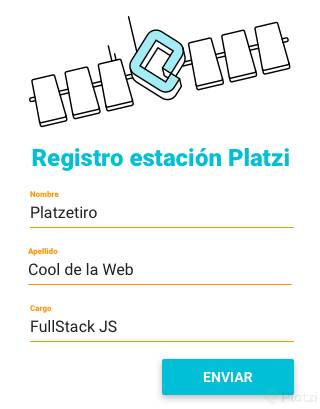
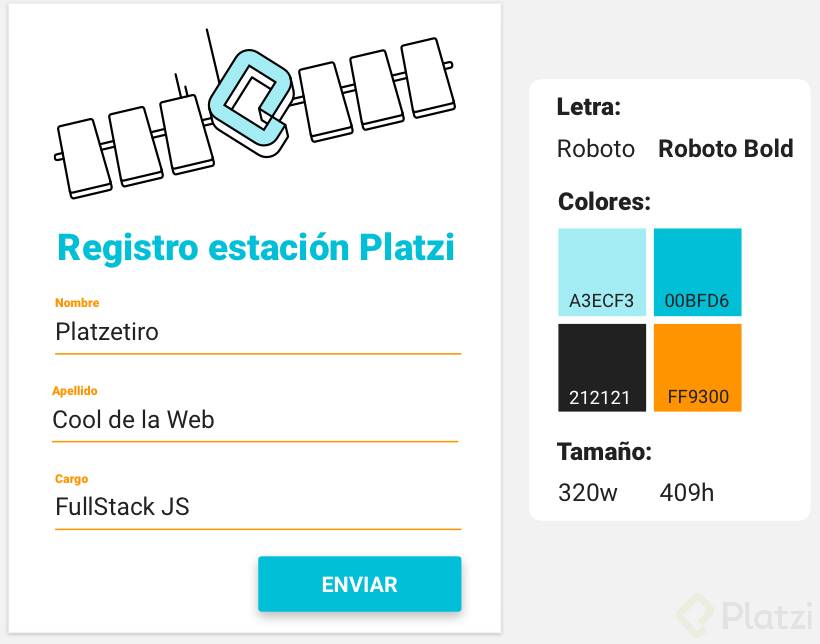
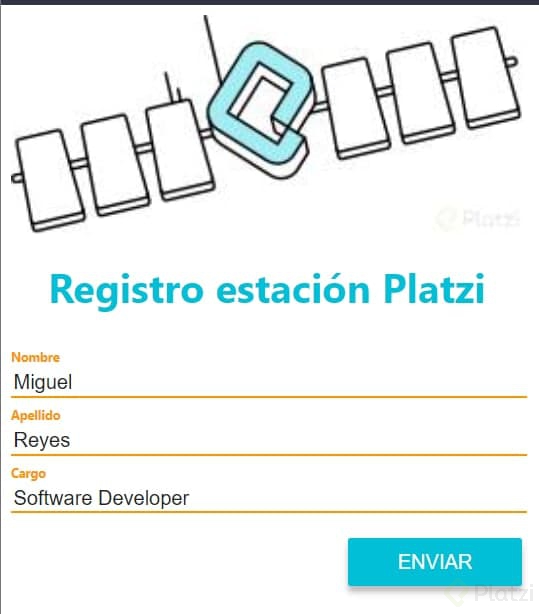
En este ejercicio te proveemos un par de Mockups para que pongas en práctica los conocimientos adquiridos durante los videos anteriores, recuerda que es muy importante compartir, así que te invito a crear tus propios mockups, compartir tu código en el sistema de discusiónes y a retroalimentar a más usuarios, revisando su código, ayudándolos a resolver errores e inclusive proponiendo mejoras.
Este es el primero de los ejercicios que debes realizar:

Josh Ospina
Ricardo Celis
ProfesorExcelente JoshDev! no olvides darle feedback a otro de los usuarios!
Johan Armando Villamil Gaitan
que significa esta sintaxis amigo &#{-btn)?
Template Vue:
<template lang="pug"> #app .container img(src="https://static.platzi.com/media/user_upload/Page%201-d8d869f4-7130-4ae9-9907-2fa809bd136a.jpg") h1 Registro Estación Platzi form label Nombre input(type="text") label Apellido input(type="text") label Cargo input(type="text") input(type="submit" id="submit" value="Enviar") </template>
main.css
@import '../../node_modules/bulma/bulma.sass'; $orange: #FF9300; $light_blue: #A3ECF3; $sky_blue: #00BFD6; $black: #212121; .container { width: 320px; height: 409px; margin: 30px auto; padding: 0 15px; position: relative; font-family: "Roboto", sans-serif; } img { width: 100%; } h1 { font-size: 1.5em; color: $light_blue; text-align: center; font-weight: bold; margin: 10px 0; font-weight: 900 } label { display: block; font-size: 10px; color: $orange; font-weight: bold; margin: 5px 0; } input[type="text"] { width: 100%; border: none; border-bottom: 1px solid $orange; color: $black; font-size: 1.5em; } input[type="submit"] { position: absolute; right: 15px; bottom: 0; width: 50%; color: #FFF; background: $sky_blue; font-size: 1.5em; text-transform: uppercase; border: none; padding: 5px; } input:focus { outline: none; }```

<template> <div id="app"> <section style="section"> <img src="https://static.platzi.com/media/user_upload/Page%201-d8d869f4-7130-4ae9-9907-2fa809bd136a.jpg" alt="Imagen Registro Platzi" /> <h2>Registro estación Platzi</h2> <span>Nombre</span> <input type="text" placeholder="Platzerito" /> <span>Apellido</span> <input type="text" placeholder="Cool de la Web" /> <span>Cargo</span> <input type="text" placeholder="FullStack JS" /> <div class="button-container"> <button>ENVIAR</button> </div> </section> </div> </template> <script> export default { name: 'App', } </script> <style lang="scss"> @import '@/scss/main.scss'; #app { //font-family: Avenir, Helvetica, Arial, sans-serif; -webkit-font-smoothing: antialiased; -moz-osx-font-smoothing: grayscale; text-align: center; color: #2c3e50; margin-top: 60px; width: auto; font-family: -apple-system, BlinkMacSystemFont, 'Segoe UI', Roboto, Oxygen, Ubuntu, Cantarell, 'Open Sans', 'Helvetica Neue', sans-serif; } section { display: inline-flex; flex-direction: column; justify-items: center; align-content: center; } section h1 { font-size: 24px; font-weight: bold; color: #00bfd6; } section span { width: inherit; text-align: left; color: #ff9300; justify-self: left; font-weight: bold; font-size: 8px; margin-top: 12px; } section input { justify-self: center; width: inherit; border-width: 0px 0px 1px 0px; border-color: #ff9300; } section input::placeholder { color: black; } .button-container { display: inline-flex; justify-content: flex-end; } section button { background-color: #00bfd6; border: none; margin-top: 16px; width: 120px; height: 34px; border-radius: 4px; font-weight: bold; color: white; } </style>

Omar Flores Grimontt
Me parece excelente los ejercicios 😃.
Aquí está mi código y el formulario.

Juan Camilo Avila
Grande Omaaaar ♥
Omar Flores Grimontt
El gran Juan Camilo 💪

Fernando Schlottmann
Luis Alvarez Ollarvez
Excelente contribución!

Miguel Angel Reyes Moreno

Jhasmany Roque Chambi
Sergio Castro García
Gracias por compartir, tengo experiencia nula en pug y sas, pero ya me doy una idea !!!

Nicolás F. Ormeño Rojas
Algo es algo

Nacho Anaya
ProfesorMuy bueno 👏👏👏
Ricardo Celis
Profesory puntos extra por los nombre y apellido!

Carolina Fernandez
Algo tarde, pero por aquí va el mío!!
Hecho con pug, sass y bulma

Ricardo Celis
Profesorno es tarde, excelente trabajo! no olvides seguir practicando todos los ejercicios del curso =)

Carlos David Marciglia Gomez
Carlos David Marciglia Gomez
Aqui screen-shot
Ricardo Celis
ProfesorExcelente trabajo!
Joel Hostilio Lopez Detrinidad
MY CODE:


Fabian Gutierrez

David Alejandro Abreu Abreu
Supongo que es que ya debo tener conocimientos de PUG y SASS? en los vídeos anteriores no trataron nada de como usar PUG y BULMA, y de repente PUM! Haz este ejercicio, y el siguiente es mas avanzado aun 😥😥

Harold David Carhuancho Aquino

Andres Pinzon
Sara Juliana Blandón

Victor Roberto López Marroquín

Ayda Yineth Montoya Henao

Lucas Guzmán

Diego Alvaro Parra Abad
Ejercicio
index.pug
doctype html html(lang='es') head title Platzi Lunar meta(charset='UTF-8') meta(name='viewport', content='width=device-width, initial-scale=1') link(href="https://fonts.googleapis.com/css?family=Roboto:400,700" rel="stylesheet") link(href='asset/css/style.css', rel='stylesheet') body .container .container-img img(src="asset/img/img.jpg" class="container-img--responsive") h2(class="title") Registro estación Platzi .container-element label(for="name" class="container-label") Nombre input(type="text" id="name" name="name" class="container-input") .container-element label(for="lastname" class="container-label") Apellido input(type="text" id="lastname" name="lastname" class="container-input") .container-element label(for="role" class="container-label") Cargo input(type="text" id="role" name="role" class="container-input") .container-submit button(class="container-btn") Enviar```
main.scss
//Variables $container-w: 320px; $container-h: 409px; $color-black: #212121; $color-yellow: #ff9300; $color-lightblue: #00bfd6; $color-whiteblue: #A3ECF3; .container{ width: $container-w; height: $container-h; font-family: 'Roboto', sans-serif; &#{-img}{ &--#{responsive}{ max-width: 100%; } } &#{-elemnent}, &#{-img}{ width: 100%; } &#{-label}, &#{-input}{ width: 100%; display: block; } &#{-label}{ font-size: 9px; color: $color-yellow; } &#{-input}{ border: 0; border-bottom: 1px solid $color-yellow; margin-bottom: .75em; padding: 3px 0 .5em; &:focus { outline: 0; } } &#{-submit}{ padding: .5em 0; display: flex; justify-content: flex-end; } &#{-btn}{ border-radius: .2em; background-color: $color-lightblue; color: $color-whiteblue; padding: .7em 3em; text-transform: uppercase; font-size: 10px; font-weight: 700; border: none; box-shadow: 2px 3px 10px #ddd; &:active, &:focus { outline:0; } } } .title{ color:$color-lightblue; } body{ display: flex; justify-content: center; align-items: center; height: 100vh; } html{ font-size: 100%; }
<template lang="pug"> #app.container.box.wrap.has-text-centered img(src="./assets/satellite-platzi.jpg") h1.title.is-4 {{ title }} .field label.label.has-text-left.is-small Nombre .control input.input(type="text", value="Platzetiro") .field label.label.has-text-left.is-small Apellido .control input.input(type="text", value="Cool de la web") .field label.label.has-text-left.is-small Cargo .control input.input(type="text", value="FullStack JS") .control.has-text-right button.button.is-primary Enviar </template> <script> export default { name: "App", data() { return { title: "Registro estación Platzi" }; } }; </script> <style lang="scss"> @import "./scss/main.scss"; @import url("https://fonts.googleapis.com/css2?family=Roboto:wght@400;700&display=swap"); $font-1: "Roboto", sans-serif; $color-1: #a3ecf3; $color-2: #00bfd6; $color-3: #212121; $color-4: #ff9300; $width-1: 320px; $height-1: 409px; .wrap { width: $width-1; font-family: $font-1; border: 0px solid black; } .title { color: $color-2; } .label { color: $color-4; } .input { border-color: $color-4; border-top-width: 0; border-left-width: 0; border-right-width: 0; border-radius: 0; box-shadow: none; } .button.is-primary { width: $width-1/2; background-color: $color-2; } </style>
Resultado:
Código:
<template> <div id="app"> <img src="@/assets/platzi_foto.jpg" /> <h1 class="title">{{ msgH1 }}</h2> <form class="form"> <label class="nameInput"> <small>Nombre</small> <input type="text" name="" id="" placeholder="Ejemplo: Miguel"> </label> <label class="lastNameInput"> <small>Apellido</small> <input type="text" name="" id="" placeholder="Ejemplo: Reyes"> </label> <label class="workInput"> <small>Cargo</small> <input type="text" name="" id="" placeholder="Ejemplo: Software Developer"> </label> <button class="sendButton" type="submit"> ENVIAR </button> </form> </div> </template> <script> export default { data() { return { msgH1: 'Registro estación Platzi', } } } </script> <style lang="scss"> $blue: #00bfd6; $blue2: #a3ecf3; $orange: #ff9300; $black: #212121; #app, .form { display: flex; flex-direction: column; align-items: center; } #app { width: 409px; height: 320px; font-family: -apple-system, BlinkMacSystemFont, 'Segoe UI', Roboto, Oxygen, Ubuntu, Cantarell, 'Open Sans', 'Helvetica Neue', sans-serif; & img { width: 100%; height: auto; } & .title { font-style: bold; color: $blue; } & .form { width: 100%; & small { color: $orange; font-weight: bold; font-size: 10px; } & input, & label { width: 100%; } & input { border: none; border-bottom: 2px solid $orange; font-size: 16px; color: $black; &:focus { outline: none; } } & .sendButton { width: fit-content; margin-top: 20px; align-self: flex-end; background: $blue; color: white; border: none; border-radius: 2px; font-size: 16px; padding: 10px 40px; box-shadow: 0px 5px 5px 0px rgb(0 0 0 / 25%); &:hover { background: $blue2; } } } } </style>
Lo logre!
<template lang="pug"> #app .container img(src="https://static.platzi.com/media/user_upload/Page%201-d8d869f4-7130-4ae9-9907-2fa809bd136a.jpg") h1 Registro estación Platzi form label Nombre input(name="nombre" id="nombre" value="Robert") label Apellido input(name="usuario" id="usuario" value="Kiyosaki") label Cargo input(name="cargo" id="cargo" value="Mercadeo") div.caja_button button(type='submit' class='btn-action') ENVIAR </template>
<style> :root { /* --color_primary: #A3ECF3; */ --color_primary: #00BFD6; --color_secondary: #FF9300; --color_text: #212121; } #app { font-family: Roboto; width:100%; display: flex; justify-content: center; font-size: 16px; } .container{ width: 320px; height: 409px; padding: 16px; } h1{ color: var(--color_primary); } label{ color: var(--color_secondary); } label, input{ display: block; width: 100%; font-weight: 500; } input{ border: 0px; border-bottom: 1px solid var(--color_secondary); color: var(--color_text); margin-bottom: 16px; font-size: 24px; } button{ background-color: var(--color_primary); color: #FFF; padding: 8px; width: 150px; border-radius: 4px; } .caja_button{ display: flex; justify-content: flex-end; margin-bottom:16px; } </style>
Ejercicio desde el archivo App.Vue
<template lang="pug"> .container-wh .img img(src="./assets/logo-platzi-music.jpg") h1(class="title") {{msg}} .form-registro b-field(label="Nombre") b-input(placeholder="Carlos") b-field(label="Apellido") b-input(placeholder="Marsiglia") b-field(label="Cargo") b-input(placeholder="FullStack JS") b-field(class="aling-button") button(class="button is-primary") ENVIAR </template> <script> export default { name: 'app', data () { return { msg: 'Registro Estacion Platzi' } } } </script> <style lang="scss"> // Import Bulma's core @import "~bulma/sass/utilities/_all"; // Import Customizing theme with Sass Buefy @import './scss/buefy.scss'; // Import Bulma and Buefy styles @import "~bulma"; @import "~buefy/src/scss/buefy"; //Sass Platzi Music @import url('https://fonts.googleapis.com/css?family=Roboto'); @import './scss/main.scss'; </style>
Main.scss
$container-ancho: 320px; $container-alto: 409px; $color-negro: #212121; $color-amarillo: #ff9300; $color-azul-oscuro: #00bfd6; $color-azul-claro: #A3ECF3; html{ background: $light; height: 100%; } .container-wh{ width: $container-ancho; margin-left: auto; margin-right: auto; margin-top: 50px; margin-bottom: 50px; background-color:$white; padding: 20px; } .title{ color:$color-azul-oscuro; font-size: 25px; text-align: center; } .label{ color: $color-amarillo; font-size: 10px; } .input{ border: 0px; border-bottom: 1px solid $color-amarillo; box-shadow:none; border-radius:0; color:$color-negro; background: transparent; transition: all 0.5s ease-out; } .aling-button{ margin-top: 10px; text-align: right; } .button, .is-primary{ box-shadow: 2px 3px 8px #ddd; }
<template > <div class="register-container"> <img src="./assets/header-img.png" alt=""> <h1>{{title}}</h1> <div class="field"> <label for="">{{label1}}</label> <input type="text"> </div> <div class="field"> <label for="">{{label2}}</label> <input type="text"> </div> <div class="field"> <label for="">{{label3}}</label> <input type="text"> </div> <div class="button-container"> <button>{{buttonText}}</button> </div> </div> </template> <script> export default { data(){ return{ title: "Registro estacion platzi", label1: "Nombre", label2: "Apellido", label3: "Cargo", buttonText: "ENVIAR" } } } </script> <style lang="sass"> .register-container width: 280px height: 409px padding: 0px 20px margin: 20px auto 0px img width: 280px height: 100px h1 font-family: -apple-system, BlinkMacSystemFont, 'Segoe UI', Roboto, Oxygen, Ubuntu, Cantarell, 'Open Sans', 'Helvetica Neue', sans-serif font-weight: bold font-size: 20px color: #00BFD6 text-align: center .field display: flex flex-direction: column align-items: flex-start padding: 10px 0px label color: #FF9300 font-size: 10px font-family: -apple-system, BlinkMacSystemFont, 'Segoe UI', Roboto, Oxygen, Ubuntu, Cantarell, 'Open Sans', 'Helvetica Neue', sans-serif font-weight: bold margin-bottom: 10px input border: none border-bottom: 1px solid #FF9300 width: 100% outline-color: transparent outline: none height: 20px font-size: 16px color: #212121 .button-container display: flex align-items: flex-end justify-content: flex-end button background-color: #00BFD6 border: none padding: 10px 30px color: white font-weight: bold box-shadow: 0px 5px 8px -5px rgba(179,179,179,1) </style>```
<template lang="pug"> #app div(class="container container-form") figure(class="logo-figure") img(src="./assets/logo.jpg" class="logo-img") h1(class="h1") Registro estación div(class="field") label(class="control") Nombre div(class="control") input(class='input-form' type="text" placeholder="Ingresa tu nombre") div(class="field") label(class="control") Apellido div(class="control") input(class='input-form' type="text" placeholder="Ingresa tu apellido") div(class="field") label(class="control") Cargo div(class="control") input(class='input-form' type="text" placeholder="Ingresa tu cargo") div(class="field is-grouped") div(class="control") button(class="button is-custom") ENVIAR </template> <script> export default { name: 'app', data(){ return{ } } } </script> <style lang="scss"> @import '../node_modules/bulma/bulma.sass'; @import url('https://fonts.googleapis.com/css2?family=Roboto&display=swap'); $color-title: #A3ECF3; $color-button: #00BFD6; $color-labels: #FF9300; $color-letter: #212121; .container-form{ width: 480px; height: 614px; font-family: 'Roboto', sans-serif; margin-top: 40px; } .logo-figure{ display: flex; justify-content: center; } .logo-img{ width: 85%; } .h1{ color: $color-title; font-size: 52px; text-align: center; padding: 5px 0; } .control{ color: $color-labels; font-size: 20px; } .input-form { border-color: transparent; border-bottom: 2px solid $color-labels; color: $color-letter; align-items: center; width: 100%; font-size: 16px; padding: 7px; } .input-form:focus{ outline: none; border-bottom: 2px solid $color-labels; } .field.is-grouped { display: flex; justify-content: flex-end; } .is-custom{ color: white; background: $color-button; width: 114px; } </style>
Register.vue
<template lang="pug"> .container.platzi-register-container img(src="@/assets/images/logo.jpg") h1 Registro estación Platzi <Field label="Nombre" id="first-name"/> <Field label="Apellido" id="last-name"/> <Field label="Cargo" id="position"/> button.button.is-link.is-pulled-right Enviar </template> <script> import Field from "@/components/Field.vue"; export default { name: "Register", props: { msg: String }, components: { Field } }; </script> <!-- Add "scoped" attribute to limit CSS to this component only --> <style scoped lang="scss"> @import "@/scss/main.scss"; #app { .platzi-register-container { max-width: 500px; padding: 0 5%; h1 { color: $platzi-music-strong-blue; font-size: 1.4em; font-weight: bold; margin: 0.5em 0; } button { background-color: $platzi-music-strong-blue; padding: 1em 2.5em; } } } </style>
Field.vue
<template lang="pug"> .field label.label {{ label }} .control input.input(type="text" v-bind:id="id") </template> <script> export default { name: "Field", props: { label: String, id: String } }; </script> <!-- Add "scoped" attribute to limit CSS to this component only --> <style scoped lang="scss"> @import "@/scss/main.scss"; #app { .platzi-register-container { .field { margin-bottom: 1em; } input { border-color: $platzi-music-orange; border-radius: 0px; border-width: 0px 0px 1.5px 0px; border-style: solid; box-shadow: none; color: $platzi-music-black; padding-left: 0; } label { text-align: left; font-size: 0.75em; color: $platzi-music-orange; margin-bottom: 0; } } } </style>
main.scss
@import "../../node_modules/bulma/bulma.sass"; $platzi-music-blue:#A3ECF3; $platzi-music-strong-blue:#00BFD6; $platzi-music-black:#212121; $platzi-music-orange:#FF9300; #app { font-family: Roboto, Avenir, Helvetica, Arial, sans-serif; -webkit-font-smoothing: antialiased; -moz-osx-font-smoothing: grayscale; text-align: center; color: #2c3e50; margin-top: 60px; }
<template lang="pug"> #app.my-3.mx-3 section(class="section") div(class="columns") .column.is-6.is-offset-3 .card .card-image.has-text-centered img(src="./assets/page1.jpg") .card-content h1.title.has-text-weight-bold.has-text-info.has-text-centered Registro estación Platzi form label.has-text-weight-bold.is-size-7 Nombre input.input.is-warning.is-shadowless label.has-text-weight-bold.is-size-7 Apellido input.input.is-warning.is-shadowless label.has-text-weight-bold.is-size-7 Cargo input.input.is-warning.is-shadowless button.button.is-pulled-right.is-primary.mt-2 Enviar </template> <script> export default { name: 'app', data () { return { msg: 'Hello wordl!!' } } } </script> <style lang="scss"> @import './scss/main.scss'; label { color: $platzi-music-orange; } </style>
Cree mi código: Utilizando Pug
<template lang="pug"> #app img(src="@/assets/Page1.webp", alt="PLatzi logo", id="logo") h1 {{ msg }} br section span(for="name") Nombre input(type="text", id="name", name="name") span(for="apellido") Apellido input(type="text", id="Apellido", name="Apellido") span(for="cargo") Cargo input(type="text", id="cargo", name="cargo") .button-container button(type="submit") Enviar </template> <script> export default { name: "app", data() { return { msg: "Registro estación Platzi", }; }, }; </script> <style lang="scss"> @import "scss/main.scss"; html { background-color: #dc7633; } #app { -webkit-font-smoothing: antialiased; -moz-osx-font-smoothing: grayscale; text-align: center; color: #2c3e50; margin-top: 60px; font-family: system-ui, -apple-system, BlinkMacSystemFont, "Segoe UI", Roboto, Oxygen, Ubuntu, Cantarell, "Open Sans", "Helvetica Neue", sans-serif; margin-left: auto; margin-right: auto; width: fit-content; padding: 25px 25px 25px 25px; border-radius: 10px; box-shadow: 3.5px 7px 7px #00000061; background-color: white; } section { display: inline-flex; flex-direction: column; justify-items: center; align-content: center; width: 100%; } h1 { font-size: 24px; font-weight: bold; color: #00bfd6; } span { width: inherit; text-align: left !important; color: #ff9300; justify-self: left; font-weight: bold; font-size: 10px; margin-top: 12px; } input { justify-self: center; width: inherit; border-width: 0px 0px 1px 0px; border-color: #ff9300; } input::placeholder { color: black; } input:focus { outline: none; border-color: #00bfd6; } .button-container { display: inline-flex; justify-content: flex-end; } button { background-color: #00bfd6; border: none; margin-top: 16px; width: 120px; height: 34px; border-radius: 4px; font-weight: bold; color: White; } </style>

CODIGO App.vue
<template> <div id="app"> <img src="@/platzi_foto.jpg" /> <h1 class="title">{{ msgH1 }}</h2> <form class="form"> <label class="nameInput"> <small>Name</small> <input type="text" name="" id="" placeholder=" Ayda"> </label> <label class="lastNameInput"> <small>Last Name</small> <input type="text" name="" id="" placeholder=" Montoya"> </label> <label class="workInput"> <small>Position</small> <input type="text" name="" id="" placeholder=" Software Developer"> </label> <button class="sendButton" type="submit"> SEND </button> </form> </div> </template> <script> export default { data() { return { msgH1: 'Station Registration Platzi', } } } </script> <style lang="scss"> $blue: #00bfd6; $blue2: #a3ecf3; $orange: #ff9300; $black: #212121; #app, .form { display: flex; flex-direction: column; align-items: center; } #app { width: 409px; height: 320px; font-family: -apple-system, BlinkMacSystemFont, 'Segoe UI', Roboto, Oxygen, Ubuntu, Cantarell, 'Open Sans', 'Helvetica Neue', sans-serif; & img { width: 100%; height: auto; } & .title { font-style: bold; color: $blue; } & .form { width: 100%; & small { color: $orange font-weight: bold; font-size: 10px; } & input, & label { width: 100%; } & input { border: none; border-bottom: 2px solid $orange; font-size: 16px; color: $black; &:focus { outline: none; } } & .sendButton { width: fit-content; margin-top: 20px; align-self: flex-end; background: $blue; color: white; border: none; border-radius: 2px; font-size: 16px; padding: 10px 40px; box-shadow: 0px 5px 5px 0px rgb(0 0 0 / 25%); &:hover { background: $blue2; } } } } </style>
hola amigos! Dejo mi Ejercicio:
main.scss:
@import '~bulma/bulma.sass'; @import url('https://fonts.googleapis.com/css2?family=Roboto:wght@400;700&display=swap'); $platzi-cyan: #A3ECF3; $platzi-cyan-dark: #00BFD6; $platzi-black: #212121; $platzi-orange: #FF9300; #estacion-platzi-container{ width:100%; height: 100vh; } .estacion-platzi{ font-family: 'Roboto' sans-serif; width:320px; height: 450px; color: $platzi-black; .title{ font-weight: 700; font-size: x-large; color: $platzi-cyan-dark; } label{ font-weight: 500; font-size:small; display:block; color: $platzi-orange; } input{ width: 100%; height: 4vh; border-top:none; border-left:none; border-right:none; border-bottom: 3px solid $platzi-orange; font-weight: 500; &:focus{ outline: none; } } button{ background-color: $platzi-cyan-dark; color:white; text-transform: uppercase; font-weight: 500; } }
Y mi App.vue con pug:
<template lang="pug"> #estacion-platzi-container.is-flex.is-justify-content-center.is-align-content-center .estacion-platzi.is-align-self-center.box img.mb-2(src="https://static.platzi.com/media/user_upload/Page%201-d8d869f4-7130-4ae9-9907-2fa809bd136a.jpg") h1.title {{ msg }} label Nombre input.mb-3(type="text" spellcheck="false") label Apellido input.mb-3(type="text" spellcheck="false") label Cargo input.mb-3(type="text" spellcheck="false") button.button.is-pulled-right Enviar </template> <script> export default { name: 'App', data(){ return { msg: 'Registro estación Platzi' } } } </script> <style lang="scss"> @import './scss/main.scss'; </style>
Así quedó:

Aporte de Noviembre 2021:
HTML
#app.hero.is-fullheight .hero-body .container .columns.is-centered .column.is-5-table.is-4-desktop.is-3-widescreen .image.is-inline-block img(src="./assets/logo-platzi-reto1.png") h1.title.has-text-centered Registro estación de Platzi form.box label.field label.label Nombre input(type="text").input label.field label.label Apellido input(type="text").input label.field label.label Cargo input(type="text").input .field.field-button button(type="button").button.is-medium Enviar
CSS
.image { margin: 1rem 0 1rem 0; } .title { font-size: 1.5rem; font-weight: bold;; color: #00BFD6; } .box { margin-top: 2rem; } .label { font-size: .7rem; color: #FF9300; } .input { border-top: 0 solid transparent; border-left: 0 solid transparent; border-right: 0 solid transparent; border-bottom: 2px solid #FF9300; color: #212121; } .field-button { display: flex; justify-content: flex-end; } .button { width: 8rem; margin-top: 1.5rem; background-color: #00BFD6; color: white; }