



Mario Andrés Castro Martínez
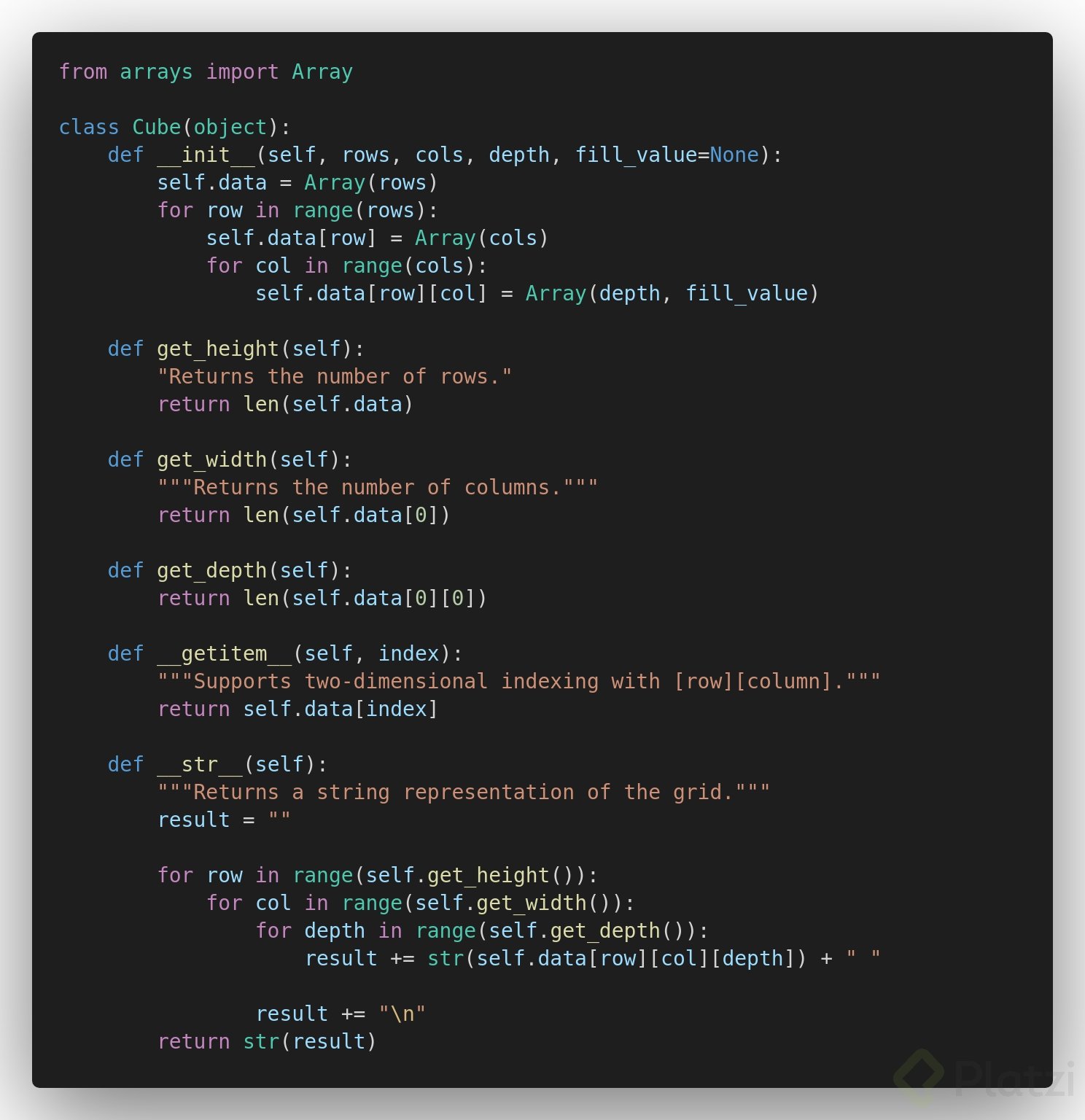
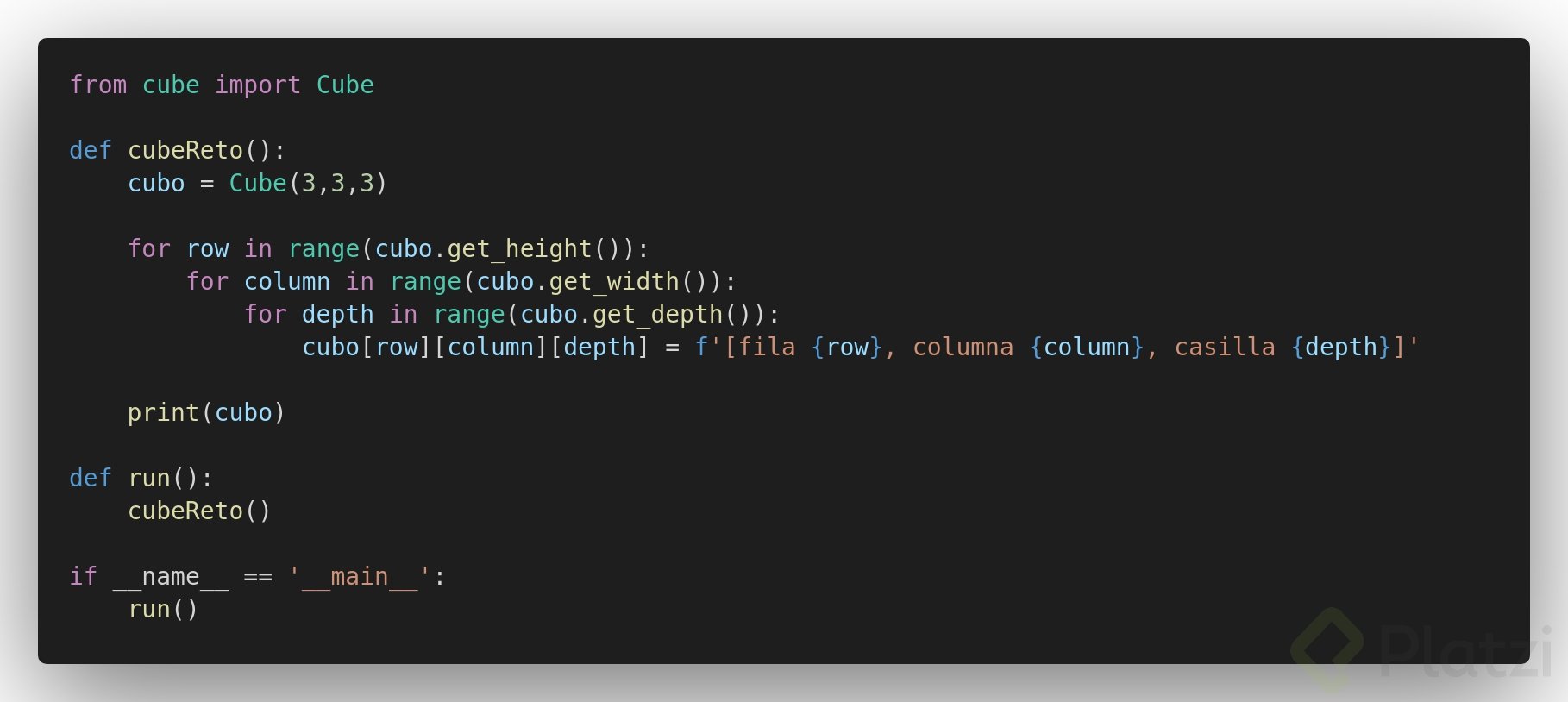
Solucion al reto 2 sin aplicar la clase Grid:
clase Cube:
main:

Omar Daniel Centeno
Buenísimo!

Mauricio Gonzalez Falcon
Construir estructuras de datos más complejas a partir de otras más simples es una de las habilidades fundamentales en programación. Aquí se explica paso a paso cómo crear un array bidimensional reutilizando una clase array previamente desarrollada, aplicando conceptos como anidación de objetos, loops anidados y representación en string.
¿Qué es un array de dos dimensiones y por qué se le llama grid?
Un array de dos dimensiones es una estructura de datos que organiza elementos en filas y columnas, formando una tabla. También se le conoce como bidimensional array, two dimensional array, grid, rejilla, malla o tabla [0:29]. Todos estos nombres hacen referencia a lo mismo: una estructura donde la intersección de cada fila con cada columna contiene un elemento con un valor propio.
Si alguna vez anidaste una lista dentro de otra lista en Python, ya trabajaste con esta idea. La diferencia es que ahora se construye de forma más robusta usando una clase dedicada.
¿Cómo se construye la clase grid en Python?
El archivo se llama grid.py y lo primero que se hace es importar la clase array desarrollada previamente [1:17]:
python from array import Array
class Grid: def init(self, rows, columns, fill_value=None): self.data = Array(rows) for row in range(rows): self.data[row] = Array(columns, fill_value)
El método constructor __init__ recibe tres parámetros: filas, columnas y un valor por defecto (fill_value). Internamente se crea un array cuya longitud es el número de filas, y en cada posición se anida otro array con el tamaño de las columnas [1:35]. Esta técnica de anidar un array dentro de otro es la base de la bidimensionalidad.
¿Cómo obtener la altura y el ancho del grid?
A diferencia de un array unidimensional que solo tiene longitud, un grid posee altura y ancho [2:15]:
python def get_height(self): return len(self.data)
def get_width(self): return len(self.data[0])
get_height retorna la cantidad de filas usando len(self.data).get_width retorna la cantidad de columnas consultando len(self.data[0]), porque las columnas están anidadas en la posición cero del array principal [2:40].¿Cómo acceder a elementos y representarlos como string?
El método __getitem__ permite recuperar un elemento por su índice [2:55]:
python def getitem(self, index): return self.data[index]
Para la representación en string se utilizan ciclos for anidados que recorren filas y columnas [3:15]:
python def str(self): result = "" for row in range(self.get_height()): for col in range(self.get_width()): result += str(self.data[row][col]) + " " result += "\n" return str(result)
El backslash n (\n) genera un salto de línea entre filas para mejorar la legibilidad. Sin ese espacio adicional después de cada dato, todos los valores aparecerían pegados [4:25].
¿Cómo se prueba el grid en la terminal?
Se crea una instancia llamada matrix de tres filas por tres columnas [5:00]:
python from grid import Grid
matrix = Grid(3, 3) print(matrix)
Inicialmente todos los valores son None. Para asignar valores distintos se recorren filas y columnas con loops anidados [5:55]:
python for row in range(matrix.get_height()): for col in range(matrix.get_width()): matrix[row][col] = row * col
Al imprimir se obtiene una tabla legible con los resultados de multiplicar cada índice de fila por el de columna. Los métodos get_height y get_width confirman que ambas dimensiones son tres [6:20]. Para acceder a un dato específico se indica primero la fila y luego la columna: matrix[2][0] devuelve cero [6:45].
¿Qué ocurre con los arrays de tres dimensiones?
Un array tridimensional es simplemente un array dentro de otro array que a su vez está dentro de otro [8:05]. Aunque es posible implementarlo, se recomienda mantenerse en dos niveles de anidación para no aumentar la complejidad del código innecesariamente.
La gran ventaja de este enfoque es que no fue necesario reescribir todo desde cero: se reutilizó la clase array original y se le incorporaron métodos nuevos como get_height, get_width y la representación en string adaptada a dos dimensiones. Dominar los loops anidados resulta indispensable para recorrer estas estructuras correctamente [8:25].
Si quieres llevar esto al siguiente nivel, intenta crear una clase llamada cube con tres dimensiones e incluir métodos para conocer largo, ancho y profundidad. Comparte tu solución y cuéntanos qué métodos adicionales le añadiste.
Mario Andrés Castro Martínez
Solucion al reto 2 sin aplicar la clase Grid:
clase Cube:
main:
Omar Daniel Centeno
Buenísimo!
Mauricio Gonzalez Falcon

Nicolás García Caicedo
Me parece curioso que el método str de laguna manera es el método que se ejecuta cuando se usa la función print() Si se fijan cualquier modificación que le hagan a este método se verá reflejada en el print() que le hagan al objeto de la clase Grid.
Pruébenlo y verán lo que suede. Metan algún print("hola mundo") en el str y se darán cuenta.

Alexis Dorado Muñoz
Gracias por tu aporte

Andres David Caicedo Marquez
¡Exactamente! Estás comprendiendo algo muy poderoso y útil de Python:
cuando haces print(objeto), automáticamente se llama al método __str__() de ese objeto.
En Python, cuando imprimes un objeto, el intérprete quiere saber cómo representarlo como una cadena de texto legible para humanos. Para eso, busca si el objeto tiene un método especial llamado __str__().
Que buena interpretacion.

Christian Molina Vázquez

Juan Martin Pastuso Borda
Pesima forma de hacerse entender.

Jeronimo Yañez
algun video de yt mejor explicado?

Ricardo Rito Anguiano
Tengo una duda existencial.
Crei que en la parte de grid, podria hacer lo siguiente para ahorrarme el for en el cual lleno la grid
def __init__(self, rows, columns, fill_value=None): self.data = Array(rows, Array(columns, fill_value))
Esto hubiera funcionado en otros lenguajes como c# o java, peroooo resulta que en Python los parametros **siempre ** se pasan por referencia, por lo que al ejecutar el siguiente metodo:
def fill(self): for i in range(self.get_height()): self.data[i].fill()
Al cambiar los valores de una fila, se cambian todas las filas 🤯
Mi pregunta es ¿Mi razonamiento es correcto? Porque no encontre otra razon por la cual, al usar fill, se cambiaban todas las filas en lugar de cada elemento de cada fila 🤯

Héctor Daniel Vega Quiñones
ProfesorEl razonamiento de lo que quieres hacer es correcto, sin embargo la ejecución es distinta como pudiste apreciar. Lo que lo hace tricky es que las filas son array dentro de otros y no una estructura como los DataFrame de pandas, por ejemplo.

Raul Burbano
Tengo este error alguien me puede ayudar?


Lucas Yañez
Yo estoy igual.. lo pudiste solucionar?

John Velasco
Lo mismo me pasa

Mitchell Mirano
Podemos resolver el reto, utilizando las estructuras anteriores y llamando a sus metodos.


Victor Parra
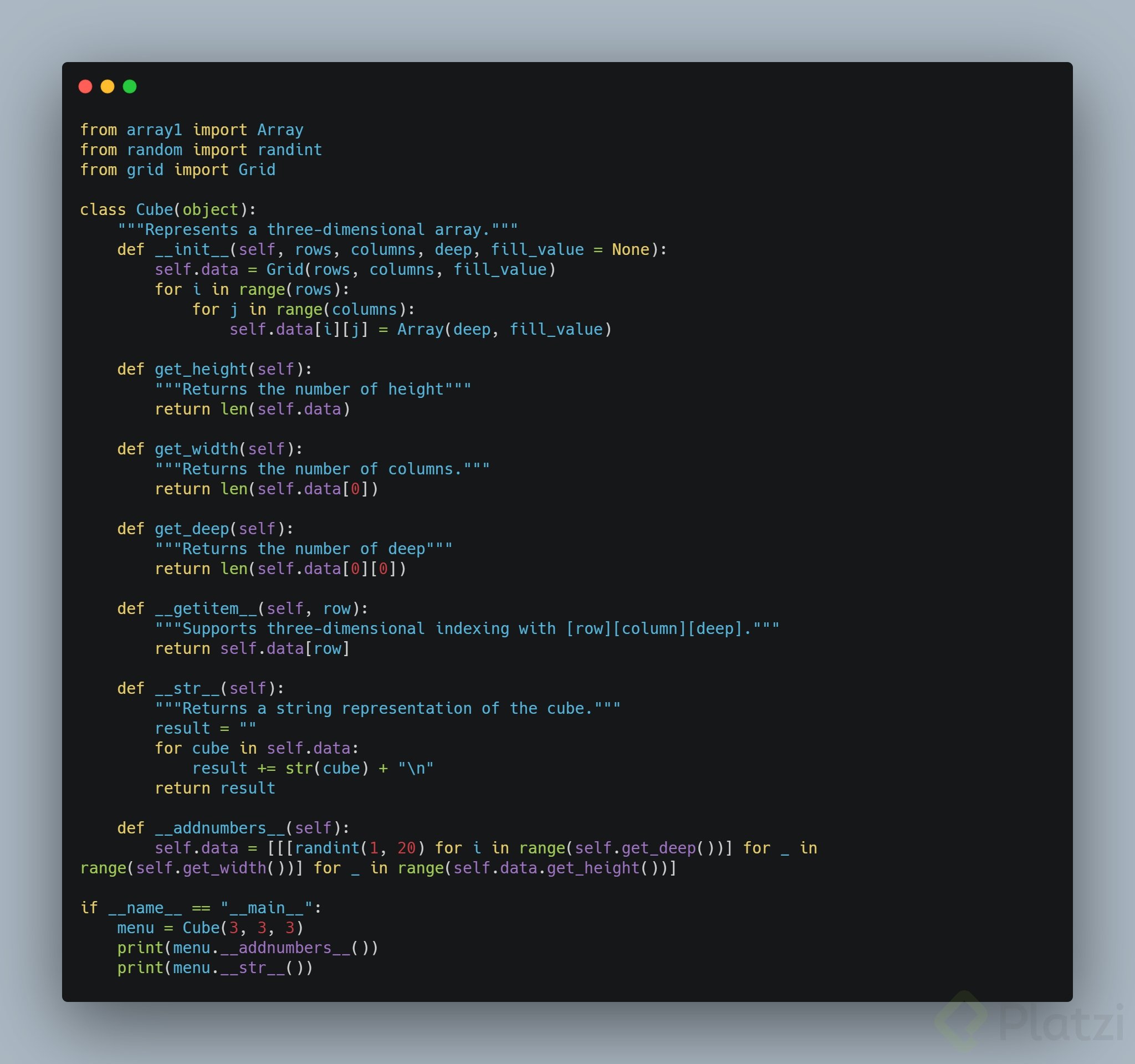
Este es mi aporte:


Junior Peves
En el metodo get_height debe ir:
return self.data.get_height()

Carlos Fernando Aguilar González
Hola
Estoy tratando de seguir los pasos junto al profesor pero la consola muestra el siguiente error:

¿A qué creen que se deba eso?
Muchas gracias de antemano

Brandon Gutierrez
Ocupas ver primero como guardaste el programa de array, si lo llevas tal cual como el profesor tu error es porque en el from debe ir la 'a' minuscula y veo que tu la tienes mayuscula, siguiente el import debe ir 'A' mayuscula y veo que la tienes minuscula(si esto no funciona revisa bien como guardaste el programa y el nombre que le diste al array)_

Bruno Guillaume Hernández Villamil
También puede ser porque 'array' es palabra reservada. Yo tuve el mismo error, le cambié el nombre al archivo y se solucionó ese problema.

OSMAR LEYET
Se me hace más cómodo entender los valores de ancho y alto de la matriz, de forma inversa a como lo operacionaliza el profesor.

Eduardo Blanco
En lugar de imprimirlo en la terminal en forma de matriz lo imprime de esta forma:
print(matrix) 0 0 0 0 1 2 0 2 4
¿Alguna idea de cual puede ser el error? intenté seguir completamente al profesor, acá el código:
<from arreglo import Arreglo class Grid(): def __init__(self, rows, columns, fill_value=None): self.data = Arreglo(rows) for row in range(rows): self.data[row] = Arreglo(columns, fill_value) def get_height(self): return len(self.data) def get_width(self): return len(self.data[0]) def __getitem__(self, index): return self.data[index] def __str__(self): result = "" for row in range(self.get_height()): for col in range(self.get_width()): result += str(self.data[row][col]) + " " result += "\n" return str(result)>

Juan Granada

Gonzalo Daniel Cayunao Erices

Luis Eduardo Lerena Pereira

David Rangel
David Rangel

Daniel daniel

Juan Pablo Alvarez Ovalle
pareciera que hay algun error en la implementacion de la clase Grid ya que esta no permite que se le asignen elementos usando altura[index]. Tambien creo que la implementacion del init no esta bien porque estas intentando asignar un valor a un elemento del grid. Para hace un cubo de 3 dimensiones deberias usar un Array de este modo [ Grid1, Grid2, Grid3 ....Gridn]

Marifer Villarroel
¿Por qué al definir los métodos, en algunos casos solo define el nombre, como def get_height() y en otros le agrega dos guiones bajos al nombre, como def __getitem__()?
Carlos Fernando Aguilar González
Brandon Gutierrez
Al igual revisa bien como guardaste el programa de array y su clase, recuerda que en el from va el nombre del programa y el import va el de la clase, una vez hagas eso compila y fijate si te siga mandando errores
Crear el Array de 3 dimensiones en una sola línea de código con List Comprehentions
def __init__(self, rows, columns, depth, fill_value = None): """ Create tri-dimensional Arrays Giving numbers of rows, columns, and depth to get an Array """ self.cube = [Array(columns, Array(depth)) for i in range(rows)]
Mi soluciones al reto.
1ra Parte - Incorpora un método para poblar sus slots
from array_clase import Array import random class Grid(): def __init__(self, rows, columns, fill_value=None): self.data = Array(rows) for row in range(rows): self.data[row] = Array(columns, fill_value=fill_value) def get_height(self): return len(self.data) def get_width(self): return len(self.data[0]) def __getitem__(self, index): return self.data[index] def __str__(self): result = "" for row in range(self.get_height()): for col in range(self.get_width()): result += str(self.data[row][col]) + " " result += "\n" return str(result) def random_fill(self, min, max): for i in range(self.get_height()): for j in range(self.get_width()): self[i][j] = random.randint(min, max)
Prueba del reto
from array2D import Grid matrix = Grid(3,3) matrix.random_fill(1,100) print(matrix)
Salida
72 97 45 33 97 65 18 11 100
2° parte del reto Array 3D
from array2D import Grid from array_clase import Array import random class Array3D(): def __init__(self,depth, rows, columns,fill_value=None): self.data = Grid(rows, columns) for row in range(rows): for column in range(columns): self.data[row][column] = Array(depth, fill_value=fill_value) def get_rows(self): return self.data.get_height() def get_columns(self): return self.data.get_width() def get_depth(self): return len(self.data[0][0]) def __getitem__(self, index): return self.data[index] def __str__(self): result = "" for depth in range(self.get_depth()): result += f'index depth: [{depth}] \n' for row in range(self.get_rows()): for column in range(self.get_columns()): result += f' {self.data[row][column][depth]} ' result += "\n" result += "\n" return str(result) def random_fill3D(self, min, max): for i in range(self.get_rows()): for j in range(self.get_columns()): for x in range(self.get_depth()): self[i][j][x] = random.randint(min, max)
Prueba de la clase
from array3D import Array3D tensor3D = Array3D(depth=2,rows=4,columns=3) print(tensor3D.get_rows()) print(tensor3D.get_columns()) print(tensor3D.get_depth()) print() print(tensor3D) tensor3D.random_fill3D(0,9) print(tensor3D)
Salida
4 3 2 index depth: [0] None None None None None None None None None None None None index depth: [1] None None None None None None None None None None None None index depth: [0] 7 0 7 9 0 5 9 4 6 1 5 0 index depth: [1] 4 2 2 6 4 5 7 7 2 5 5 4
Después de dos días completos repasando clases anteriores y practicando con bucles anidados lo logré, aquí mi código:
from grid import Grid from arreglo import Arreglo import random class Cube(): def __init__(self, height, width, depth, fill_value='None'): self.height = height self.width = width self.depth = depth self.elements = Arreglo(depth) for element in range(depth): self.elements[element] = Grid(height, width, fill_value) def adding_idx(self): for d in range(self.depth): for h in range(self.height): for w in range(self.width): element = self.elements[d].data[h].items[w] self.elements[d].data[h].items[w] = element+str(h+1)+str(w+1)+str(d+1) def adding_random(self, lower, upper): for d in range(self.depth): for h in range(self.height): for w in range(self.width): self.elements[d].data[h].items[w] = random.randint(lower,upper) def __show_values__(self): print('-----'*5) for element in self.elements: print(element) print('-----'*5)
le agregué un índice en uno de los métodos.
Solución al reto:
from custom_arrays import Array import random class Cube: def __init__(self, rows: int, columns: int, layers: int, fill_value=None): """Generate a Cube from an array of rows, columns and layers. Args: rows (int): rows number by layer. X axis dimension. columns (int): columns number by row. Y axis dimesion. layers (int): number of layers. Z axis dimension. fill_value (NoneType, optional): Fill created cube with given value. Defaults to None. """ self.data = Array(layers) for layer in range(layers): self.data[layer] = Array(rows, fill_value) for row in range(rows): self.data[layer][row] = Array(columns, fill_value) def get_layers(self): return len(self.data) def get_height(self, layer): return len(self.data[layer]) def get_width(self, layer): return len(self.data[layer][0]) def __getitem__(self, index): return self.data[index] def __str__(self): result = "\n" for layer in range(self.get_layers()): for row in range(self.get_height(layer)): for col in range(self.get_width(layer)): result += str(self.data[layer][row][col]) + " " result += "\n" result += "\n" return str(result) def fill_none_values(self, start=1, end=100): for layer in range(self.get_layers()): for row in range(self.get_height(layer)): for col in range(self.get_width(layer)): if self[layer][row][col] == None: self[layer][row][col] = random.randint(start, end)
Un ejemplo:
cube_array = Cube(4,4,3) cube_array.fill_none_values() print(cube_array)
37 68 44 16 83 58 52 66 89 31 39 45 48 75 94 95
67 5 49 85 51 31 58 44 5 91 46 98 31 88 48 6
73 13 61 93 34 87 12 94 63 32 40 12 35 38 10 26
Reto 2: Archivo MiCubo
from MiGrid import Grid from MiArray import Array class Cubo(): def __init__(self, depth, rows, cols, value=None): self.__depth__ = depth self.__rows__ = rows self.__cols__ = cols self.cube = Array(depth, value) for depth in range(depth): self.cube.__setitem__(depth, Grid(rows, cols, value)) def __getdepth__(self): return len(self.cube) def __getheight__(self): return self.cube.__getitem__(0).__getheight() def __getwidth__(self): return self.cube.__getitem__(0).__getwidth() def __getitem__(self, index): return self.cube.__getitem__(index) def __setitem__(self, deep, row, col, value): self.cube.__getitem__(deep).__setitem__(row, col, value) def __getvalue__(self, deep, row, col): return self.cube.__getitem__(deep).__getvalue__(row, col) def __populate__(self, random_number_end): for depth in range(self.__depth__): self.cube.__getitem__(depth).__populate__(random_number_end) def __str__(self): result = '' result += self.cube.__str__() + '\n\r' result += '[\n\r' for deep in range(self.__depth__): result += '\t' + self.cube.__getitem__(deep).__str__() + '\n\r' result += ']' return result
Esta es mi propuesta de solución para agregar datos random a la grid 2d:
from set_array import Array import random class Grid(): def __init__(self, rows, columns, fill_value=None): self.data = Array(rows) for row in range(rows): self.data[row] = Array(columns, fill_value) def get_height(self): return len(self.data) def get_width(self): return len(self.data[0]) def __getitem__(self, index): return self.data[index] def __str__(self): result = '' for row in range(self.get_height()): for col in range(self.get_width()): result += str(self.data[row][col]) + ' ' result += '\n' return str(result) def random_number_fill(self, lower_limit=0, higher_limit=10): for row in range(self.get_height()): for column in range(self.get_width()): self[row][column] = random.randint(int(lower_limit), int(higher_limit)) return self def random_letters_fill(self): for row in range(self.get_height()): for column in range(self.get_width()): self[row][column] = random.choice('ABCDEFGHIJKLMNOPQRSTUVWXYZ') return self def random_string_fill(self): for row in range(self.get_height()): for column in range(self.get_width()): self[row][column] = random.choice('ABCDEFGHIJKLMNOPQRSTUVWXYZ0123456789') return self if __name__ == '__main__': from grid import Grid matrix = Grid(3, 3) print(matrix.__str__()) for row in range(matrix.get_height()): for column in range(matrix.get_width()): matrix[row][column] = row * column print(matrix) print(matrix.get_height()) # 3 print(matrix.get_width()) # 3 print(matrix.__getitem__(1)) # [0, 1, 2] print(matrix.__getitem__(1)[2]) # 2 print(matrix.__str__()) ''' 0 0 0 0 1 2 0 2 4 ''' matrix_two = Grid(3, 3) print(f'this the matrix two: \n{matrix_two}') ''' this the matrix two: None None None None None None None None None ''' print(f'this the matrix two filled with numbers: \n{matrix_two.random_number_fill()}') print(f'this the matrix two filled with letters: \n{matrix_two.random_letters_fill()}') print(f'this the matrix two filled with numbers and/ or letters as strings: \n{matrix_two.random_string_fill()}')
Esta es mi propuesta de solución para crear la grid 3d:
from set_array import Array import random class Grid_3d: def __init__(self, rows, columns, depth): self.rows = rows # actually this works like depth self.columns = columns # actually this works like rows self.depth = depth # actually this works like cols self.data = Array(rows) for row in range(rows): self.data[row] = Array(columns) for column in range(columns): self.data[row][column] = Array(depth, None) def __str__(self): result = '' for row in range(self.rows): for col in range(self.columns): for d in range(self.depth): result += str(self.data[row][col][d]) + ' ' result += '\n' result += '\n' return str(result) def random_number_fill(self, lower_limit=0, higher_limit=10): for row in range(self.rows): for col in range(self.columns): for d in range(self.depth): self.data[row][col][d] = random.randint(int(lower_limit), int(higher_limit)) if __name__ == '__main__': from grid_3d import Grid_3d matrix = Grid_3d(3,3,3) print(matrix.__str__()) matrix_two = Grid_3d(4,3,3) matrix_two.random_number_fill() print(matrix_two)
class Cubo: def __init__(self, fila, columna, altura, fill_value=None): self.data = Grid(fila, columna, fill_value) for i in range(altura): self.data[i] = Array(altura, fill_value)
Hola no entiendo porque no funciona este codigo, me pone el siguiente error
File "cubo.py", line 144, in <module> c = Cubo(3, 3, 3) File "cubo.py", line 108, in __init__ self.data[i] = Array(altura, fill_value) TypeError: 'Grid' object does not support item assignment
por lo que entiendo interpreta como que self.data[i] es del tipo Grid, sin embargo lo estoy definiendo como Array, que es lo que me perdi aca. Saludos y Gracias.
Hola
Me estoy basando en el ejemplo de Mario para el reto.
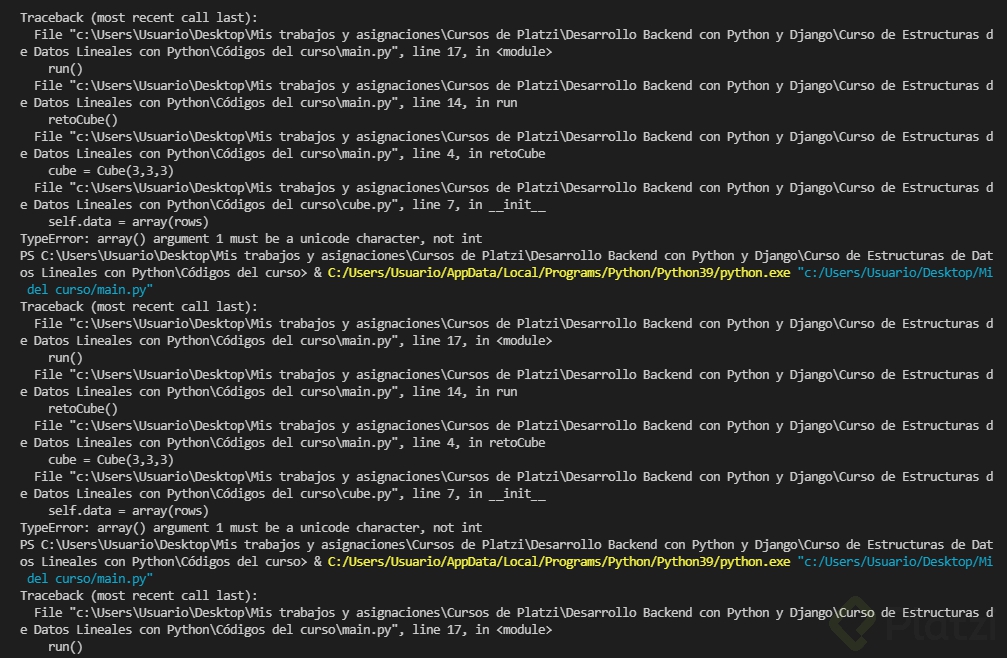
from array import array class Cube(object): def __init__(self, rows, columns, depth, fill_value = None): self.data = array(rows) for row in range(rows): self.data[row] = array(columns, fill_value) for columns in range(columns): self.data[row][columns] = array(depth, fill_value) def get_height(self): return len(self.data) def get_width(self): return len(self.data[0]) def get_depth(self): return len(self.data[0][0]) def __getitem__(self, index): return self.data[index] def __str__(self): result = "" for row in range(self.get_height()): for col in range(self.get_width()): for depth in range(self.get_depth()): result += str(self.data[row][col][depth]) + " " result += "\n" return str(result)
from cube import Cube def retoCube(): cube = Cube(3,3,3) for row in range(cube.get_height()): for column in range(cube.get_width()): for depth in range(cube.get_depth()): cube[row][column][depth] = f'[fila {row}, columna {column}, casilla {depth}]' print(cube) def run(): retoCube() if __name__ == '__main__': run()
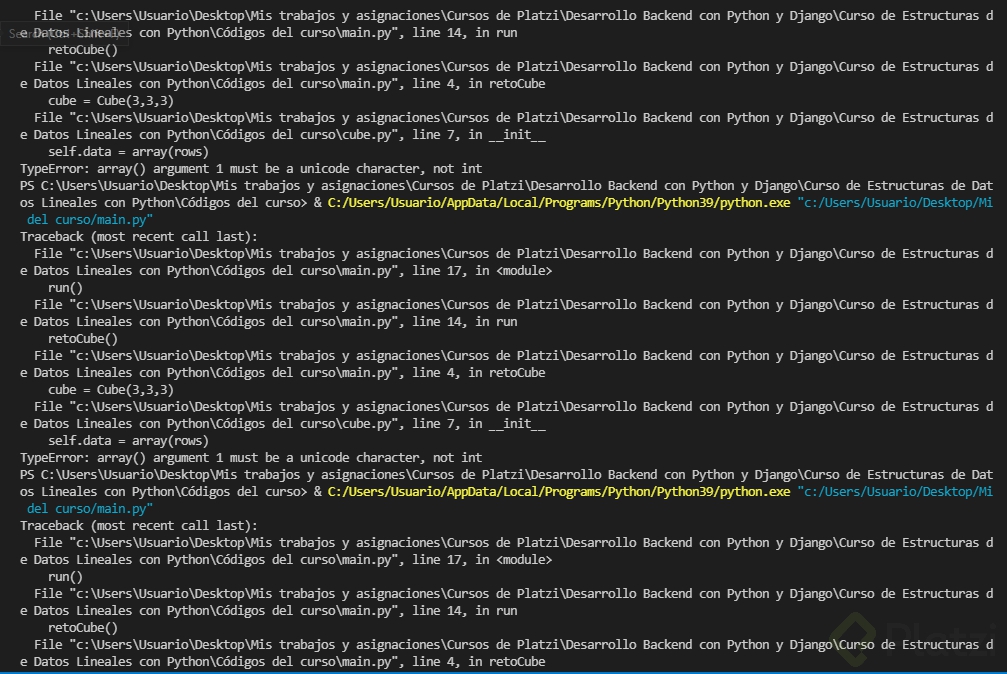
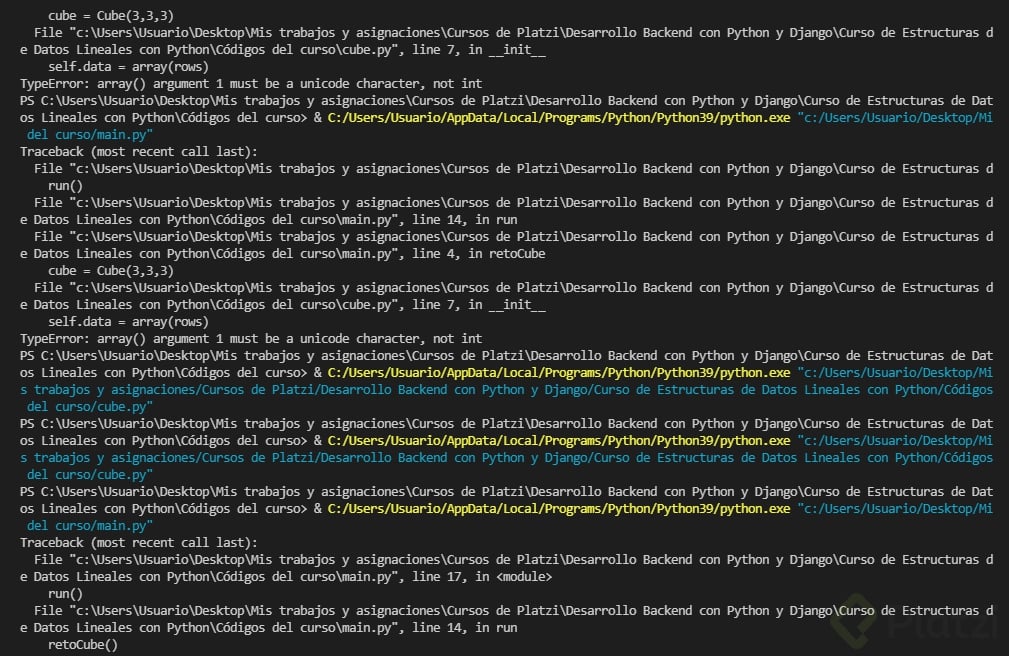
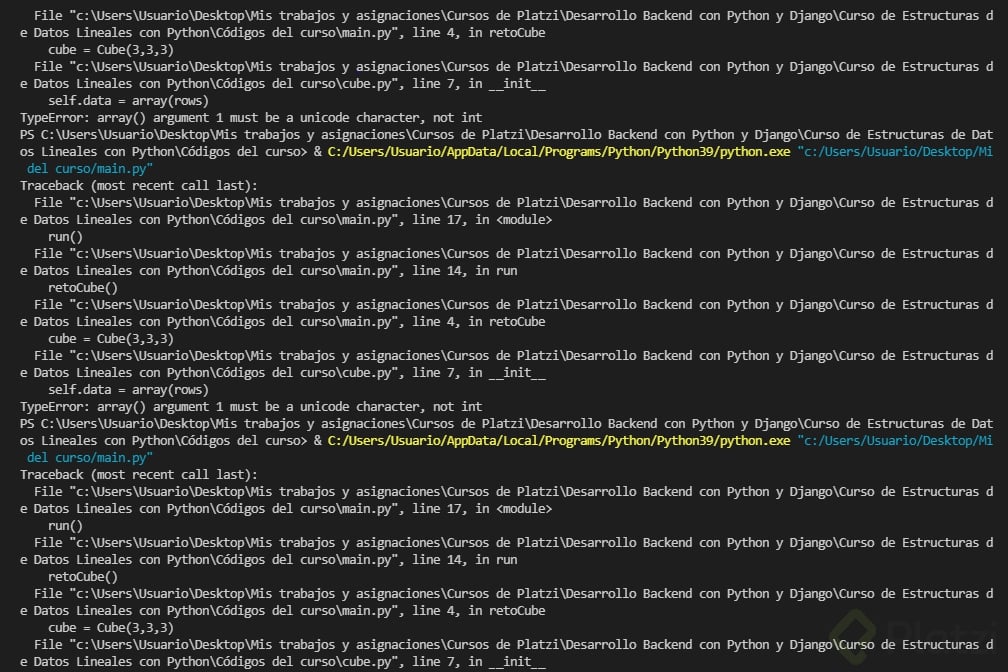
Sin embargo, al imprimir en consola, aparecen los siguientes mensajes:
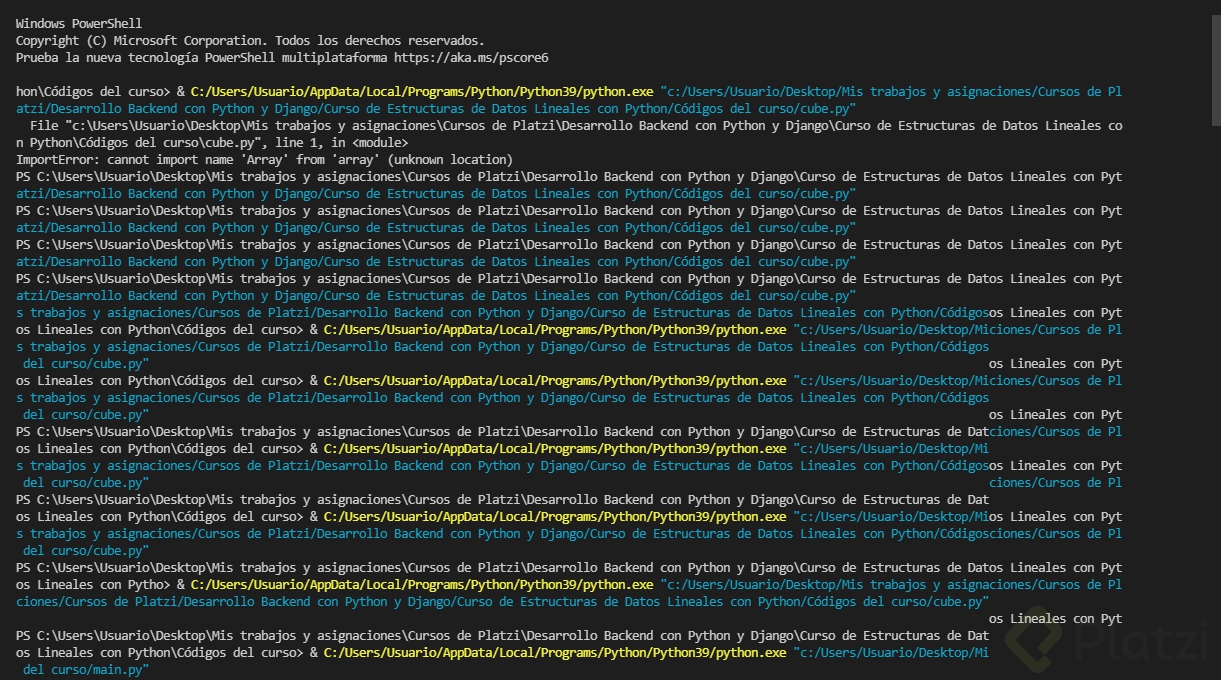

Si alguien sabe cómo resolver esto, lo agradeceré muchísimo.