Conjuntos en Python: creación, métodos y operaciones básicas
Resumen
Domina los conjuntos en Python con ejemplos claros y prácticos. Aprende qué es un set, cómo evitar duplicados de forma automática y cuáles son los métodos clave para agregar, buscar, eliminar y combinar elementos. Además, entiende por qué el orden no está garantizado y cómo aprovechar operaciones como unión, intersección y diferencia.
¿Qué es un conjunto (set) en Python y cómo funciona?
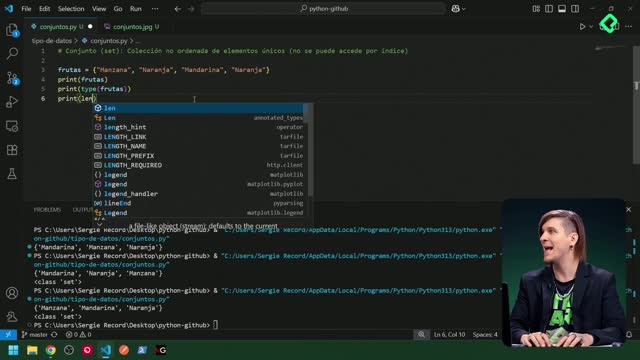
Un conjunto es una colección no ordenada y sin duplicados. Es ideal para asegurar unicidad y realizar operaciones de teoría de conjuntos.
Se define con llaves y elementos separados por comas.
Ignora automáticamente los duplicados al crearlo o actualizarlo.
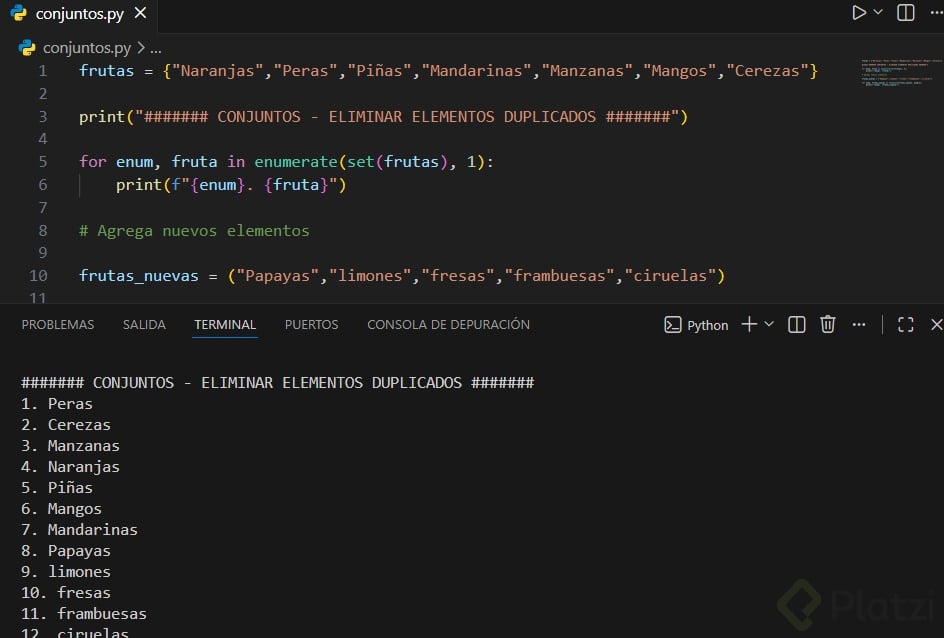
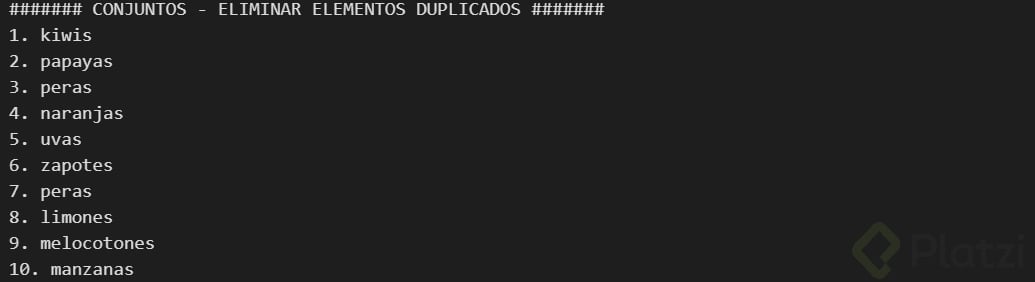
¿Cómo eliminar duplicados con sets desde listas o tuplas?
Convierte a set para quitar repetidos y vuelve al tipo original si lo necesitas.
numeros = [1, 2, 2, 3, 3, 3] unicos = list(set(numeros)) print(unicos) # [1, 2, 3] (el orden puede variar)
¿Te quedó alguna duda sobre add, update, remove, discard, pop, clear o las operaciones de unión, intersección y diferencia? Comparte tu pregunta o tu caso práctico y seguimos la conversación.
La diferencia entre remove() y discard(): clave para evitar errores cuando no estás seguro si un elemento existe
El "truco mágico" para eliminar duplicados es: list(set(mi_lista)) 🚀
Muchas gracias por comentarios que suman al contenido!
El método .update() no se utiliza para listas en Python. Este método se aplica a conjuntos (sets) para agregar múltiples elementos de otro conjunto o iterable. Para listas, se utiliza el método .extend() para añadir varios elementos a la lista existente.
Por ejemplo:
lista =[1,2,3]lista.extend([4,5])print(lista)# Salida: [1, 2, 3, 4, 5]
Esto es clave para entender cómo funcionan las diferentes colecciones en Python.
Otra cosa que no se mencionó es que los sets solo aceptan elementos con Hashability (primitivos, tuples, frozensets, etc).
¿Qué es ser "Hashable"?
Significa que el objeto tiene un valor fijo que nunca cambia durante su vida (identificado por un hash en memoria). Este valor es necesario para que el set pueda identificar y organizar sus elementos internamente de forma eficiente.
La Regla Simple: Solo los objetos Inmutables son Hashables.
✅ Aceptados (Inmutables): Primitivos (str, numericos, bool), Tuplas (si sus contenidos lo son) y frozensets.
❌ Rechazados (Mutables):Listas (list), Sets y Diccionarios (dict), Classes, Objects.
Usar mutables provocará un TypeError. Por ejemplo, para guardar una lista en un set, primero debes convertirla a una tupla inmutable.
Muchas gracias por tu comentario
Dato curioso, si en el conjunto colocas 0 y False, o 1 y True, solo se imprimira uno de ellos.
conjuntos ={True,False,1,0}print(conjuntos)
Devolverá
True
False
Esto por que en el contexto de conjuntos 1 es igual a True y 0 es igual a False.
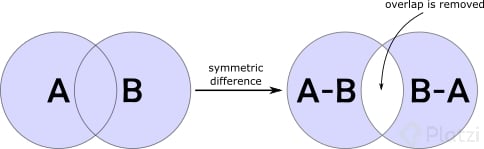
# Operations between setsset_a ={1,2,3,4}set_b ={3,4,5,6}# Symmetric difference of setssym_diff_set = set_a.symmetric_difference(set_b)print(sym_diff_set)# Output: {1, 2, 5, 6}
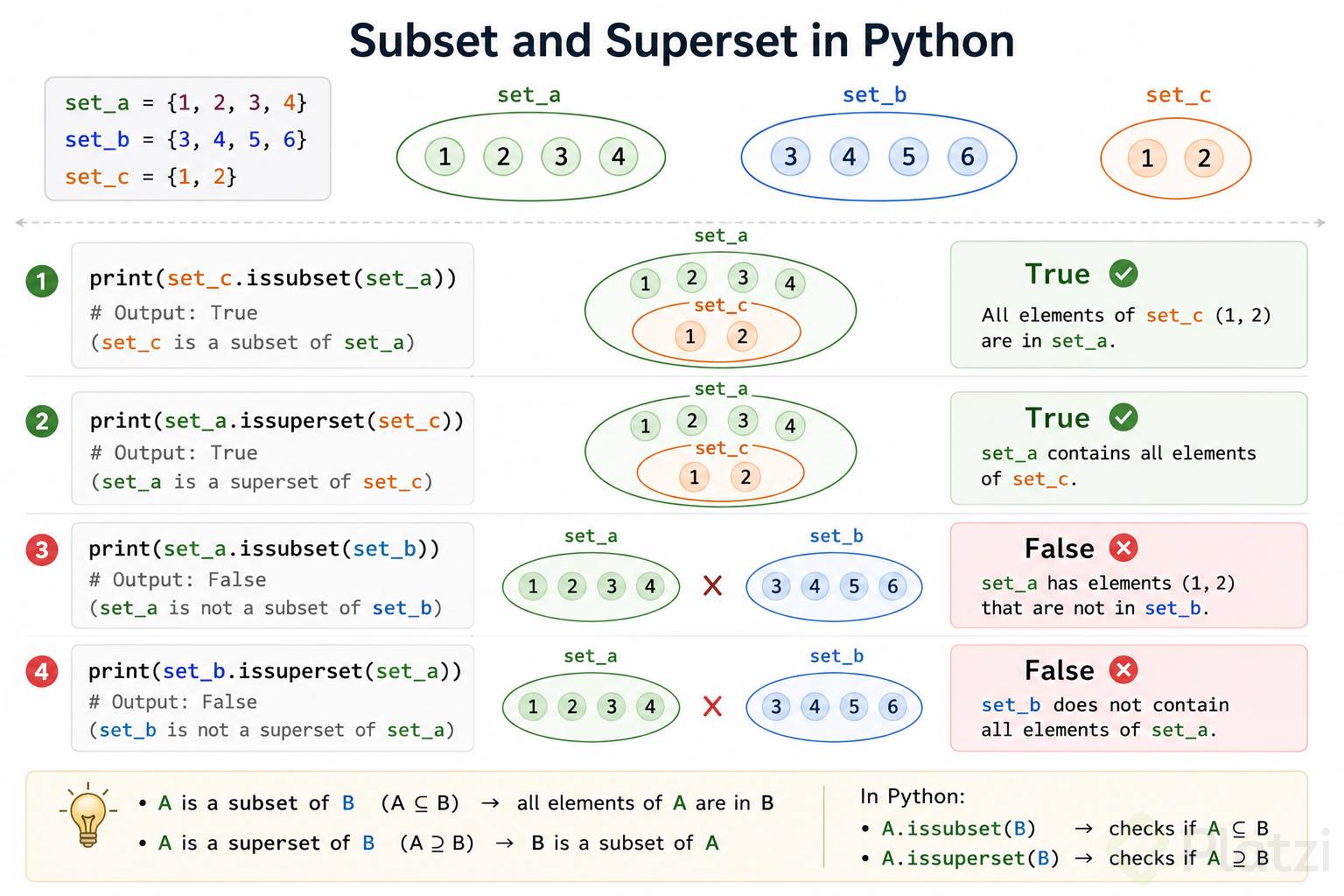
set_a ={1,2,3,4}set_b ={3,4,5,6}# Subset and Supersetset_c ={1,2}print(set_c.issubset(set_a))# Output: True (set_c is a subset of set_a)print(set_a.issuperset(set_c))# Output: True (set_a is a superset of set_c)print(set_a.issubset(set_b))# Output: False (set_a is not a subset of set_b)print(set_b.issuperset(set_a))# Output: False (set_b is not a superset of set_a)
#Sets are unordered collections of unique elements. They are defined using curly braces {} or thefruits ={"apple","banana","cherry","apple"}#A set can contain duplicate elements, but they will be ignoredprint(fruits)#Output: {'apple', 'banana', 'cherry'} (the duplicate "apple" is ignored)print(type(fruits))#Output: <class 'set'>print(len(fruits))#Output: 3 (length of the set), the duplicate "apple" is not countedset1 ={"Python",156,True,3.14}#A set can contain elements of different data typesprint(set1)#Output: {True, 3.14, 'Python', 156} (the order of the elements in the set is not guaranteed)print(type(set1))#Output: <class 'set'>for item in set1:print(item)#Output: True, 3.14, 'Python', 156 (the order of the elements in the set is *not guaranteed*)#checking if an element is in the setprint("banana"in fruits)#Output: True (checking if an element is in the set)print("grape"in fruits)#Output: False (checking if an element is in the set)#adding elements to the setfruits.add("orange")#This will add "orange" to the setprint(fruits)#Output: {'apple', 'banana', 'cherry', 'orange'} (the set after adding "orange")fruits.update(["grape","melon"])#This will add "grape" and "melon" to the set, the update() method is used in lists, tuples, and sets to add multiple elements to the collection#removing elements from the setfruits.remove("banana")#This will remove "banana" from the set, if the element is not found, it will raise a KeyErrorprint(fruits)#Output: {'apple', 'cherry', 'orange', 'grape', 'melon'} (the set after removing "banana")fruits.discard("grape")#This will remove "grape" from the set, if the element is not found, it will do nothingprint(fruits)#Output: {'apple', 'cherry', 'orange', 'melon'} (the set after discarding "grape")#the diference between remove() and discard() is that remove() will raise a KeyError if the element is not found, while discard() will do nothing if the element is not foundfruits.pop()#This will remove and return an arbitrary element from the set, since sets are unordered, you cannot predict which element will be removedprint(fruits)#Output: {'apple', 'cherry', 'orange'} (the set after popping an element, the popped element is not guaranteed)fruits.clear()#This will remove all elements from the setprint(fruits)#Output: set() (the set after clearing all elements)print("----------------------")#Set operationssetA ={"a","b","c"}setB ={"b","c","d"}print(setA.union(setB))#Output: {'a', 'b', 'c', 'd'} (the union of setA and setB, it will contain all unique elements from both sets)print(setA.intersection(setB))#Output: {'b', 'c'} (the intersection of setA and setB, it will contain only the elements that are present in both sets)print(setA.difference(setB))#Output: {'a'} (the difference of setA and setB, it will contain only the elements that are present in setA but not in setB)
#Sets are unordered collections of unique elements. They are defined using curly braces {} or the

fruits = {"apple", "banana", "cherry", "apple"} #A set can contain duplicate elements, but they will be ignored
print(fruits) #Output: {'apple', 'banana', 'cherry'} (the duplicate "apple" is ignored)
print(type(fruits)) #Output: <class 'set'>
print(len(fruits)) #Output: 3 (length of the set), the duplicate "apple" is not counted

set1 = {"Python", 156, True, 3.14} #A set can contain elements of different data types
print(set1) #Output: {True, 3.14, 'Python', 156} (the order of the elements in the set is not guaranteed)
print(type(set1)) #Output: <class 'set'>


for item in set1:
    print(item) #Output: True, 3.14, 'Python', 156 (the order of the elements in the set is *not guaranteed*)

#checking if an element is in the set
print("banana" in fruits) #Output: True (checking if an element is in the set)
print("grape" in fruits) #Output: False (checking if an element is in the set)

#adding elements to the set
fruits.add("orange") #This will add "orange" to the set
print(fruits) #Output: {'apple', 'banana', 'cherry', 'orange'} (the set after adding "orange")
fruits.update(["grape", "melon"]) #This will add "grape" and "melon" to the set, the update() method is used in lists, tuples, and sets to add multiple elements to the collection

#removing elements from the set
fruits.remove("banana") #This will remove "banana" from the set, if the element is not found, it will raise a KeyError
print(fruits) #Output: {'apple', 'cherry', 'orange', 'grape', 'melon'} (the set after removing "banana")
fruits.discard("grape") #This will remove "grape" from the set, if the element is not found, it will do nothing
print(fruits) #Output: {'apple', 'cherry', 'orange', 'melon'} (the set after discarding "grape")
#the diference between remove() and discard() is that remove() will raise a KeyError if the element is not found, while discard() will do nothing if the element is not found
fruits.pop() #This will remove and return an arbitrary element from the set, since sets are unordered, you cannot predict which element will be removed
print(fruits) #Output: {'apple', 'cherry', 'orange'} (the set after popping an element, the popped element is not guaranteed)
fruits.clear() #This will remove all elements from the set
print(fruits) #Output: set() (the set after clearing all elements)

print("----------------------")

#Set operations
setA = {"a", "b", "c"}
setB = {"b", "c", "d"}
print(setA.union(setB)) #Output: {'a', 'b', 'c', 'd'} (the union of setA and setB, it will contain all unique elements from both sets)
print(setA.intersection(setB)) #Output: {'b', 'c'} (the intersection of setA and setB, it will contain only the elements that are present in both sets)
print(setA.difference(setB)) #Output: {'a'} (the difference of setA and setB, it will contain only the elements that are present in setA but not in setB)
Un conjunto (set) es una colección no ordenada, sin elementos duplicados y mutable (puede cambiar después de crearse).
Se usa para operaciones matemáticas como uniones, intersecciones, diferencias, etc.
Propiedades importantes
No tiene índice → no se accede por posición.
No permite duplicados.
Sus elementos deben ser inmutables (por ejemplo: no puedes tener listas dentro de un set, pero sí tuplas).
Me di cuenta que el .update funciona aunque tengas tuplas, listas y conjuntos, al final los agrega siempre:
idiomas = {"Ingles", "Frances", "Español"}
idiomas2 = ("Koreano", "Mandarin", "Salvadoreño")
idiomas3 = ["Griego", "Japones", "Nahuat"]
print (type(idiomas))
print (type(idiomas2))
print (type(idiomas3))
print(idiomas,idiomas2,idiomas3)
print(idiomas)
print(idiomas2)
print(idiomas3)
print(len(idiomas))
print(len(idiomas2))
print(len(idiomas3))
print(idiomas)
print(idiomas2)
print ("Ingles" in idiomas3)
idiomas.add("Latin")
print(idiomas)
idiomas.update(idiomas2)
print(idiomas)
idiomas.update(idiomas2,idiomas3)
print(idiomas)
A={1,2,3}
B={3,4,5}
#union
C=A.union(B)
print(C)
#diferencia
D=A.difference(B)
print(D)
#Intercepcion
E=A.intersection(B)
print(E)
Si ejecutan el método symmetric_difference, pueden obtener un nuevo conjunto conteniendo solo los elementos únicos que no son comunes en ambos conjuntos.
numero =[1,2,2,3,3,3]unicos =list(set(numero))print(unicos)abc=["a","v","s","f","e","a","s","f","g","a","s","e","a","s","a","e"]abcUnico =list(set(abc))abcUnico.sort()print(abcUnico)
# Conjuntos en Python: creacion, metodos y Operaciones basicas
"""Conjuntos/set coleciones no ordenadas que no permiten duplicados"""
Lo que hay que tener en cuenta y que alguien me corrija si no es así que la funcionalidad de pop es eliminar siempre el primer elemento, sea aleatorio o no
Buenas tardes,
Pop es un metodo que pertenece a las listas y te elimina el ultimo elemento de la lista o el de un elemento especifico siempre y cuando pases el indice del elemento a eliminar
me rectifico (desestima lo que mencione), pop para conjuntos elimina elemento aleatorio asi tal cual se explica en esta clase.
Puede ser el primer elemento como el ultimo, en mi caso, me borro el ultimo elemento
conjuntos = { "Apple" , 1 , True, 3.14} # asume 1 y True como iguales
print(conjuntos)
print(type(conjuntos))
print(len(conjuntos))
for item in conjuntos:
print(item)
¿Por qué son diferentes los métodos de los conjuntos y las listas?, creo que sería más práctico tener los mismos métodos en ambos, ya que sus funciones son prácticamente iguales.
Hay un caso interesante que me surgió al crear un conjunto con tipos de datos mixtos, por ejemplo hice el siguiente:
conjuntos = {"Python",1,True}
Al imprimir la variable conjuntos, el resultado solo me muestra
{1, 'Python'}
Por lo que entiendo que probablemente el conjunto esté tomando el 1 y el True como los mismos valores, recordemos que se puede usar el 1 y el 0 como True o False en booleano respectivamente.
Hay que tener cuidado al usar conjuntos con Booleanos y enteros