Contenido del curso

Type Hints for Functions and Lists in Python

Resumen

Adding type hints to Python functions and lists turns your editor into a real-time guide that catches mistakes before they break your code. You will learn how to annotate parameters, return values, lists, dictionaries, tuples and the flexible Any type, with practical examples that scale from a single file to a full project.

How do you add type hints to function parameters and return values?

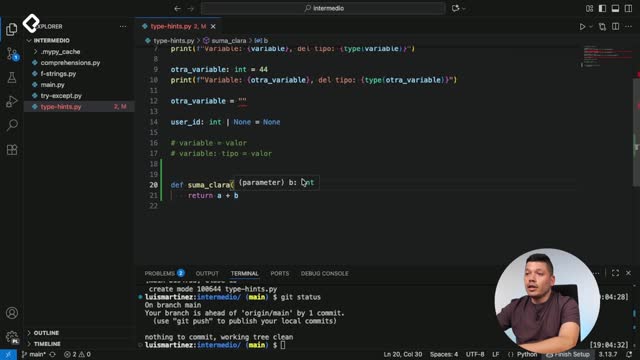
When you define a function like suma_clara, which adds a number A and a number B, you can annotate each parameter using a colon followed by the type. So a: int and b: int tell Python (and your editor) that both arguments must be integers. Hover over the variable and the editor confirms the type instantly.

For the return value, you use the arrow operator: a hyphen plus a greater-than sign (->) right before the colon that opens the function body. If the function returns an integer, you write -> int.

python def suma_clara(a: int, b: int) -> int: return a + b

What is the arrow operator in Python type hints? It is the -> symbol placed after the function parameters and before the colon. It tells the editor and MyPy what type the function returns.

Why does this matter in large projects?

In a small file you can read the logic directly. But in an application with dozens of modules, type hints let you know exactly what data a function expects without opening the source file. The editor autocompletes and warns you the moment you pass the wrong type.

How do you type a list in Python with List and brackets?

Imagine you have a list of articles, each one an object with a title. To annotate it, you use list as the type. In older Python versions you had to write from typing import List with a capital L, but in current versions that import is no longer required. You can use the lowercase list directly.

Once annotated, when you type articles. the editor only suggests methods that belong to a list. That alone saves time and prevents bugs.

How do you specify the type of items inside a list?

You add square brackets after list and place the inner type inside. If your list holds dictionaries, you write list[dict]. If you try to insert a string into that list, the editor immediately flags the incompatibility.

You can also nest types. A list of lists of strings looks like this:

python articles: list[list[str]] = [["first", "second"], ["third"]]

Drop an integer inside and the editor will tell you the item is incompatible because it expects str.

Do you still need to import List from typing? No, not in modern Python. You can use the built-in list with square brackets, like list[str] or list[dict], without any import.

When should you use Any and which basic types are available?

The basic types you will use most often are integers, str, lists, dictionaries and tuples. All of them work the same way: as parameter annotations, as return types, or nested inside other generic types.

There is also a special type called Any, which validates any kind of data. To use it you import it from the typing module:

python from typing import Any

Any is useful when you are migrating a project that has no type hints and you do not yet know what type a variable will hold. It buys you time during the transition.

Why should you avoid abusing Any?

Because Any disables the safety net that type hints provide. If every variable is Any, your editor cannot warn you about mismatches. As a rule of thumb, it is better to have no typing at all than to fill every file with Any. Use it as a temporary bridge, not as a permanent solution.

  • Use specific types whenever you know what the data looks like.
  • Reserve Any for legacy code you are gradually migrating.
  • Install the MyPy extension to surface type errors across your project.

With these tools you can annotate any data structure you encounter, from a simple integer to a nested list of dictionaries. Now go back to every file you have created so far, add the types they need, run MyPy and share in the comments which annotation was the trickiest to get right.

      Type Hints for Functions and Lists in Python