Mario Alexander Rincón Suarez
Rolando Fernández
Mariangelica Useche
Team PlatziJuan Camilo Lentino Villalba
Daniela Chaux Gallego
DANIEL MURCIA
Juan José Jaramillo Cajamarca
Kengya Moncada
Jose Rodriguez
DANIEL MURCIA
Rolando Fernández
Mariangelica Useche
Team PlatziCesar Pelaez
Diego Alejandro Montenegro Alvarado
Oscar A. Díaz R.
Invitado Certificado
Max Andy Diaz Neyra
Bigbox ELearning
Juan Martin Rodriguez
Andres Prieto
Ivo Zayas
Mariangelica Useche
Team PlatziDavid Rangel
Jose Alexis Nuñez Torres
Company_adminFranco Silvano Oviedo Arias
Franco Silvano Oviedo Arias
Harold Zurita Simon
Carlos Molina
Platzi
Pablo Martin ZULIAN
Sebastian Carballo
DANIEL STEVEN RODRIGUEZ VERANO
En el video creo que hay un corte, donde pasan la prop: favorite al componente PokemonCard, y en este se lo pasan al Card, se lo pasan al isFavorite, este prop le llega a PokemonCard desde PokemonList como favorite={pokemon.favorite}
import { useDispatch } from 'react-redux'; import { Card } from 'antd'; import Meta from 'antd/lib/card/Meta'; import StarButton from './StarButton'; import { setFavorite } from '../actions/index' const PokemonCard = ({ name, image, abilities, id, favorite }) => { const dispatch = useDispatch(); const allAbilities = abilities.map(ability => ability.ability.name).join(', '); const handleOnFavorite = () => { dispatch(setFavorite({pokemonId: id})); } return ( <Card title={name} cover={<img src={image} alt={name} />} extra={<StarButton isFavorite={favorite} onClick = {handleOnFavorite}/>} > <Meta description={allAbilities}/> </Card>) } export default PokemonCard;
Vi lo q indicas, en el map d PokemonList pasa como prop a PokemonCard favorite={pokemon.favorite}, pero no entiendo d donde sale esa propiedad favorite porq en la API no viene con esa propiedad.
Gracias, Mario. Revisaremos ese corte.
en el minuto 15:41 al parecer hay un pequeño corte, si al terminar la clase falla o se rompe la aplicación, lo único que debemos hacer es pasar favorite como props desde el componente PokemonList al componente PokemonCard
const PokemonList = ({ pokemons })=> { console.log(pokemons) return ( <div className="PokemonList"> { pokemons.map(pokemon => ( <PokemonCard name={pokemon.name} key={pokemon.name} image={pokemon.sprites.front_default} types={pokemon.types} id={pokemon.id} favorite={pokemon.favorite} // ** /> )) } </div> ) }
luego debemos recibir esa prop en el componente PokemonCard y pasarla como valor de la prop isFavorite que PokemonCard le pasa a el componente StarButton
const PokemonCard = ({ name, image, types, id, favorite })=> { const dispatch = useDispatch() const handleOnFavorite = ()=> { dispatch(setFavorite({ pokemonId: id})) } return ( <Card ..... extra={<StarButton isFavorite={favorite} onClick={handleOnFavorite} />} > </Card> ) }
de esta forma la aplicación no se romperá y tendríamos el código igual al de la clase, debemos saber que la API no contiene esta propiedad en un inicio, cada objeto pokemon no contiene esta propiedad favorite por defecto, pero el código funciona y la razón es que, en un inicio cuando pasamos la prop favorite desde el componente PokemonList al componente PokemonCard, el valor de esta prop es undefined, no esta definido aun, cuando la recibimos en PokemonCard y pasamos como valor de la prop isFavorite a el componente StarButton sigue siendo undefined, este componente StarButton la recibe y hace una validación con esta propiedad isFavorite, al ser su valor undefined renderizara el componente StarOutLined
const StarButton = ({ isFavorite, onClick })=> { const Icon = isFavorite ? StarFilled : StarOutlined return <Button icon={<Icon/>} onClick={onClick}> </Button> }
esta propiedad favorite se añade a los objetos pokemon cuando se dispara la acción setFavorite y llega al reducer
export const pokemonsReducer = (state = initialState, action)=> { switch(action.type){ case SET_POKEMONS: .... case SET_FAVORITE: const newPokemonList = [ ...state.pokemons ] const pokemonIndex = newPokemonList.findIndex(pokemon => pokemon.id === action.payload.pokemonId) if (pokemonIndex < 0){ return state } newPokemonList[pokemonIndex].favorite = !newPokemonList[pokemonIndex].favorite return { ...state, pokemons: newPokemonList } case SET_LOADING: .... default: return state } }
este caso del reducer lo que hace es crear la nueva propiedad favorite en el objeto pokemon y darle como valor lo opuesto al valor que tiene, como acabamos de crear la propiedad y no le hemos dado un valor aun, su valor por defecto es undefined y al darle como valor lo opuesto a undefined su valor al final seria true
console.log(!undefined) // true
de esta manera hemos creado la propiedad favorite con su valor en true en el objeto pokemon al que demos click, y al dar click nuevamente su valor será lo opuesto, es decir de true a false y así cada vez que demos click. Analizando un poco el flujo de la data, pude notar que estaríamos creando esta propiedad solo en algunos objetos pokemon, al final tendriamos objetos pokemon que tienen una propiedad favorite y otros que no, lo cual puede generarnos conflictos en un futuro, para evitar esto lo hice de otra forma, no paso la propiedad favorite como prop de PokemonList a PokemonCard
const PokemonList = ({ pokemons })=> { console.log(pokemons) return ( <div className="PokemonList"> { pokemons.map(pokemon => ( <PokemonCard name={pokemon.name} key={pokemon.name} image={pokemon.sprites.front_default} types={pokemon.types} id={pokemon.id} /> )) } </div> ) }
por lo tanto, no la recibo en el componente PokemonCard, lo que hago es crear un estado local con valor inicial en false
const [favoriteLocal, setFavoriteLocal] = useState(false)
se lo paso como valor de la prop isFavorite a el componente StarButton, este componente StarButton al recibir la acción de click dispara la acción setFavorite la cual no recibirá un objeto {pokemonId: id}, solamente id, y cambiara el valor del estado local a su opuesto con setFavoriteLocal
const PokemonCard = ({ name, image, types, id })=> { const dispatch = useDispatch() const [favoriteLocal, setFavoriteLocal] = useState(false) const handleOnFavorite = ()=> { dispatch(setFavorite(id)) setFavoriteLocal(!favoriteLocal) } return ( <Card style={{width: 250}} title={name} cover={<img src={image} alt={name} />} extra={<StarButton isFavorite={favoriteLocal} onClick={handleOnFavorite} />} > .... </Card> ) }
sabemos que el componente StarButton esta recibiendo esa prop y haciendo una validación con ella, cuando el valor de esta prop sea true renderizara el componente StarFilled, de esta manera solucionaríamos el problema del renderizado y al dar click en las card se estará llenando y vaciando la estrella, pero el cambio mas grande esta en la acción que se disparo cuando llega al reducer, debemos añadir una nueva propiedad favorite con valor de un array vacío al estado inicial
const initialState = { pokemons: [], loading: false, favorite: [], }
una vez añadida la nueva propiedad solo debemos modificar el caso SET_FAVORITE, lo que este caso hará será añadir el objeto pokemon al que demos click al array de favoritos, y en caso de que ya exista, lo eliminara del arreglo
export const pokemonsReducer = (state = initialState, action)=> { switch(action.type){ case SET_POKEMONS: .... case SET_FAVORITE: const x = state.pokemons.find(element => element.id == action.payload) const element = state.favorite.find(element => element.id == action.payload) if (element === undefined){ return { ...state, favorite: [...state.favorite, x ]} } else { const filter = state.favorite.filter(elem => elem.id !== action.payload ) return { ...state, favorite: [ ...filter ] } } case SET_LOADING: .... default: return state } }
de esta manera, al dar click sobre un card de un pokemon se añadirá ese objeto al arreglo de favoritos y su estrella se llenara, al dar click nuevamente se sacara del arreglo y su estrella se vaciara, al final tendríamos un arreglo de pokemons con todos nuestros objetos pokemon intactos y otro arreglo con solo nuestros objetos pokemon favoritos
Muchas gracias!!
pfff , es demasiado detalle para saltarse en un curso de Redux.
Problemas de rendimiento
Hasta este punto se ha creado este proyecto dejando de lado un tema muy importante: Performance. Tal cual ha avanzado el proyecto hasta este punto, en cada momento en el que se agrega un pokemon como favorito, esto causa que toda nuestra lista de pokemones se renderice totalmente.
Si de toda la lista de pokemones (digamos que pueden ser miles), solo cambia el valor isFavorite de 1 solo. ¿Es coherente que se rendericen TODOS los pokemones?
Pues la respuesta es NO!!! Y aquí te dejo una pequeña solución.
Para esto utilizaremos React.memo(), esta función nos permite guardar en memoria el estado renderizado de un componente y hacer una evaluación que básicamente es lo siguiente: ¿Las props del componente cambiaron desde el último renderizado?
Si la respuesta es no, pues React no vuelve a renderizar el componente, tan solo muestra el que tenía guardado. Si la respuesta es sí, React vuelve a renderizar el componente.
Ojo React.memo tiene muchas mas implicaciones y te recomiendo leer la documentación para saber cuando utilizarlo.
Entonces, esto parece que soluciona nuestro problema.
Pues lo único que debemos hacer es envolver nuestro componente PokemonCard dentro de este HOC:
export default React.memo(PokemonCard, (prevProps, nextProps) => { return prevProps.isFavorite === nextProps.isFavorite });
De esta forma evitaremos renderizados innecesarios y cuando se agregue un pokemon a favoritos, solo se re-renderizará ese card, no toda la lista.
Saludos,
lo hice asi como indicas, pero cuando le doy click al btn star demora un chin en cambiar el color... revise mi archivo de reducer y solo actualiza el elemento que le hago click.
luego de terminar el video, deben pasarle la prop favorite al pokemonCard.jsx desde el pokemonList.jsx
favorite={pokemon.favorite}
y luego del pokemonCard.jsx pasarle esa misma prop al StarButton.jsx
extra={<StarButton isFavorite={favorite} onClick={handleOnFavorite} />}
mil gracias Jose.
De donde sale la propiedad pokemon.favorite? en la API no viene con esa propiedad.
Esa la agregamos nosotros mismos durante la clase :)
Hubo al parecer un corte en la edición, pero, en PokemonList, donde se llama pokemonCard te debe quedar algo asi:
<PokemonCard name={pokemon.name} image={pokemon.sprites.front_default} types={pokemon.types} abilities={pokemon.abilities} id={pokemon.id} favorite={pokemon.favorite} key={id} />
y luego en las props del componente pokemonCard dejar algo asi:
const PokemonCard = ({ name, image, types, id, favorite }) ...
Hola Todos!
Hubo un corte en el minuto 15:41 y en este corte no agregaron tres lineas en los scripts de PokemonCard.jsx y pokemonList.jsx
En el video sale de la siguiente manera:
const PokemonCard = ({ name, image, types, id}) => {
Pero con el prop quedaria de la siguiente manera:
const PokemonCard = ({ name, image, types, id, favorite }) => {
extra={<StarButton isFavorite onClick={handleOnFavorite} />}
Pero con el cambio quedaria de la siguiente manera:
extra={<StarButton isFavorite={favorite} onClick={handleOnFavorite} />}
const PokemonList = ({ pokemons }) => { return ( <div className='PokemonList'> {pokemons.map((pokemon) => { return <PokemonCard name={pokemon.name} key={pokemon.name} image={pokemon.sprites.front_default} types = {pokemon.types} id={pokemon.id} />; })} </div> ); };
Pero agregando agregariamos el favorite y el codigo quedaria de la siguiente manera:
const PokemonList = ({ pokemons }) => { return ( <div className='PokemonList'> {pokemons.map((pokemon) => { return <PokemonCard name={pokemon.name} key={pokemon.name} image={pokemon.sprites.front_default} types = {pokemon.types} id={pokemon.id} favorite={pokemon.favorite} />; })} </div> ); };
Se me ocurrio hacer el cambio de otra forma
case SET_FAVORITE: const pokemonsState = [...state.pokemons]; const newValues = pokemonsState.map((element) => element.id === action.payload ? { ...element, isFavorite: !element.isFavorite } : element ); return { ...state, pokemons: newValues }; case SET_LOADING: return { ...state, loading: action.payload };
Muy buen aporte! Esto se puede comprobar con un console.log("RENDER") en el componente Card
Y la propiedad a comparar seria return prevProps.favorite === nextProps.favorite Si siguieron como lo hizo el curso.
Dejo mi codigo del proyecto en TS con Vite:
// PokemonList.tsx import { FC } from "react"; import { PokemonDetailType } from "../api"; import { PokemonCard } from "./PokemonCard"; import './PokemonList.css' interface Props { pokemons: PokemonDetailType[] } const PokemonList:FC<Props> = ({ pokemons }) =>{ return ( <div className="PokemonList"> {pokemons.map((pokemon,index)=>( <PokemonCard id={pokemon.id} name={pokemon.name} types={pokemon.types} image={pokemon.sprites.other.home.front_default} key={pokemon.name} isFavorite={pokemon.favorite} /> ))} </div> ) } PokemonList.defaultProps = { pokemons: Array(10).fill('') } export { PokemonList }
// PokemonCard.tsx import { FC } from "react"; import { Card } from "antd"; import Meta from "antd/lib/card/Meta"; import { StarButton } from "./StarButton"; import { useDispatch, useSelector } from "react-redux"; import { setFavorite } from "../actions"; type Props = { name: string, image: string, types: any[], id: number, isFavorite: boolean } const PokemonCard:FC<Props> = ({name, image, types, id, isFavorite}) => { const dispath = useDispatch(); return ( <Card title={name} cover={<img src={image} alt={name} />} extra={<StarButton isFavorite={isFavorite} onClick={()=>{ dispath(setFavorite({pokemonId: id})) }} />} > <Meta description={types.map(type=>type.type.name).join()} /> </Card> ) } export { PokemonCard }
// StarButton.tsx import { StarFilled, StarOutlined } from "@ant-design/icons"; import { Button } from "antd"; import { FC } from "react"; type Props = { isFavorite: boolean, onClick : ()=>void } const StarButton:FC<Props> = ({ isFavorite, onClick}) =>{ const Icon = isFavorite?< StarFilled />:<StarOutlined /> return <Button icon={Icon} onClick={onClick}></Button> } export { StarButton }
// api/index.ts import axios from "axios"; export type PokemonType = { name: string; url: string } export type PokemonDetailType = { id:number; name: string; image : string; types: any[]; sprites: any; abilities: any; favorite: boolean } type GetPokemonsResponse = { results: PokemonType[] } type GetPokemonsDetailResponse = PokemonDetailType export const getPokemons = async ()=>{ try { const { data } = await axios.get<GetPokemonsResponse>('https://pokeapi.co/api/v2/pokemon?limit=151'); return data.results; } catch (err) { console.error(err); } } export const getPokemonDetails = async (pokemon:PokemonType) => { const { data } = await axios.get<GetPokemonsDetailResponse>(pokemon.url); return data; }
// actions/index.ts import { getPokemonDetails, PokemonDetailType, PokemonType } from "../api"; import { SET_FAVORITE, SET_LOADING, SET_POKEMONS } from "./types"; export const setPokemons = (payload: PokemonDetailType[])=>({ type: SET_POKEMONS, payload }) export const setLoading = (payload:boolean)=>({ type: SET_LOADING, payload }) export const setFavorite = (payload:any)=>({ type: SET_FAVORITE, payload }) export const getPokemonsWithDetails = (pokemons:PokemonType[]=[]) => async (dispatch: any) =>{ const pkmnsDetailed = await Promise.all((pokemons as PokemonType[]).map(pkmn=>getPokemonDetails(pkmn))) dispatch(setPokemons(pkmnsDetailed)) }
//reducers/pokemon.ts import { SET_FAVORITE, SET_LOADING, SET_POKEMONS } from "../actions/types" import { PokemonDetailType } from "../api" export type TypeState = { pokemons: PokemonDetailType[], loading : boolean } const initialState: TypeState = { pokemons: [], loading: false } export const pokemonReducer = (state:TypeState = initialState, action:any)=>{ switch(action.type){ case SET_POKEMONS: return {...state, pokemons: action.payload} case SET_FAVORITE: const newPokemonList = [...state.pokemons] const currentPokemonIndex = newPokemonList.findIndex( pkmn => { return action.payload.pokemonId === pkmn.id } ) if(currentPokemonIndex < 0){ return state; } newPokemonList[currentPokemonIndex].favorite = !newPokemonList[currentPokemonIndex].favorite return {...state, pokemons: newPokemonList} case SET_LOADING: return {...state, loading: action.payload} default: return state } }
Consulta, si tenemos Redux, por qué pasamos datos por props en vez de llamar al estado en cada componente por separado? No era eso lo que se quería evitar?
Supiste entender el por qué? Tengo la misma duda
Es un antipatrón de desarrollo de software meter TODAS las variables en la FSM (Redux), lo usual es poner ahí las varaibles que son globales, no absolutamente todo
a lo mejor me estoy adelantando, pero que sentido tiene poder agregar favoritos si cuando recargo la página se borran?
Buena pregunta. Acá estamos viendo cómo funciona con Redux.
En una aplicación real, la data de cuáles son tus favoritos debería ser persistida en una base de datos (para esto hay que llamar a un endpoint y consumir una API).
Ahora, ¿qué pasa cuando tienes una SPA? Que haces el llamado al API pero ésta puede o no devolverte los datos actualizados. Recordemos que una SPA no hace reload al cambiar de página. Entonces necesitas mostrarle el cambio al usuario (mediante redux), hacer el llamado al endpoint que es quien persiste el cambio y ya cuando recargues la página verás tus favoritos siempre.
Espero haberme explicado, sino cuéntame y con gusto lo intento de nuevo.
Así se ve con TypeScript:
// app/types/pokeTypes.ts export interface PokemonDataType { name: string; url?: string; type?: string; } export interface PokeType { type: { name: string; }; } export interface PokeDetail { id: number; name: string; sprites: { front_default: string; }; types: PokeType[]; favourite: boolean; } export interface PokemonResponseType { count: number; next: string | null; previous: string | null; results: PokeDetail[]; } // app/types/reducerTypes.ts import type { SET_LOADING, SET_POKEMONS, SET_FAVOURITE } from './actionTypes'; import type { PokeDetail } from './pokeTypes'; export interface PokemonState { pokemons: PokeDetail[]; loading: boolean; } export interface SetPokemonAction { type: typeof SET_POKEMONS; payload: PokeDetail[]; } export interface SetLoadingAction { type: typeof SET_LOADING; payload: boolean; } export interface SetFavouriteAction { type: typeof SET_FAVOURITE; payload: number; } export type PokemonAction = | SetPokemonAction | SetLoadingAction | SetFavouriteAction; export interface PokemonState { pokemons: PokeDetail[]; loading: boolean; } //app/actions/index.ts import type { Dispatch } from '@reduxjs/toolkit'; import { SET_LOADING, SET_POKEMONS, SET_FAVOURITE } from '~/types/actionTypes'; import type { PokeDetail, PokemonDataType } from '~/types/pokeTypes'; import { getPokemonDetails } from '~/api/getPokemonDetails'; export const setPokemons = (payload: PokeDetail[]) => ({ type: SET_POKEMONS, payload, }); export const setLoading = (payload: boolean) => ({ type: SET_LOADING, payload, }); export const setFavourite = (payload: number) => ({ type: SET_FAVOURITE, payload, }); export const getPokemonsWithDetails = (pokemons: PokemonDataType[] = []) => async (dispatch: Dispatch) => { if (pokemons.length > 0) { const pokeDetailsRaw = await Promise.all( pokemons.map((poke: PokemonDataType) => getPokemonDetails(poke)), ); const pokeDetails = pokeDetailsRaw.filter( (poke): poke is PokeDetail => poke !== undefined, ); dispatch(setPokemons(pokeDetails)); } }; // app/reducers/pokemonsReducer.ts import { SET_LOADING, SET_POKEMONS, SET_FAVOURITE } from '~/types/actionTypes'; import type { PokemonAction, PokemonState } from '~/types/reducerTypes'; const initialState: PokemonState = { pokemons: [], loading: false, }; export const pokemonsreducer = ( state: PokemonState = initialState, action: PokemonAction, ) => { switch (action.type) { case SET_POKEMONS: return { ...state, pokemons: action.payload }; case SET_FAVOURITE: const currenPokeIndex = state.pokemons.findIndex((poke) => { return poke.id === action.payload; }); if (currenPokeIndex === -1) return state; const updatedPokemons = state.pokemons.map((poke) => { if (poke.id === action.payload) { return { ...poke, favourite: !poke.favourite, }; } return poke; }); return { ...state, pokemons: updatedPokemons }; case SET_LOADING: return { ...state, loading: action.payload }; default: return state; } }; // app/components/PokeCard.tsx import { Card } from 'antd'; import { Meta } from 'antd/es/list/Item'; import { useDispatch } from 'react-redux'; import { StarButton } from './StarButton'; import { setFavourite } from '~/actions'; interface PokeCardProps { name: string; type: string; imgUrl: string; id: number; favourite: boolean; className?: string; } export const PokeCard = ({ name, type, imgUrl, id, favourite, className, }: PokeCardProps) => { const dispatch = useDispatch(); const handleOnClick = () => { dispatch(setFavourite(id)); }; return ( <Card title={name} className={className} extra={<StarButton isFavourtie={favourite} onClick={handleOnClick} />} cover={<img src={imgUrl} alt={name} className='w-100' />}> <Meta description={type} /> </Card> ); }; // app/components/PokeList.tsx import { PokeCard } from './PokeCard'; import { type PokeDetail } from '~/types/pokeTypes'; export const PokeList = ({ pokemons }: { pokemons: PokeDetail[] }) => { return ( <> <div className='row w-100 justify-content-center '> {pokemons.map((pokemon) => ( <PokeCard key={pokemon.name} name={pokemon.name} type={pokemon.types[0].type.name} imgUrl={pokemon.sprites.front_default} id={pokemon.id} favourite={pokemon.favourite} className='col-sm-3 m-3 cursor-pointer' /> ))} </div> </> ); };
COMPARTO MI SOLUCION CON REDUX
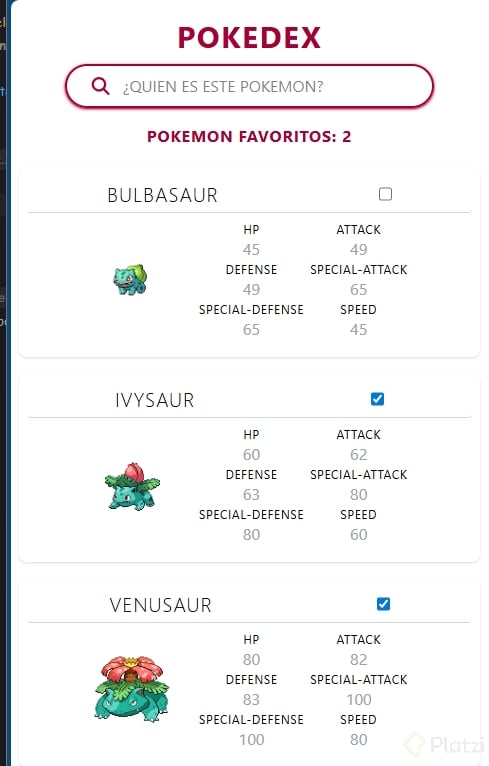
//PAGINA PRINCIPAL import {toast, Toaster} from "react-hot-toast"; import {type JSX, useEffect} from "react"; import {InputSearch} from "./components/input-search"; import {Loader} from "./components/loader"; import {PokemonList} from "./components/pokemon-list"; import {Tittle} from "./components/tittle"; import {createPortal} from "react-dom"; import {pokemonThunks} from "./actions/pokemon/pokemon.thunk.ts"; import {useAppDispatch, useAppSelector} from "./store.tsx"; const Page: () => JSX.Element = (): JSX.Element => { const dispatch = useAppDispatch(); const {result, status, favorites, error} = useAppSelector((state) => state.pokemon); useEffect((): void => { toast.promise(dispatch(pokemonThunks.all(4)), { success: 'Pokemon capturados!', error, loading: 'Buscando...', }) }, [dispatch]) if (status === 'loading') return (createPortal(<Loader message='Conectando con profesor hook...'/>, document.body)) return ( <section className='w-full p-2'> <Tittle title='pokedex'/> <InputSearch/> <section className='px-2 pt-4'> <p> Pokemon favoritos: {favorites.length} </p> </section> {status === 'failed' && <p>Error critico xd</p>} {(status === 'succeeded' && result.length > 0) && <PokemonList className='flex flex-col gap-y-4 mt-5' pokemon={result}/>} <Toaster position='top-right'/> </section> ); }; export default Page;
// POKEMON SLICES (REDUX) import {createSlice} from "@reduxjs/toolkit"; import {initialState} from "./pokemon.initial.state.ts"; import {pokemonThunks} from "./pokemon.thunk.ts"; import type {PokemonData} from "../../types/pokemon.types.ts"; const pokemonSlices = createSlice({ name: 'pokemon', initialState, reducers: { addFavorites: (state, action: { payload: PokemonData }) => { const favorites = state.favorites; const existInFavorites = favorites.find(item => item.id === action.payload.id); if (existInFavorites) state.favorites = favorites.filter(item => item.id !== action.payload.id) else state.favorites.push(action.payload); } }, extraReducers: builder => { builder .addCase(pokemonThunks.all.pending, (state) => { state.status = 'loading' }) .addCase(pokemonThunks.all.fulfilled, (state, action) => { state.status = 'succeeded' state.result = action.payload }) .addCase(pokemonThunks.all.rejected, (state, action) => { state.status = 'failed' state.error = action.error.message || 'error desconocido' }) } }) export default pokemonSlices;
// LOGICA DEL COMPONENTE import type {JSX} from 'react'; import {useAppDispatch} from "../../store.tsx"; import pokemonSlices from "../../actions/pokemon/pokemon.slices.ts"; import type {PokemonData} from "../../types/pokemon.types.ts"; type Props = { pokemon: PokemonData; } const TittlePokemonCard: (props: Props) => JSX.Element = ({pokemon}: Props): JSX.Element => { const dispatch = useAppDispatch(); const onClick = (pokemon: PokemonData) => { dispatch(pokemonSlices.actions.addFavorites(pokemon)); } return ( <section className='flex item-center w-full justify-around border-b-1 py-1 border-gray-300 rounded-sm'> <h2>{pokemon.name}</h2> <input type='checkbox' onClick={() => onClick(pokemon)}/> </section> ); }; export {TittlePokemonCard};
En esta Clase no entendi como haces para que el icono de la estrella cambie al hacer click, si en el codigo colocaste
extra={<StartButton isFavorite onClick={HandleOnFavorite} />} >
isFavorite siempre va a ser true y por lo tanto siempre va a mostrar el icono de la estrella "StarFilled", no se en que momento se hace para que cambie el icono
En el video no mostraste el cambio, pero ya lo ajuste
⭐ Mejoras en las Cards de Pokémon: descripción dinámica + favoritos
Vamos a mejorar nuestras Pokemon Cards reemplazando la descripción estática por una dinámica obtenida desde nuestro request.
Además, implementaremos un botón de favorito ⭐ usando la propiedad extra que nos ofrece Ant Design (antd).
También prepararemos el handleOnFavorite para alternar el estado de favoritos de cada Pokémon.
🎴 PokemonCard: descripción dinámica + botón de favorito
import { Card } from "antd"; import Meta from "antd/es/card/Meta"; import StarButton from "./StarButton"; import { useDispatch } from "react-redux"; import { setFavorite } from "../actions"; const PokemonCard = ({ name, image, types, id, favorite }) => { const dispatch = useDispatch(); const typesString = types.map(elem => elem.type.name).join(", "); const handleOnFavorite = () => { dispatch(setFavorite({ pokemonId: id })) } return ( <Card title={name} cover={ <img src={image} alt={name} /> } extra={<StarButton isFavorite={favorite} onClick={handleOnFavorite} />} > <Meta description={typesString}></Meta> </Card> ); }; export default PokemonCard;
⭐ StarButton: botón personalizado para favoritos
Creamos un componente que se colocará en la propiedad extra de la Card.
Tiene dos props:
isFavorite → estado actual del favoritoonClick → función para alternar el estadoimport { Button } from "antd"; import { StarFilled, StarOutlined } from "@ant-design/icons" const StarButton = ({ isFavorite, onClick }) => { const Icon = isFavorite ? StarFilled : StarOutlined; return <Button icon={<Icon />} onClick={onClick} /> } export default StarButton
🧱 Redux: creando SET_FAVORITE y su acción
Primero añadimos el action type:
export const SET_FAVORITE = "SET_FAVORITE";
Luego su acción correspondiente:
import { SET_FAVORITE, SET_LOADING, SET_POKEMONS } from "./types"; import { getPokemonDetails } from "../api"; export const setPokemons = (payload) => ({ type: SET_POKEMONS, payload, }); export const setLoading = (payload) => ({ type: SET_LOADING, payload, }); export const setFavorite = (payload) => ({ type: SET_FAVORITE, payload, }); export const getPokemonsWithDetails = (pokemons = []) => async (dispatch) => { const pokemonsDetailed = await Promise.all( pokemons.map((pokemon) => getPokemonDetails(pokemon)) ); dispatch(setPokemons(pokemonsDetailed)); }
🔧 Reducer: alternar el estado de favorito ⭐
Añadimos el Case SET_FAVORITE y modificamos la propiedad favorite del Pokémon correspondiente.
import { SET_FAVORITE, SET_LOADING, SET_POKEMONS } from "../actions/types"; const initialState = { pokemons: [], loading: false, }; export const pokemonsReducer = (state = initialState, action) => { switch (action.type) { case SET_POKEMONS: return { ...state, pokemons: action.payload }; case SET_FAVORITE: const newPokemonList = [...state.pokemons]; const currentPokemonIndex = newPokemonList.findIndex( (pokemon) => pokemon.id === action.payload.pokemonId ); if (currentPokemonIndex < 0) return state; newPokemonList[currentPokemonIndex].favorite = !newPokemonList[currentPokemonIndex].favorite; return { ...state, pokemons: newPokemonList }; case SET_LOADING: return { ...state, loading: action.payload }; default: return state; } };
🗂️ PokemonList: pasamos las nuevas props a la Card
Finalmente, la lista envía a cada Card la información necesaria, incluyendo el nuevo estado favorite.
import PokemonCard from "./PokemonCard"; import "./PokemonList.css"; const PokemonList = ({ pokemons }) => { return ( <div className="PokemonList"> {pokemons.map((pokemon, index) => { return ( <PokemonCard key={index} name={pokemon.name} image={pokemon.sprites.front_default} types={pokemon.types} id={pokemon.id} favorite={pokemon.favorite} /> ); })} </div> ); }; export default PokemonList;
de donde sale la propiedad favorito?
La propiedad favorito no se menciona como parte de los datos iniciales, se crea en el reducer al modificar la propiedad de un Pokémon para marcarlo como favorito o no favorito, con un toggle en la acción setFavorite.
Quizás alguien tenga más precisiones sobre un detalle que noté: la key isFavorite que añadimos al initialState no parece ser de mayor utilidad. Revisando Redux DevTools, el mismo nunca se modifica y tampoco es usado dentro del Reducer.
C'mooon! We're having a great practice and learning opportunity here!
English version branch
Branch name:
feat/pokemon-favorites
Commit message:
feat: Implement Pokemon favorite functionality
This commit introduces the ability to mark Pokemons as favorites.
- Adds a StarButton component to toggle favorite status.
- Integrates StarButton into PokemonCard component.
- Implements Redux state management for favorites in pokemons reducer and actions.
- Defines SET_FAVORITE action type.
no se si este metodo es mas sencillo a largo plazo. júzguelo ustedes
import React from 'react' import { FaRegStar, FaStar } from 'react-icons/fa' import { useDispatch, useSelector } from 'react-redux' import { setFavorite } from '../actions' function PokemonCard({ index, name, image, tipo, ability }) { const dispatch = useDispatch() const pokemons = useSelector((state) => state.pokemons) const isFavorit = pokemons.find((pokemon) => pokemon.id === index)?.favorite const handleOnFavorite = () => { dispatch(setFavorite({ pokemonId: index })) } return ( <> <section className=" grid grid-rows-4"> <figure className="relative flex justify-center"> {isFavorit ? ( <FaStar className=" absolute right-0 h-8 w-8 fill-amber-400" onClick={handleOnFavorite} /> ) : ( <FaRegStar className=" absolute right-0 h-8 w-8" onClick={handleOnFavorite} /> )}
no se si este metodo es mas sencillo a largo plazo. júzguelo ustedes
import React from 'react' import { FaRegStar, FaStar } from 'react-icons/fa' import { useDispatch, useSelector } from 'react-redux' import { setFavorite } from '../actions' const dispatch = useDispatch() const pokemons = useSelector((state) => state.pokemons) const isFavorit = pokemons.find((pokemon) => pokemon.id === index)?.favorite const handleOnFavorite = () => { dispatch(setFavorite({ pokemonId: index })) } return ( <> <section className=" grid grid-rows-4"> <figure className="relative flex justify-center"> {isFavorit ? ( <FaStar className=" absolute right-0 h-8 w-8 fill-amber-400" onClick={handleOnFavorite} /> ) : ( <FaRegStar className=" absolute right-0 h-8 w-8" onClick={handleOnFavorite} /> )} ```import React from 'react'import { FaRegStar, FaStar } from 'react-icons/fa'import { useDispatch, useSelector } from 'react-redux'import { setFavorite } from '../actions' function PokemonCard({ index, name, image, tipo, ability }) { const typeToColorClass = { bug: 'bg-lime-100 text-lime-900', dark: 'bg-gray-200 text-white', dragon: 'bg-indigo-200 text-indigo-900', electric: 'bg-yellow-200 text-black', fairy: 'bg-pink-200 text-pink-900', fighting: 'bg-red-400 text-white', fire: 'bg-red-200 text-red-800', flying: 'bg-teal-100 text-teal-700', ghost: 'bg-purple-300 text-white', grass: 'bg-green-100 text-green-800', ground: 'bg-amber-900 text-white', ice: 'bg-cyan-100 text-cyan-900', normal: 'bg-gray-300 text-black', poison: 'bg-purple-200 text-purple-900', psychic: 'bg-pink-200 text-pink-900', rock: 'bg-slate-300 text-slate-900', steel: 'bg-gray-400 text-black', water: 'bg-blue-200 text-blue-900', } const dispatch = useDispatch() const pokemons = useSelector((state) => state.pokemons) const isFavorit = pokemons.find((pokemon) => pokemon.id === index)?.favorite const handleOnFavorite = () => { dispatch(setFavorite({ pokemonId: index })) } return ( <> \<section className=" grid grid-rows-4"> \<figure className="relative flex justify-center"> {isFavorit ? ( \<FaStar className=" absolute right-0 h-8 w-8 fill-amber-400" onClick={handleOnFavorite} /> ) : ( \<FaRegStar className=" absolute right-0 h-8 w-8" onClick={handleOnFavorite} /> )}
no se si este metodo es mas sencillo a largo plazo. júzguelo ustedes
import React from 'react' import { FaRegStar, FaStar } from 'react-icons/fa' import { useDispatch, useSelector } from 'react-redux' import { setFavorite } from '../actions' function PokemonCard({ index, name, image, tipo, ability }) { const typeToColorClass = { bug: 'bg-lime-100 text-lime-900', dark: 'bg-gray-200 text-white', dragon: 'bg-indigo-200 text-indigo-900', electric: 'bg-yellow-200 text-black', fairy: 'bg-pink-200 text-pink-900', fighting: 'bg-red-400 text-white', fire: 'bg-red-200 text-red-800', flying: 'bg-teal-100 text-teal-700', ghost: 'bg-purple-300 text-white', grass: 'bg-green-100 text-green-800', ground: 'bg-amber-900 text-white', ice: 'bg-cyan-100 text-cyan-900', normal: 'bg-gray-300 text-black', poison: 'bg-purple-200 text-purple-900', psychic: 'bg-pink-200 text-pink-900', rock: 'bg-slate-300 text-slate-900', steel: 'bg-gray-400 text-black', water: 'bg-blue-200 text-blue-900', } const dispatch = useDispatch() const pokemons = useSelector((state) => state.pokemons) const isFavorit = pokemons.find((pokemon) => pokemon.id === index)?.favorite const handleOnFavorite = () => { dispatch(setFavorite({ pokemonId: index })) } return ( <> <section className=" grid grid-rows-4"> <figure className="relative flex justify-center"> {isFavorit ? ( <FaStar className=" absolute right-0 h-8 w-8 fill-amber-400" onClick={handleOnFavorite} /> ) : ( <FaRegStar className=" absolute right-0 h-8 w-8" onClick={handleOnFavorite} /> )} ```import React from 'react'import { FaRegStar, FaStar } from 'react-icons/fa'import { useDispatch, useSelector } from 'react-redux'import { setFavorite } from '../actions' function PokemonCard({ index, name, image, tipo, ability }) { const typeToColorClass = { bug: 'bg-lime-100 text-lime-900', dark: 'bg-gray-200 text-white', dragon: 'bg-indigo-200 text-indigo-900', electric: 'bg-yellow-200 text-black', fairy: 'bg-pink-200 text-pink-900', fighting: 'bg-red-400 text-white', fire: 'bg-red-200 text-red-800', flying: 'bg-teal-100 text-teal-700', ghost: 'bg-purple-300 text-white', grass: 'bg-green-100 text-green-800', ground: 'bg-amber-900 text-white', ice: 'bg-cyan-100 text-cyan-900', normal: 'bg-gray-300 text-black', poison: 'bg-purple-200 text-purple-900', psychic: 'bg-pink-200 text-pink-900', rock: 'bg-slate-300 text-slate-900', steel: 'bg-gray-400 text-black', water: 'bg-blue-200 text-blue-900', } const dispatch = useDispatch() const pokemons = useSelector((state) => state.pokemons) const isFavorit = pokemons.find((pokemon) => pokemon.id === index)?.favorite const handleOnFavorite = () => { dispatch(setFavorite({ pokemonId: index })) } return ( <> \<section className=" grid grid-rows-4"> \<figure className="relative flex justify-center"> {isFavorit ? ( \<FaStar className=" absolute right-0 h-8 w-8 fill-amber-400" onClick={handleOnFavorite} /> ) : ( \<FaRegStar className=" absolute right-0 h-8 w-8" onClick={handleOnFavorite} /> )}