Seba Cardoso
Alex Leonardo Rodriguez Carvajal
Wladimir Rocha
DANIEL MURCIA
Aaron Fuentevilla
Víctor Rolack
Daniel Alejandro Contreras Suárez
Víctor Manuel Morales Hoyos
Carlos Omar Beltran Miguel
Lucia Rodriguez
Andres Prieto
Andres Prieto
Miguel Angel Reyes Moreno
Moises Hernandez
Ulqernesh Karvenae
Gabriel Fernández Moral
Harold Zurita Simon
Gonzalo Gutiérrez Castillo
Geovanni Labastida Vázquez
Max Andy Diaz Neyra
César Palma
David Rangel
LUZ ADRIANA GONZALEZ MEJIA
Mariangelica Useche
Team PlatziSebastian Carballo
Kengya Moncada
N40 M10
Juan Pablo Avilan
Redux toolkit usado con react-query es muy poderoso. Creo que esta herramienta se merece todo un curso a parte.
Que interesante Seba!, le echare un vistazo a esa combinacion
yo tengo ganitas de probar redux toolkit con rtk para ver que tal
No sé, tal vez soy yo, pero... es que la profe se come muchas partes importantes de la explicacion, tal vez las supone obvias, pero en realidad creo que este curso se merece un Remake, la seguí con mucho esfuerzo hasta aquí, pero no me anda la App ni a tiros desde que empezó con toolkit
Tambien he notado que se pasa cosas, pero creo que es parte del show y me gusta eso, lo hace mas retador, tambien el punto es buscarle, al final eso es lo que se vive en el mundo laboral, nadie te va resolver o explicar todo, espero que lo hayas podido arreglar
precisamente los cursos deberían entregar más respuestas para aplicarlas en el mundo laboral xD
Creo que la maestra olvido implementar "configureStore" de Redux toolkit, ya que para crear el store seguimos usando el metodo legacy "createStore" importado de redux.
Leyendo la documentacion me quedo de esta manera:
import { configureStore } from '@reduxjs/toolkit'; import dataReducer from './slices/dataSlice'; import uiReducer from './slices/uiSlice'; export const store = configureStore({ reducer: { data: dataReducer, ui: uiReducer, }, }); // Infer the `RootState` and `AppDispatch` types from the store itself export type RootState = ReturnType<typeof store.getState>; // Inferred type: {posts: PostsState, comments: CommentsState, users: UsersState} export type AppDispatch = typeof store.dispatch;
Y asi, el codigo en el archivo index queda mucho mas limpio (ya no necesitamos hacer la validacion del compose para usare el compose correcto):
import React from 'react'; import ReactDOM from 'react-dom/client'; import { Provider } from 'react-redux'; import App from './App'; import { store } from './store'; import './index.css'; const root = ReactDOM.createRoot( document.getElementById('root') as HTMLElement ); root.render( <React.StrictMode> <Provider store={store}> <App /> </Provider> </React.StrictMode> );
Tambien al hacer esto, ya no necesitamos el root reducer, asi que elmine la carpeta "reducers" y elimine las depencias de thunk y redux-thunk.
¿Cómo añades en tu versión la opción de usar las Redux Devtools?
Respondiendo a Víctor, que dudo que lo vea nuevamente pero por si a alguien le sirve.
Este paso que menciona picirilo es sumamente útil al estar trabajando con typescript. Y al hacer uso de configureStore quedan automáticamente configuradas las devtools de acuerdo a la propia documentación de Redux toolkit.
> "This creates a Redux store, and also automatically configure the Redux DevTools extension so that you can inspect the store while developing."
Que desastre como se explican estos temas tan importantes!
Cuando comparas la doc de react toolkit con el código, se nota que este curso se ha quedado viejo :/
No quiero sonar más negativo de lo que soy pero, ¿Para que se hizo la UI de un componente de búsqueda si nunca se volvió a tocar?
¡Creo que mejoró mucho el código con redux-tookit!
muy bueno y fácil con redux-toolkit
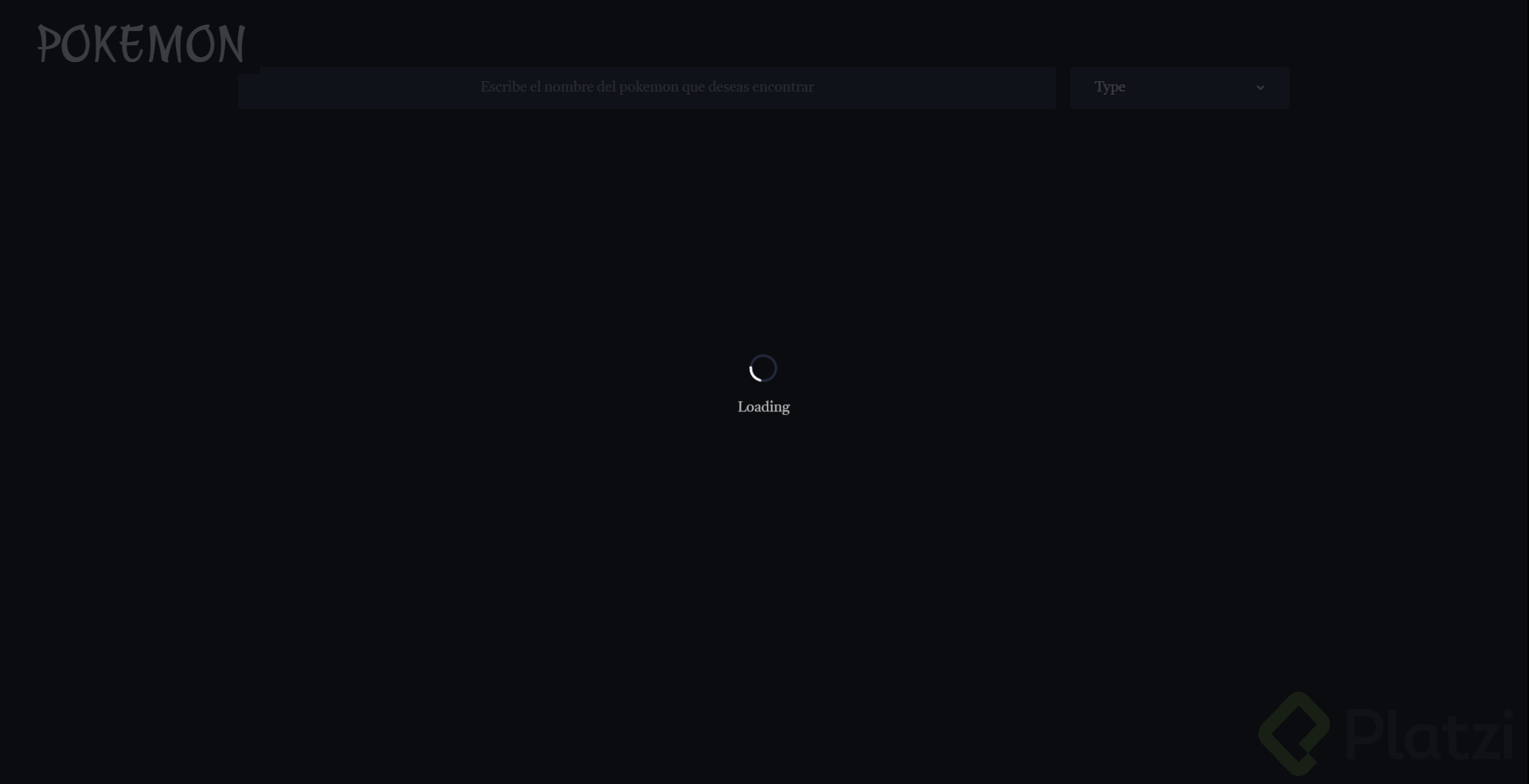
Una vez más vuelve a hacer cambios que no muestra. Como quitar el hardcoding de loading que hace a false. Si no te acuerda de esto, te quedas loco pensando porqué a ti no te aparece el spin
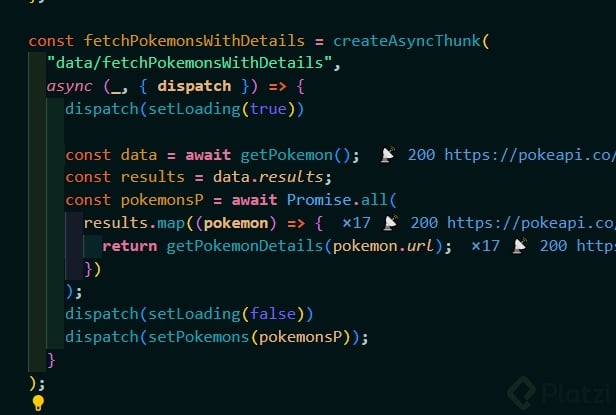
✨ Asincronismo con Redux Toolkit usando createAsyncThunk
Redux Toolkit facilita muchísimo el manejo de acciones asincrónicas, y gracias a createAsyncThunk ya no necesitamos usar Redux Thunk manualmente. 🚀
🔧 ¿Qué es createAsyncThunk?
createAsyncThunk es un método que nos permite crear acciones asincrónicas (thunks) sin todo el boilerplate que antes teníamos que escribir.
Recibe dos parámetros:
<nombreDelSlice>/<nombreDelTipo>
Ej: "data/fetchPokemonsWithDetails"
dispatch.⚙️ Flujo del thunk
Dentro del createAsyncThunk haremos:
1. 🔄 dispatch(setLoading(true))
2. 🐱 Obtener pokemons desde la API
3. 📄 Obtener detalles de cada pokemon
4. 📥 Guardar esos datos en el store
5. 📴 Desactivar el loading
Todo usando acciones de nuestros slices.
🧩 dataSlice — Pokémons
import { createSlice, createAsyncThunk } from "@reduxjs/toolkit"; import { getPokemon, getPokemonDetails } from "../api"; import { setLoading } from "./uiSlice"; const initialState = { pokemons: [], }; export const fetchPokemonsWithDetails = createAsyncThunk( "data/fetchPokemonsWithDetails", async (_, { dispatch }) => { dispatch(setLoading(true)); const pokemonsRes = await getPokemon(); const pokemonsDetailed = await Promise.all( pokemonsRes.map((pokemon) => getPokemonDetails(pokemon)) ); dispatch(setPokemons(pokemonsDetailed)); dispatch(setLoading(false)); } ); export const dataSlice = createSlice({ name: "data", initialState, reducers: { setPokemons: (state, action) => { state.pokemons = action.payload; }, setFavorite: (state, action) => { const index = state.pokemons.findIndex( (pokemon) => pokemon.id === action.payload.pokemonId ); if (index >= 0) { state.pokemons[index].favorite = !state.pokemons[index].favorite; } }, }, }); export const { setFavorite, setPokemons } = dataSlice.actions; export default dataSlice.reducer;
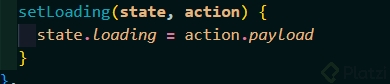
🎛 uiSlice — Manejo del loading
import { createSlice } from "@reduxjs/toolkit"; const initialState = { loading: false, }; export const uiSlice = createSlice({ name: "ui", initialState, reducers: { setLoading: (state, action) => { state.loading = action.payload; }, }, }); export const { setLoading } = uiSlice.actions; export default uiSlice.reducer;
🗂 rootReducer — Combinando los slices
import { combineReducers } from "redux"; import dataReducer from "../slices/dataSlice"; import uiReducer from "../slices/uiSlice"; const rootReducer = combineReducers({ data: dataReducer, ui: uiReducer, }); export default rootReducer;
🪝 Custom Hook — usePokemons
Ahora simplemente llamamos al thunk fetchPokemonsWithDetails sin ninguna sintaxis de ImmutableJS 🎉.
import { shallowEqual, useDispatch, useSelector } from "react-redux"; import { fetchPokemonsWithDetails } from "../slices/dataSlice"; import { useEffect } from "react"; export const usePokemons = () => { const pokemons = useSelector((state) => state.data.pokemons, shallowEqual); const loading = useSelector((state) => state.ui.loading); const dispatch = useDispatch(); const fetchPokemons = () => { dispatch(fetchPokemonsWithDetails()); }; useEffect(() => { fetchPokemons(); }, []); return { pokemons, loading, fetchPokemons, }; };
🧱 PokemonCard — usando setFavorite
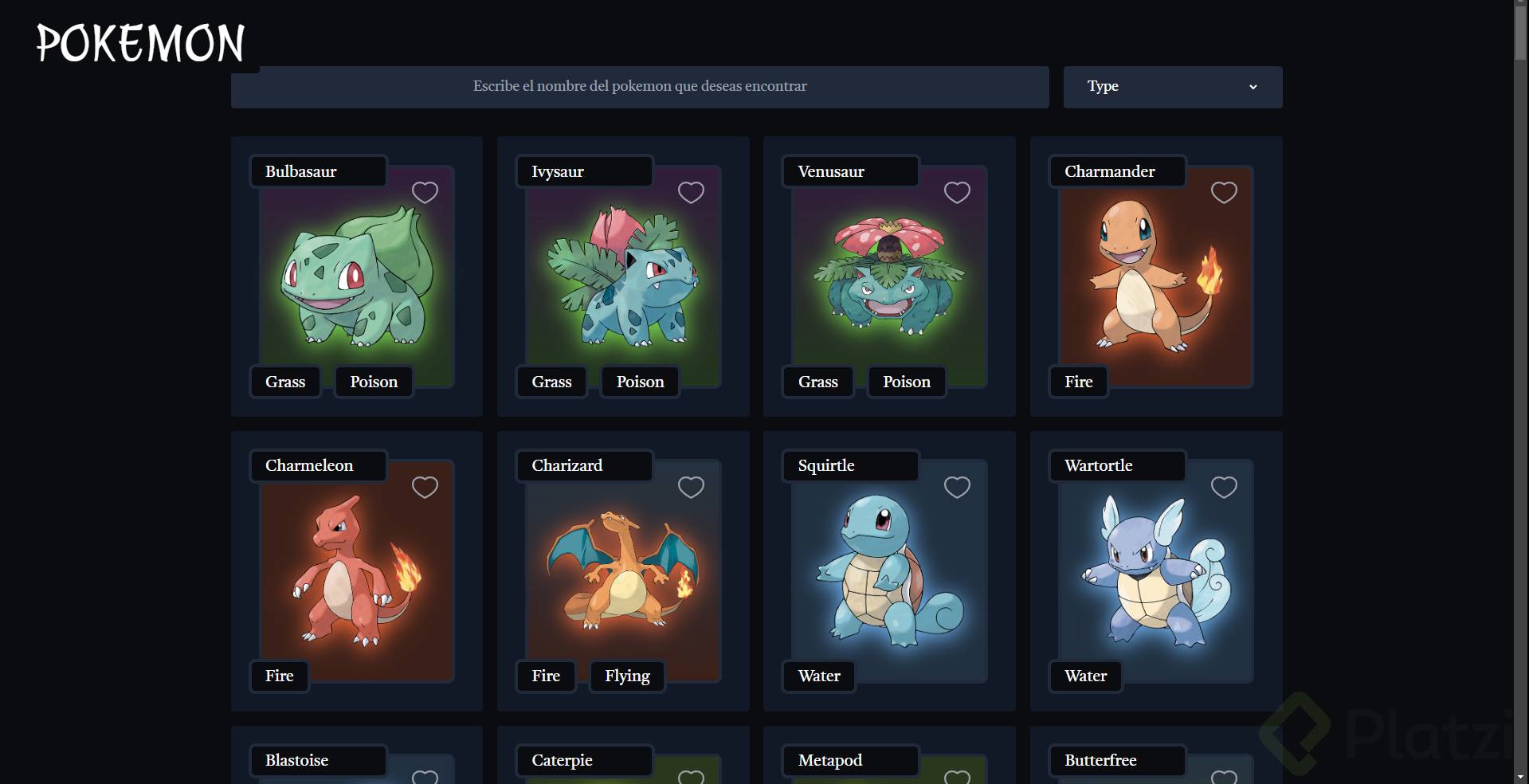
import { Card } from "antd"; import Meta from "antd/es/card/Meta"; import StarButton from "./StarButton"; import { useDispatch } from "react-redux"; import { setFavorite } from "../slices/dataSlice"; const PokemonCard = ({ name, image, types, id, favorite }) => { const dispatch = useDispatch(); const typesString = types.map(t => t.type.name).join(", "); const handleOnFavorite = () => { dispatch(setFavorite({ pokemonId: id })); }; return ( <Card title={name} cover={<img src={image} alt={name} />} extra={<StarButton isFavorite={favorite} onClick={handleOnFavorite} />} > <Meta description={typesString} /> </Card> ); }; export default PokemonCard;
🗑 Limpieza final
✔️ Eliminamos archivos que ya no se usan:
actions/pokemons.jsui.js✔️ Quitamos librerías del proyecto:
immutableredux-immutableAsi me quedo el middleware para integrarlo al sistema que usa reduxtoolkit y su metodo configureStore en el index.js general:
middlewares.js
export const capitalizePokemons = (store)=>(next)=>(action)=>{ const capitalize = (string) => { return string.charAt(0).toUpperCase() + string.slice(1); } if (action.type === "data/setPokemons") { const capitalizedPokemons = action.payload.map((pokemon) => { return { ...pokemon, name: capitalize(pokemon.name), }; }); const updatedAction = { ...action, payload: capitalizedPokemons } return next(updatedAction) } return next(action) }
index,js
const store = configureStore({ reducer: rootReducer, middleware: (getDefaultMiddleware) => getDefaultMiddleware().concat(logger, capitalizePokemons) });
Bueno para poder utilizar middlewares, lo que se tiene que hacer es simplemente conocer como esta estructurado el action que autogenera redux toolkit, como la convencion para el ombre del action type y donde se encuetra el payload
Algo que no se mencionó es modificar la configuración del store con @reduxjs/toolkit. . Esto simplifica mucho nuestro index.jsx, ya que incluye por defecto:
import React from 'react' import ReactDOM from 'react-dom/client' import App from './App/index' import './index.css' import { rootReducer } from './reducers/rootReducer' import { Provider } from 'react-redux' import { configureStore } from '@reduxjs/toolkit' import { logger,nameUpperCase } from './middlewares/index' const store = configureStore({ reducer: rootReducer, middleware: (getDefaultMiddleware) => getDefaultMiddleware().concat(logger, nameUpperCase) }); ReactDOM.createRoot(document.getElementById('root')).render( <React.StrictMode> <Provider store={store}> <App /> </Provider> </React.StrictMode>, )
Hola a todos, les dejo mi codigo toolkit - ts - vite con algunas modificaciones respecto a la clase:
// main.tsx import React from 'react' import ReactDOM from 'react-dom/client' import App from './App' import { Provider } from "react-redux"; import { store } from './slices'; ReactDOM.createRoot(document.getElementById('root') as HTMLElement).render( <React.StrictMode> <Provider store={store} > <App /> </Provider> </React.StrictMode> )
// slices/index.ts import { configureStore } from "@reduxjs/toolkit"; import { TypedUseSelectorHook, useDispatch, useSelector } from "react-redux"; import { dataReducer } from "./dataSlice"; import { uiReducer } from "./uiSlice"; const store = configureStore({ reducer: { data: dataReducer, ui : uiReducer } }) type RootState = ReturnType<typeof store.getState> type Appdispatch = typeof store.dispatch export const useAppDispatch : ()=> Appdispatch = useDispatch; export const useAppSelector : TypedUseSelectorHook<RootState> = useSelector; export { store }
// slices/dataSlice.ts import { createSlice, createAsyncThunk } from "@reduxjs/toolkit"; import { getPokemonDetails, getPokemons, PokemonDetailType, PokemonType } from "../api"; import { setLoading } from "./uiSlice"; type InitialState = { pokemons: PokemonDetailType[] } const initialState: InitialState = { pokemons: [] } export const fetchPokemonsWithDetails = createAsyncThunk( 'data/fetchPokemonsWithDetails', async (_,{dispatch}) =>{ try { dispatch(setLoading(true)) const pkmns = await getPokemons(); const pkmnsDetailed = await Promise.all((pkmns as PokemonType[]).map(pkmn=>getPokemonDetails(pkmn))) dispatch(setPokemons(pkmnsDetailed)) dispatch(setLoading(false)) } catch (err) { console.error(err) dispatch(setLoading(false)) } } ) export const dataSlice = createSlice({ name: 'data', initialState, reducers:{ setPokemons: (state,action)=>{ state.pokemons = action.payload }, setFavorite: (state, action)=>{ const currentPokemonIndex = state.pokemons.findIndex( (pkmn:PokemonDetailType) => { return pkmn.id === action.payload.pokemonId } ) if(currentPokemonIndex >= 0){ const isFavorite = state.pokemons[currentPokemonIndex].favorite state.pokemons[currentPokemonIndex].favorite = !isFavorite } } } }) export const dataReducer = dataSlice.reducer; export const { setPokemons, setFavorite } = dataSlice.actions;
// slices/uiSlice.ts import { createSlice } from "@reduxjs/toolkit" export type TypeState = { loading : boolean } const initialState:TypeState = { loading: false } const uiSlice = createSlice({ name: 'ui', initialState, reducers: { setLoading: (state, action)=>{ state.loading = action.payload } } }) export const uiReducer = uiSlice.reducer; export const { setLoading } = uiSlice.actions;
// App.tsx import { useEffect } from 'react' import { Search } from './components/Search' import { PokemonList } from './components/PokemonList' import { Col, Spin } from 'antd' import { useAppDispatch, useAppSelector } from './slices' import { fetchPokemonsWithDetails } from './slices/dataSlice' import logo from './statics/logo.svg' import './App.css' function App() { const pokemons = useAppSelector((state)=>state.data.pokemons) const loading = useAppSelector((state)=>state.ui.loading) const dispatch = useAppDispatch(); useEffect(()=>{ dispatch(fetchPokemonsWithDetails()) },[]) return ( <div className="App"> <Col span={4} offset={10}> <img src={logo} alt="Pokedux" /> </Col> <Col span={8} offset={8}> <Search /> </Col> {loading? <Col offset={12} > <Spin spinning size='large' /> </Col> : <PokemonList pokemons={pokemons} /> } </div> ) } export default App;
Fue buena idea llevarlo a la par con typescript, costó mas pero se aprende mas
Así queda con TS:
// app/features/dataSlice.ts import { createAsyncThunk, createSlice, type PayloadAction, type Dispatch, } from '@reduxjs/toolkit'; import { getPokemon } from '~/api/getPokemon'; import type { PokeDetail, PokemonDataType } from '~/types/pokeTypes.ts'; import type { PokemonSchema } from '~/types/reducerTypes'; import { getPokemonDetails } from '~/api/getPokemonDetails'; import { setLoading } from '~/features/uiSlice'; const initialState: PokemonSchema = { pokemons: [], }; export const fetchPokeWithDetails = createAsyncThunk( 'data/fetchPokeWithDetails', async (_, { dispatch }) => { dispatch(setLoading(true)); try { const pokeRes = await getPokemon(); if (pokeRes && pokeRes.length > 0) { const pokeDetailsRaw = await Promise.all( pokeRes.map((poke: PokemonDataType) => getPokemonDetails(poke)), ); const pokeDetails = pokeDetailsRaw.filter( (poke): poke is PokeDetail => poke !== undefined, ); dispatch(setPokemons(pokeDetails)); } } catch (err) { console.error(err); } finally { dispatch(setLoading(false)); } }, ); export const dataSlice = createSlice({ name: 'data', initialState, reducers: { setPokemons: (state, action: PayloadAction<PokeDetail[]>) => { state.pokemons = action.payload; }, setFavourite: (state, action) => { const currenPokeIndex = state.pokemons.findIndex( (pokemon: PokeDetail) => pokemon.id === action.payload, ); if (currenPokeIndex > -1) { const isFavourite = state.pokemons[currenPokeIndex].favourite; state.pokemons[currenPokeIndex].favourite = !isFavourite; } }, }, }); export const { setPokemons, setFavourite } = dataSlice.actions; export default dataSlice.reducer; // app/features/uiSlice.ts import { createSlice, type PayloadAction } from '@reduxjs/toolkit'; import type { LoadingSchema } from '~/types/reducerTypes'; const initialState: LoadingSchema = { loading: false, }; export const uiSlice = createSlice({ name: 'ui', initialState, reducers: { setLoading: (state, action: PayloadAction<boolean>) => { state.loading = action.payload; }, }, }); export const { setLoading } = uiSlice.actions; export default uiSlice.reducer; // app/reducers/rootReducer.ts import { combineReducers } from '@reduxjs/toolkit'; import dataReducer from '~/features/dataSlice'; import uiReducer from '~/features/uiSlice'; export const rootReducer = combineReducers({ data: dataReducer, ui: uiReducer, }); export type RootState = ReturnType<typeof rootReducer>; // app/welcome/welcome.tsx import { useEffect } from 'react'; import { Col, Spin } from 'antd'; import { shallowEqual, useDispatch, useSelector } from 'react-redux'; import logo from '../statics/logo.svg'; import { PokeList } from '~/components/PokeList'; import { Searcher } from '~/components/Searcher'; import { type AppDispatch } from '~/store/store'; import { type RootState } from '~/reducers/rootReducer'; import { fetchPokeWithDetails } from '~/features/dataSlice'; export function Welcome() { const pokemons = useSelector( (state: RootState) => state.data.pokemons, shallowEqual, ); const loading = useSelector((state: RootState) => state.ui.loading); const dispatch = useDispatch<AppDispatch>(); useEffect(() => { dispatch(fetchPokeWithDetails()); }, [fetchPokeWithDetails]); console.log(loading) return ( <main> <h1>Pokedux</h1> <Col span={4} offset={10} className='my-3'> <img src={logo} alt='Pokedux' /> </Col> <Col span={8} offset={8} className='mt-3'> <Searcher /> </Col> {loading ? ( <Col offset={12}> <Spin spinning size='large' className='mt-3' /> </Col> ) : ( pokemons && <PokeList pokemons={pokemons} /> )} </main> ); } // app/components/PokeCard.tsx import { Card } from 'antd'; import { Meta } from 'antd/es/list/Item'; import { useDispatch } from 'react-redux'; import { StarButton } from './StarButton'; import { setFavourite } from '~/features/dataSlice'; interface PokeCardProps { name: string; type: string; imgUrl: string; id: number; favourite: boolean; className?: string; } export const PokeCard = ({ name, type, imgUrl, id, favourite, className, }: PokeCardProps) => { const dispatch = useDispatch(); const handleOnClick = () => { dispatch(setFavourite(id)); }; return ( <Card title={name} className={className} extra={<StarButton isFavourtie={favourite} onClick={handleOnClick} />} cover={<img src={imgUrl} alt={name} className='w-100' />}> <Meta description={type} /> </Card> ); };
Cuando debemos utilizar el shallowEqual??
shallowEqual tiene sentido cuando seleccionas un objeto que podría ser similar en contenido, pero diferente en referencia.
Por ejemplo:
const a = { foo: "bar" }; const b = { foo: "bar" }; console.log(a === b); // registrará false console.log(shallowEqual(a, b)); // registrará true
Si bien a y b son dos objetos con una forma y contenido similares, no son el mismo objeto. Ahora, shallowEqual realiza una comparación === entre a.foo y b.foo, y dado que ambos son cadenas con el mismo contenido, a.foo === b.foo será true.
Entonces en este caso redux mirará no solo la referencia, sino el contenido de los objetos al hacer la comparación y evitará re renders innecesarios.
Espero haber respondido tu pregunta <3
🫶
My english version branch & commit -
Commit message
"feat: Migrate to Redux Toolkit and refactor state management
This commit migrates the application's state management from Redux with ImmutableJS to Redux Toolkit.
Key changes include:
- Implemented dataSlice to manage pokemon data, replacing previous Redux logic.
- Introduced createAsyncThunk in dataSlice for asynchronous data fetching.
- Created uiSlice to manage UI state, such as loading indicators.
- Updated action dispatch calls to use Redux Toolkit actions.
- Cleaned up the project by removing the unused action folder.
- Removed immutable and redux-immutable dependencies."
Redux toolkit ♥
Moraleja, redux es, al menos hasta tener proyectos realmente grandes, usar las fases básicas junto a middleware y redux toolkit.
Esta cool RTK. Tambien existe una nueva funcionalidad de RTK que es RTK Query que permite el manejo de queries y mutations de una forma mejorada. Compite directamente con React Query.
Por debajo funciona con este createAsyncThunk pero añade más funcionalidades.