Seguimiento de mirada con Face Mesh
Contenido del curso
Seguimiento de mirada con Face Mesh
Contenido del curso

Dylan Ortega
Juan Acevedo
Bryan Castano
Armando Fabrisio Ponze de leon Portugal
Gilber Iván Rojas González
Primer forma (no sé si es la más adecuada, pero es la más acorde a lo enseñado): import cv2
import mediapipe as mp
# Inicializar Face Mesh de Mediapipe
mp_face_mesh = mp.solutions.face_mesh
face_mesh = mp_face_mesh.FaceMesh(min_detection_confidence=0.5, min_tracking_confidence=0.5)
# Capturar video de la webcam
cap = cv2.VideoCapture(0)
while cap.isOpened():
ret, frame = cap.read()
if not ret:
break
frame_rgb = cv2.cvtColor(frame, cv2.COLOR_BGR2RGB)
resultados = face_mesh.process(frame_rgb)
if resultados.multi_face_landmarks:
for face_landmarks in resultados.multi_face_landmarks:
# Obtener puntos clave de los ojos
left_eye = face_landmarks.landmark[33]
right_eye = face_landmarks.landmark[263]
mej_der = face_landmarks.landmark[214]
mej_izq = face_landmarks.landmark[434]
# Pasarla a coordenadas absolutas
h, w, _ = frame.shape
left_eye_coords = (int(left_eye.x * w), int(left_eye.y * h))
right_eye_coords = (int(right_eye.x * w), int(right_eye.y * h))
mej_der_coords = (int(mej_der.x * w), int(mej_der.y * h))
mej_izq_coords = (int(mej_izq.x * w), int(mej_izq.y * h))
# Calcular el punto medio de los ojos
mid_eye = ((left_eye_coords[0] + right_eye_coords[0]) // 2,
(left_eye_coords[1] + right_eye_coords[1]) // 2,
)
mid_mej = (
(mej_izq_coords[0] + mej_der_coords[0]) // 2 ,
(mej_izq_coords[1] + mej_der_coords[1]) // 2,
)
nariz = (
(mid_eye[0] + mid_mej[0]) // 2 ,
(mid_eye[1] + mid_mej[1]) // 2 ,
)
# Dibujar los puntos clave
cv2.circle(frame, left_eye_coords, 3, (0, 255, 0), -1)
cv2.circle(frame, right_eye_coords, 3, (0, 255, 0), -1)
cv2.circle(frame, mej_izq_coords, 3, (0, 255, 0), -1)
cv2.circle(frame, mej_der_coords, 3, (0, 255, 0), -1)
#cv2.circle(frame, mid_eye, 3, (255, 0, 0), -1) # Punto medio
#cv2.circle(frame, mid_mej, 3, (255, 0, 0), -1) # Punto medio
cv2.circle(frame, nariz, 3, (255, 0, 0), -1)
cv2.imshow("Seguimiento de Mirada", frame)
if cv2.waitKey(1) & 0xFF == ord('q'):
break
cap.release()
cv2.destroyAllWindows()
face_mesh.close()
Segunda forma (Teniendo en cuenta el punto exacto de la imagen de puntos faciales): import cv2
import mediapipe as mp
# Inicializar Face Mesh de Mediapipe
mp_face_mesh = mp.solutions.face_mesh
face_mesh = mp_face_mesh.FaceMesh(min_detection_confidence=0.5, min_tracking_confidence=0.5)
# Capturar video de la webcam
cap = cv2.VideoCapture(0)
while cap.isOpened():
ret, frame = cap.read()
if not ret:
break
frame_rgb = cv2.cvtColor(frame, cv2.COLOR_BGR2RGB)
resultados = face_mesh.process(frame_rgb)
if resultados.multi_face_landmarks:
for face_landmarks in resultados.multi_face_landmarks:
# Obtener puntos clave de los ojos
nariz = face_landmarks.landmark[4]
# Pasarla a coordenadas absolutas
h, w, _ = frame.shape
nariz_coords = (int(nariz.x * w), int(nariz.y * h))
# Dibujar los puntos clave
cv2.circle(frame, nariz_coords, 3, (255, 0, 0), -1)
cv2.imshow("Seguimiento de Mirada", frame)
if cv2.waitKey(1) & 0xFF == ord('q'):
break
cap.release()
cv2.destroyAllWindows()
face_mesh.close()
Les dejo un codigo que les pone un land es las siguientes parte:
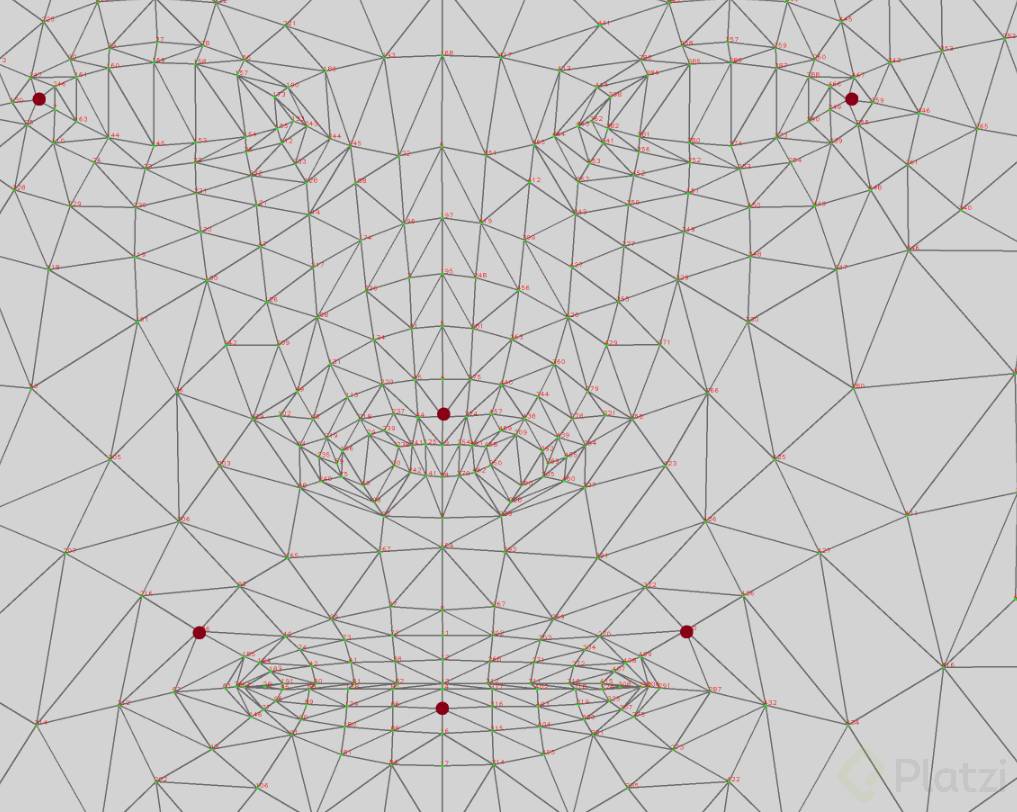
Code:
import cv2 import mediapipe as mp mp_face_msh = mp.solutions.face_mesh face_mesh = mp_face_msh.FaceMesh(min_detection_confidence = 0.5,min_tracking_confidence=0.5) def absolute_cords(frame, land): h, w, _ = frame.shape return (int(land.x * w), int(land.y * h)) cap = cv2.VideoCapture(0) if not cap.isOpened(): print('No se pudo capturar el video') else: while True: ret, frame = cap.read() if not ret: break frame_rgb = cv2.cvtColor(frame, cv2.COLOR_BGR2RGB) results = face_mesh.process(frame_rgb) if results.multi_face_landmarks: for landmask in results.multi_face_landmarks: left_eye = landmask.landmark[33] right_eye = landmask.landmark[263] left_mouth = landmask.landmark[186] right_mouth = landmask.landmark[410] center_mouth = landmask.landmark[15] lands = [left_eye, right_eye, left_mouth, right_mouth, center_mouth] #Dibujar los land for i in range(5): cv2.circle(frame, absolute_cords(frame, lands[i]), 3, (0, 0, 255), -1) cv2.imshow('Frame - Face - Nose', frame) if cv2.waitKey(1) & 0xFF == ord('q'): break cap.release() cv2.destroyAllWindows() face_mesh.close()
Hola Chico , les comparto este codigo mejorado para mostrar lso ojos de su sujeto de un video pre cargado y el mpunto medio :
import cv2 import mediapipe as mp from google.colab.patches import cv2_imshow from IPython.display import clear_output import time # Inicializar MediaPipe Face Mesh mp_face_mesh = mp.solutions.face_mesh mp_drawing = mp.solutions.drawing_utils mp_drawing_styles = mp.solutions.drawing_styles # Configurar Face Mesh face_mesh = mp_face_mesh.FaceMesh( max_num_faces=1, # Solo una cara para optimizar refine_landmarks=True, min_detection_confidence=0.5, min_tracking_confidence=0.5 ) # Función para convertir coordenadas normalizadas a absolutas def absolute_coords(w, h, landmark): """Convierte coordenadas normalizadas a píxeles absolutos""" return (int(landmark.x * w), int(landmark.y * h)) # Configuración del video video_path = '/Whaterver_is_the_name _of_your_video_path.mp4' cap = cv2.VideoCapture(video_path) # Verificar que el video se abrió correctamente if not cap.isOpened(): print('Error: No se pudo abrir el video') exit() else: print('Video cargado correctamente') # Variables de configuración frame_skip = 3 # Procesar cada 3 frames frame_count = 0 max_frames_to_show = 50 # Limitar frames para Colab # Definir puntos clave del rostro (Canonical Face Model) FACIAL_LANDMARKS = { 'left_eye': 33, 'right_eye': 263, 'nose_tip': 1, 'left_mouth': 61, 'right_mouth': 291, 'center_mouth': 13, 'chin': 152, 'left_eyebrow': 70, 'right_eyebrow': 300, 'forehead': 10 } # Colores para diferentes puntos (BGR) COLORS = { 'eyes': (0, 255, 0), # Verde 'mouth': (0, 0, 255), # Rojo 'nose': (255, 0, 0), # Azul 'face': (255, 255, 0) # Cian } print("Iniciando procesamiento...") while cap.isOpened() and frame_count < max_frames_to_show: ret, frame = cap.read() if not ret: break frame_count += 1 if frame_count % frame_skip != 0: continue # Saltar este frame # Redimensionar para procesamiento más rápido resized_frame = cv2.resize(frame, (800, 600)) h, w, _ = resized_frame.shape # Convertir de BGR a RGB frame_rgb = cv2.cvtColor(resized_frame, cv2.COLOR_BGR2RGB) # Procesar el frame results = face_mesh.process(frame_rgb) # Dibujar landmarks si se detecta rostro if results.multi_face_landmarks: for face_landmarks in results.multi_face_landmarks: # Dibujar puntos de ojos for eye_key in ['left_eye', 'right_eye']: idx = FACIAL_LANDMARKS[eye_key] landmark = face_landmarks.landmark[idx] coords = absolute_coords(w, h, landmark) cv2.circle(resized_frame, coords, 5, COLORS['eyes'], -1) cv2.circle(resized_frame, coords, 7, COLORS['eyes'], 2) # Borde # Dibujar puntos de boca for mouth_key in ['left_mouth', 'right_mouth', 'center_mouth']: idx = FACIAL_LANDMARKS[mouth_key] landmark = face_landmarks.landmark[idx] coords = absolute_coords(w, h, landmark) cv2.circle(resized_frame, coords, 5, COLORS['mouth'], -1) cv2.circle(resized_frame, coords, 7, COLORS['mouth'], 2) # Dibujar nariz nose_idx = FACIAL_LANDMARKS['nose_tip'] nose_landmark = face_landmarks.landmark[nose_idx] nose_coords = absolute_coords(w, h, nose_landmark) cv2.circle(resized_frame, nose_coords, 5, COLORS['nose'], -1) cv2.circle(resized_frame, nose_coords, 7, COLORS['nose'], 2) # Dibujar cejas for brow_key in ['left_eyebrow', 'right_eyebrow']: idx = FACIAL_LANDMARKS[brow_key] landmark = face_landmarks.landmark[idx] coords = absolute_coords(w, h, landmark) cv2.circle(resized_frame, coords, 4, COLORS['face'], -1) # Dibujar mentón chin_idx = FACIAL_LANDMARKS['chin'] chin_landmark = face_landmarks.landmark[chin_idx] chin_coords = absolute_coords(w, h, chin_landmark) cv2.circle(resized_frame, chin_coords, 5, COLORS['face'], -1) cv2.circle(resized_frame, chin_coords, 7, COLORS['face'], 2) # Añadir etiquetas left_eye_coords = absolute_coords(w, h, face_landmarks.landmark[33]) right_eye_coords = absolute_coords(w, h, face_landmarks.landmark[263]) cv2.putText(resized_frame, "Ojo Izq", (left_eye_coords[0] - 50, left_eye_coords[1] - 10), cv2.FONT_HERSHEY_SIMPLEX, 0.4, (255, 255, 255), 1) cv2.putText(resized_frame, "Ojo Der", (right_eye_coords[0] + 10, right_eye_coords[1] - 10), cv2.FONT_HERSHEY_SIMPLEX, 0.4, (255, 255, 255), 1) # Información en pantalla cv2.putText(resized_frame, f"Frame: {frame_count}", (10, 30), cv2.FONT_HERSHEY_SIMPLEX, 0.7, (255, 255, 255), 2) # Mostrar el resultado en Colab clear_output(wait=True) cv2_imshow(resized_frame) print(f"Frame {frame_count}/{max_frames_to_show} procesado") print(f"Verde: Ojos | Rojo: Boca | Azul: Nariz | Cian: Otros") # Pausa para visualización time.sleep(0.1) # Liberar recursos cap.release() face_mesh.close() print("\n✓ Procesamiento completado exitosamente")
n\Resultados Son:
<img height="145" width="154" src="https://static.platzi.com/media/user_upload/upload-d068f538-7341-455d-944b-5c8e41c6c3fe.png"> <img height="145" width="129" src="https://static.platzi.com/media/user_upload/upload-03ad6575-fc45-4728-996e-4728ca6a8874.png">
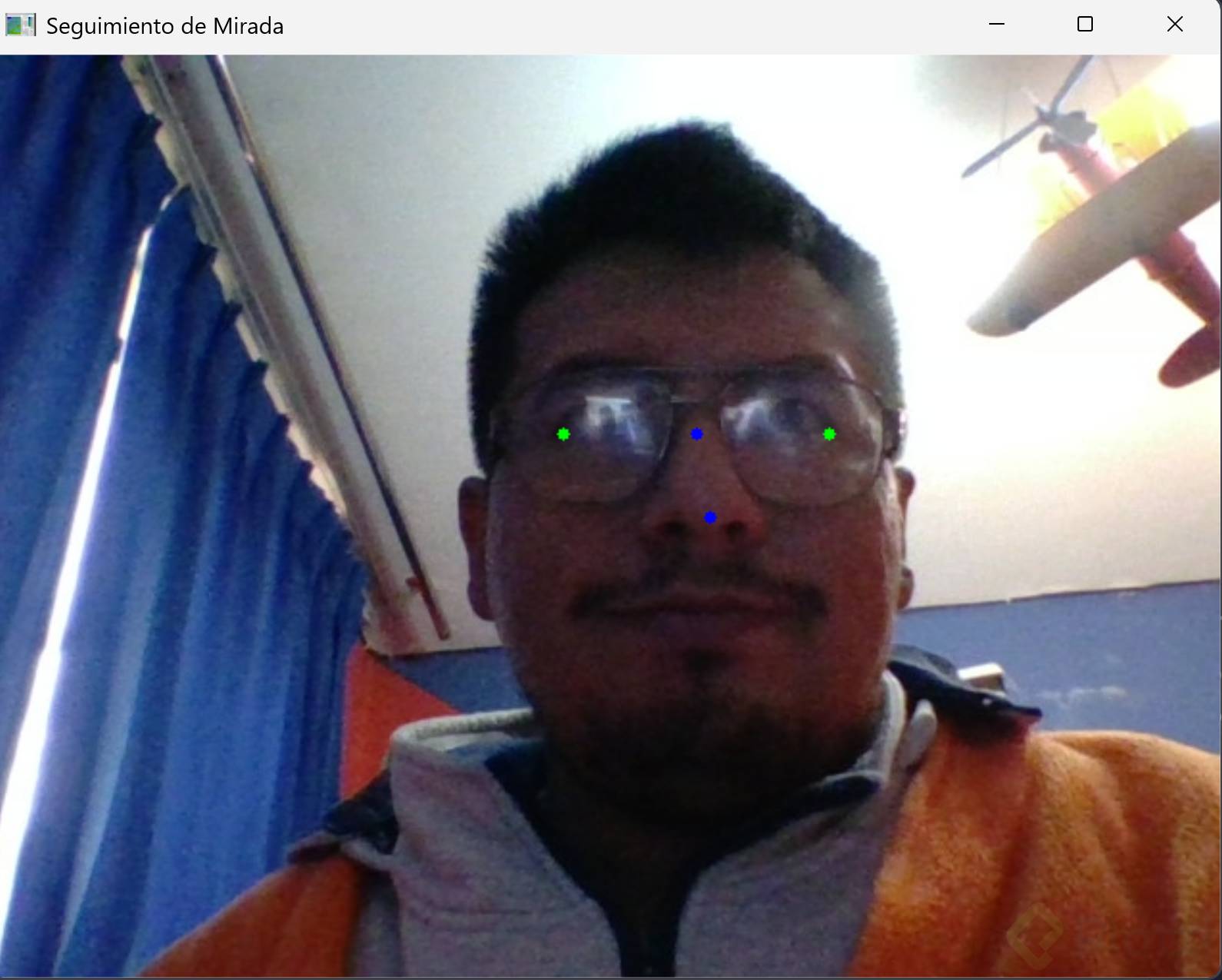
con mp 1.0.1 y python 3.14


