




Esteban Aragon
Second challenge completed 😅


Juan Pablo Calao Pérez
Épico. Símplemente épico

Giancarlo Lamadrid Cotrina
Bueeeeenaaaa jajajajaja
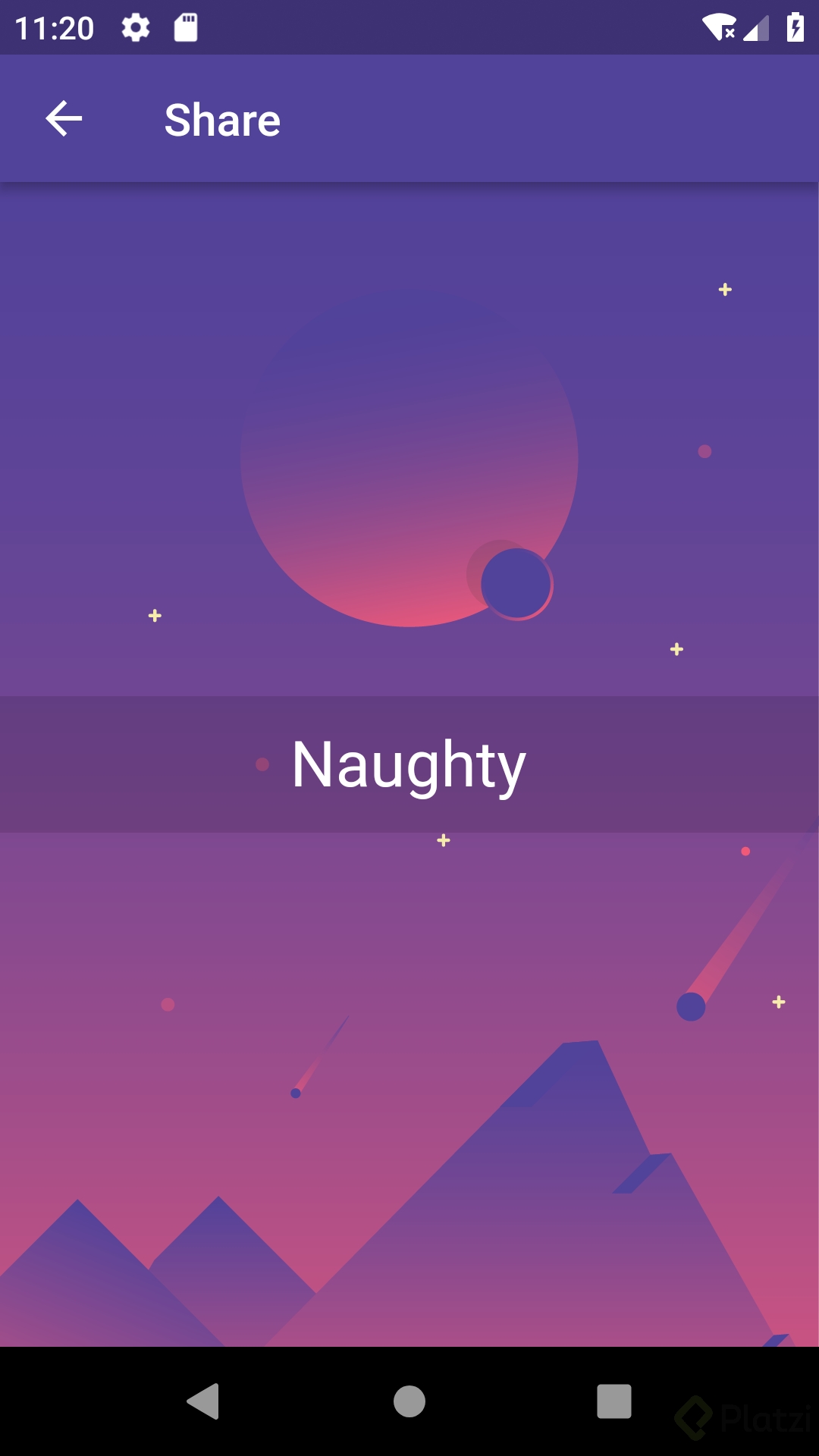
Con lo que has aprendido hasta ahora analiza y desarrolla esta interfaz en Flutter:
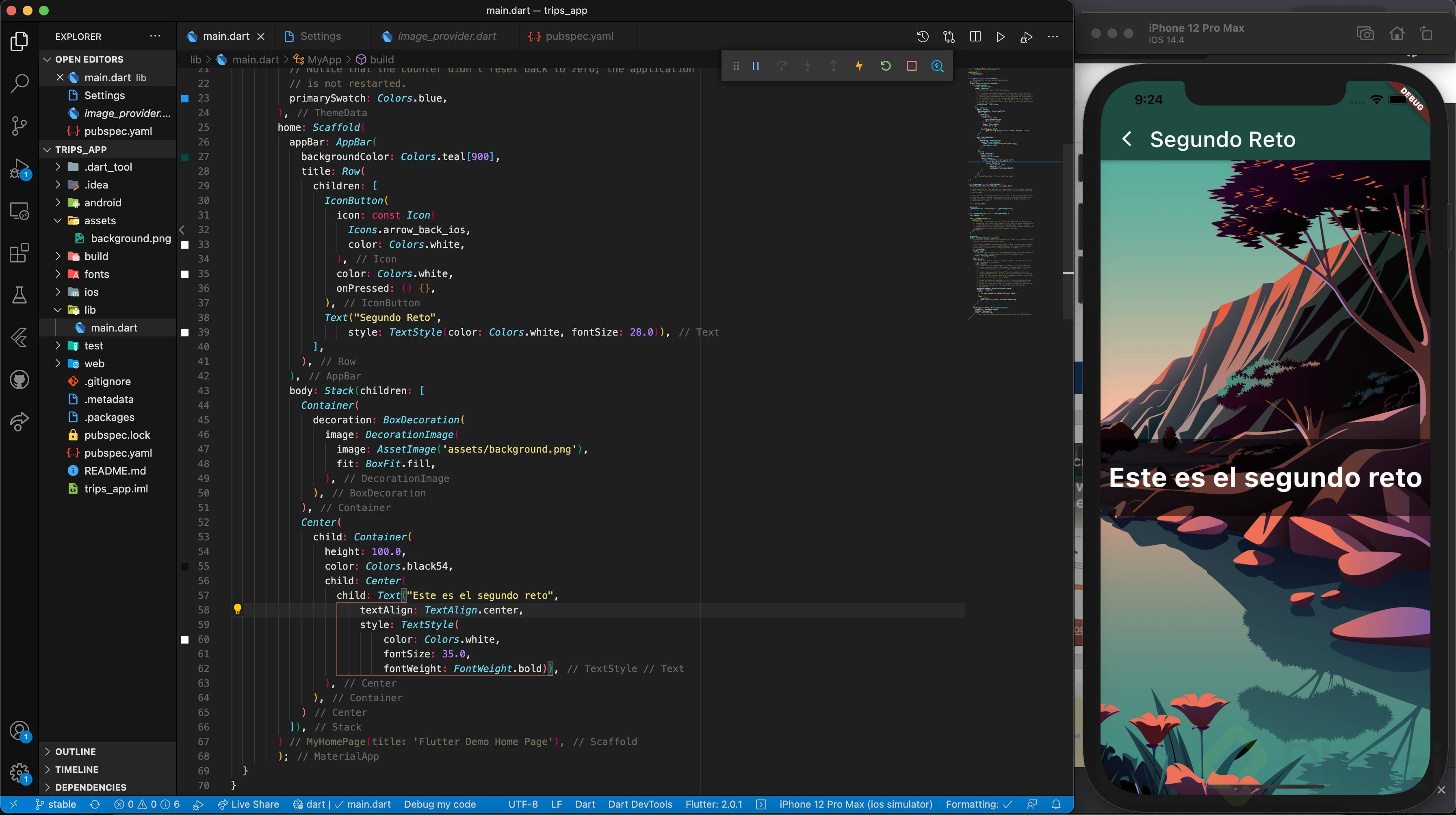
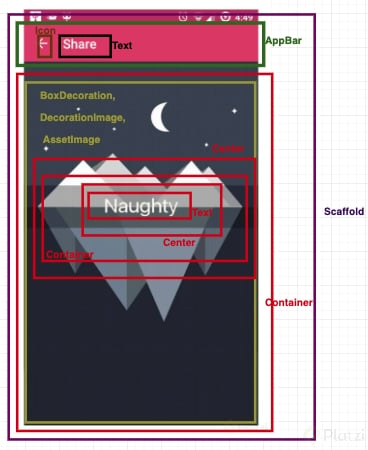
De fondo tienes una imagen, encima un contenedor negro que tiene una transparencia y a la vez por encima de este contenedor está el texto. Tanto el contenedor como el texto están centrados.
Utiliza tus propios recursos: imágenes, textos, etc. para generar tu propia versión. Compártenos tu análisis y la captura de pantalla de tus resultados en la sección de discusiones.

Esteban Aragon
Second challenge completed 😅
Juan Pablo Calao Pérez
Épico. Símplemente épico
Giancarlo Lamadrid Cotrina
Bueeeeenaaaa jajajajaja

Josué Eliezer Gómez Soto
Juan Pablo Reyes Herrera
Corroboro, totalmente!!!

Pablo Emilio Escobar Ossa
Estoy buscando en los aportes como resolverlo. Puesto que no tengo conocimiento en Flutter.

Julio J Yépez
Mi análisis del Reto:

Julio J Yépez
Como hasta ahora no hemos visto detalles de cómo pasar del análisis al código … considero que mi reto completado sería así.
¯\_(ツ)_/¯

Jorge Wenner Arévalo Alvis
Muy de acuerdo contigo…

Juan Martín Seery
No me acostumbro a escribir mil veces child y Center :v



Ludwring Liccien
Me parece vulgar este tipo de imágenes.
Debería eliminarla el usuario o la plataforma
Juan Martín Seery
Pero… es un meme: Orange Justice y “Karen, please don’t take the kids”. Me pareció una forma divertida de trabajar con Flutter.
Mis disculpas si lo he ofendido, pero no puedo (o simplemente no encuentro la opción de) borrar el post.
Edgar Morillo Vergel
Buen dia, no estoy de acuerdo con este ejercicio me ha costado. vengo de otro paradigma de desarrollo y me cuesta tomarle el hilo a la forma como lo hace flutter. me parece que se debio haber hecho un ejercicio con codigo parecido y despues si hacer la version de uno. no se trata de copiar y pegar sino de entender que es lo que estamos haciendo. pienso que todavia no se ha explicado bien lo de los widget y como incrustarlos en el codigo.

Robert Romero Medina
Concuerdo contigo

Giovanni Peña
Me too.

home: Scaffold( appBar: AppBar( title: Text("Reto Platzi"), backgroundColor: Colors.black, ), body: Stack( fit: StackFit.expand, children: <Widget>[ Container( decoration: BoxDecoration( image: new DecorationImage( image: new AssetImage('assets/images/hackerman.jpg'), fit: BoxFit.fill ) ), ), Center( child: Container( color: Colors.black.withOpacity(.5), constraints: BoxConstraints.expand(height: 70), child: Center( child: Text( "¡Desafío completado!", style: TextStyle( color:Colors.white, fontSize: 30 ), ) ), ), ) ], ) ) );```

José Antonio Di Pietro Zambrano


Cristian David Franco Garcia
Henry Villavicencio
Listo, es importante agregar:
assets:


Usuario anónimo
User!! Reto Cumplido !!
GitHub:

Fernando Ontiveros

Edward Alexis Vásquez Becerra
Gracias
Salvador Camacho Gasca
Me gusto su solución , gracias
Usuario anónimo
User
Pedro Jesus Hincapie Garcia
Un poco de humor y reflexión para este super equipo.


Anibal Daniel Moradel Lazo
Listo!

Lucas Alejandro Moreno Olivos
Naaaa, mejor esta Xayah, aunque aguante la toplane <3

samuel sanchez castillo
Luiggi Thomas Mendoza Jarahuanco
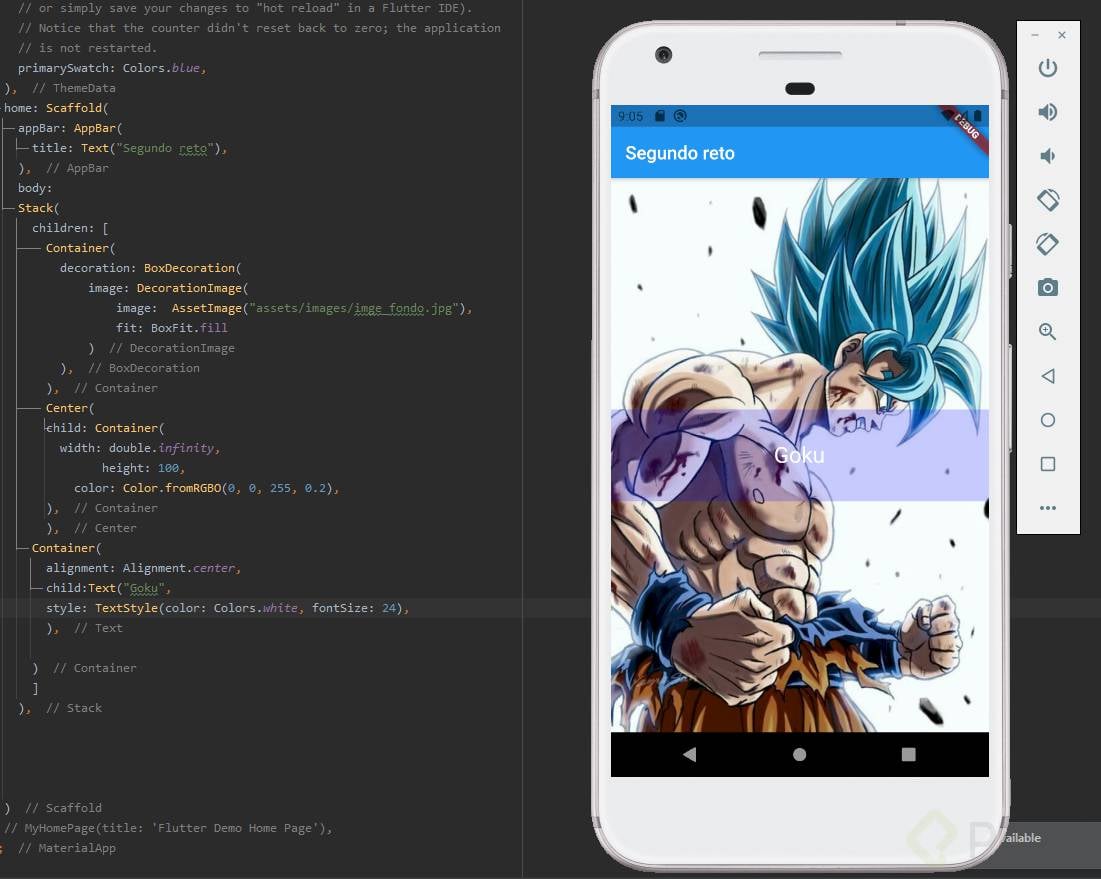
Comparto mi análisis inicial:
Sobre mi análisis, no sé si es la imagen o en realidad hay una opacidad añadida desde el medio de la imagen. Quizás sea mi imaginación. De ser así, el cuerpo cambia para rediseñar la opacidad.
Aquí mi diseño basado en el análisis inicial (con fondo blanco, la imagen tiene fondo transparente).


Paul Mauricio Realpe Guerrero

David Avendaño Casanova
Alejandro Alvarez Alvarez
Company_admin
Pues yo conozco algo de Flutter previo a este curso, por ello pude resolver el reto, creo para alguien nuevo esto sera decepcionante, ya que vera que otros pueden y el no, pensara que no es bueno para esto, por ello no estoy de acuerdo que con el nivel que se ha enseñado pidan este reto:
import 'package:flutter/material.dart'; class Home extends StatelessWidget { @override Widget build(BuildContext context) { return Scaffold( appBar: AppBar( leading: Icon(Icons.home), title: Text('Platzi'), centerTitle: true, ), body: Stack( children: <Widget>[ _imagenFondo(), _textoCentral(), ], ), floatingActionButton: FloatingActionButton( onPressed: ()=>{}, ), ); } Widget _imagenFondo() { return Image( image: AssetImage('assets/image/wp.jpg'), height: double.infinity, width: double.infinity, fit: BoxFit.cover, ); } Widget _textoCentral() { return Center( child: Container( height: 100, color: Color.fromRGBO(0, 0, 0, 0.5), child: Center( child: Text('Naughty', style: TextStyle(fontSize: 40, color: Colors.white)), ), ), ); } }

Analisis:
Code:
main.dart
home: Scaffold( appBar: AppBar(leading: Icon(Icons.arrow_back), title: Text('Share')), body: Container( decoration: BoxDecoration( image: DecorationImage( image: AssetImage('assets/images/wallpaper.jpg'), fit: BoxFit.fill)), child: Center( child: Container( height: 70.0, color: Colors.black38, child: Center( child: Text( '@crisfranco15793', style: TextStyle(color: Colors.white, fontSize: 30.0), )), ), ), ) )
pubspec.yaml
assets: - assets/images/
Result:

home: Scaffold( appBar: AppBar( title: Text("Reto 2"), ), /*body: Center( child: Text("Hola mundo"), ),*/ body: Container( decoration: BoxDecoration( image: DecorationImage( image: AssetImage('assets/background.jpg'), fit: BoxFit.cover ), ), child: Center( child: Container( height: 60.0, color: Color.fromRGBO(0, 0, 0, .4), child: Center( child: Text( 'Reto 2', style: TextStyle( color: Colors.white, fontSize: 30.0 ), ), ) ), ), ), //bottomNavigationBar: , //floatingActionButton: , //floatingActionButtonLocation: , //floatingActionButtonAnimator: , )


home:Scaffold( appBar: AppBar( actions: <Widget>[ Icon( Icons.sentiment_very_satisfied, color: Colors.white, size: 24.0, ) ], title: Text('Quedate en tu p#t@ casa'), ), body:Stack( children:<Widget>[ Container( decoration: BoxDecoration( image: DecorationImage( image: AssetImage("build/flutter_assets/images/united-nations-covid-19-response-3biD4LTasgY-unsplash.jpg"), fit: BoxFit.cover, ) ), ), Center( child: Container( //padding: EdgeInsets.all(20.0), height: 100, margin: EdgeInsets.only(), alignment: Alignment.center, decoration: BoxDecoration( gradient: LinearGradient( begin: Alignment.topCenter, end: Alignment.bottomCenter, colors: <Color>[ Colors.black45, Colors.black12, Colors.black45, ], ), ), child: Text( "#QEDATEENCASA", style: TextStyle(color: Colors.white, fontSize: 40.0), ), ), ), ] ) )

import 'package:flutter/material.dart'; void main() => runApp(MyApp()); class MyApp extends StatelessWidget { @override Widget build(BuildContext context) { return MaterialApp( debugShowCheckedModeBanner: false, title: 'Platzi Trips', home: Scaffold( appBar: AppBar( title: Text('Platzi Trips'), ), body: Stack( children: <Widget>[ _backgroundImage(), _backgroundGradient(), _messagePlatziTrips() ], ), )); } Widget _backgroundImage() { return Container( height: double.infinity, width: double.infinity, child: Image( image: AssetImage('assets/background.jpg'), fit: BoxFit.cover, )); } Widget _backgroundGradient() { return Center( child: Container( width: double.infinity, height: 60.0, decoration: BoxDecoration( gradient: LinearGradient( begin: FractionalOffset(0.0, 0.2), end: FractionalOffset(0.0, 1.0), colors: [ Color.fromRGBO(3, 169, 244, 0.35), Color.fromRGBO(48, 63, 159, 0.85), ])), ), ); } Widget _messagePlatziTrips() { return Center( child: Row( mainAxisAlignment: MainAxisAlignment.center, children: [ Container( width: 40.0, height: 40.0, child: Image(image: AssetImage('assets/logo_platzi.png')), ), SizedBox(width: 10.0,), _textPlatziTrips('#PlatziTrips', Colors.white, 32.0), ], ), ); } Widget _textPlatziTrips(message, textColor, textSize) { return Center( child: Text( '$message', style: TextStyle( color: textColor, fontSize: textSize, fontWeight: FontWeight.bold), )); } }