📘📌 React Router in Lovable
━━━━━━━━━━━━━━━━━━━━━━━━━━━━
🎯 KEY IDEA
➡️ React Router in Lovable enables fast and smooth client-side navigation.
✔️ Avoids full page reloads
✔️ Reduces 404 errors
✔️ Improves user experience
⚠️ Important: configuring routing from the very beginning prevents hidden issues later on.
🚀 WHAT PROBLEM DOES IT SOLVE?
Without React Router ❌
🔻 Full page reloads
🔻 Slow navigation
🔻 Frequent 404 errors
🔻 Poor user experience
With React Router ✅
⚡ Instant navigation
🔄 No page reload
🧭 Full route control
😊 Smooth experience
🏛️ MUSEUM ANALOGY (VERY IMPORTANT)
🔴 Without routing
🚪 Exit the museum
🚪 Re-enter the museum
🐢 Slow navigation
💥 Full reload
🟢 With React Router
🏛️ Move between rooms
⚡ Instant change
🔁 No interruptions
✨ Continuous experience
🧩 ORGANIZATION IN LOVABLE
Lovable separates the app into three clear levels 👇
🧱 COMPONENTS
🔹 Reusable UI blocks
🔹 Used multiple times\
🔹 Do not represent URLs
📌 Examples:
📄 PAGES
🔹 Represent real URLs
🔹 Are complete views
🔹 Users can access them directly
📌 Examples:
- 🏠 Home
- 🔐 Login
- ❓ Not Found
- 🎨 Style Guide
🗺️ ROUTES
🔹 Connect URL ➝ Page
🔹 Control navigation
🔹 Defined in app.tsx
📌 They allow you to:
✔️ Define the default route
✔️ Create protected routes
✔️ Handle 404 errors
⚙️ WHAT IS CONFIGURED IN app.tsx?
📍 Main route map
It defines:
🔗 Which URL goes to each page
🏁 Initial route
🔒 Pages that require login
❌ What to show when a route does not exist
🧠 KEY SKILLS TO DEVELOP
To work properly with React Router you must be able to:
🧩 Distinguish between:
- ❌ Routing errors
- 🐞 Code bugs
🧭 Know how to:
- Map URLs correctly
- Protect private pages
- Understand internal navigation
❌ 404 ERROR / PAGE NOT SHOWING
🔍 Typical cause
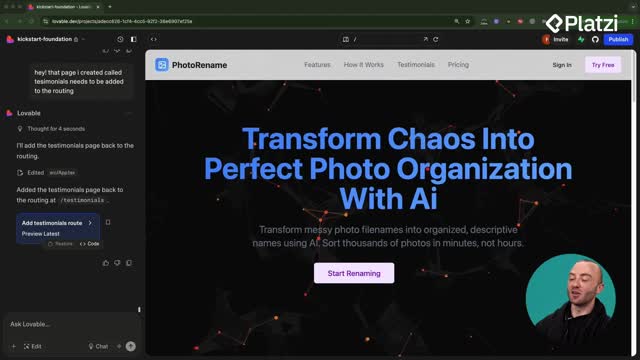
➡️ The page is not registered as a route
✅ Solution in Lovable
➕ Create or re-add the route
Result 🎉
✔️ Appears in navigation
✔️ Works via direct URL access