Giving Instructions
Contenido del curso
Giving Instructions
Contenido del curso

Jahir Esteban Abril

Adriana Victoria Peña
Profesor
Rubén Alejandro García Ibáñez

Jocelyn Marielos Chicas Benitez

Percy Del Águila

María del Consuelo Irastorza Vázquez

Leon Felipe Ocampo Escobar
Joan Sebastian Beltran Cuesta

Pablo Velásquez Caro
Company_adminAlicia Edelmira Hernández de Hernández
Dáinn Silva Gomez
Dáinn Silva Gomez

Guillermo Rolando Meléndez Cruz
Lisbeth Rocio Raigosa Palacio

alejandro gomez

José Manuel Ventura Romero

LEIDY JHOHANA CORREA MURIEL

Gerardo Jesus Ignacio Villacorta

SERGIO ANDRES BENAVIDES NAVARRETE
SERGIO ANDRES BENAVIDES NAVARRETE

Estela Marisol Canales Fashen
install Netflix first, open play atore then, write Netflix in the seeker then install app open it an select the email an password that give you finally, enter in your perfil and enjoy
Great instructions, Jahir. One thing to keep in mind. "Perfil" in English is "Profile".
Install an app
First, turn on your phone. Then, open te google play. Next, search the app. Finally, download the app.
Change your password
Go to the setting in your phone, then you write change in the search click on that put your actual password in then put new password.
Update an app
How to give instructions in English
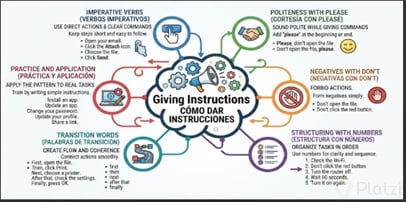
Communicate clear and effective steps using imperative verbs (Open, Click), don't for negatives, and please for politeness.
Structure and connectors:
· Use numbers to order or transition words: First, Then, Next, After that, Finally.
Practical example:
· First, open the file. Then, click Print. Finally, press OK.
First, choose to change your password. Then, log into your account settings. Next, enter your new secure password and confirm it. Finally, save the changes and test logging in again.
How to change your password
First, open your App store. Then, look the app. Next, click on Udapte option. Afther that, search the icon change your password. Finally, update your profile and share a link.
Install an app:
First, turn on the phone. Then, search your favorite App Store. Next, find the app. Finally, tap on download.
First go to play store
Then choose an app
Next click on Up date
Finally wait to complete and open the app.
uy aqui no era
mf is talking in scrach code😭🙏🥀
Scenario 1.
1. Check the documents.
2. Don’t skip the signatures.
3. Organize the files
4. Wait for team confirmation.
5. Send the final report.
first, go to the playstore in your phone then, download the app Google meet next, sing in with your profile after that, look for the link of the meeting finally, turn on the microphone and camera
Update your profile on Platzi.
First, click on your profile picture.
Then, click the "View my profile" button.
Next, click the "Edit profile" button.
After that, update your information.
Finally, click the "Save changes" button.
ChanChange password
1. Click "Change password"
2. Enter current password
3. Enter new password
4. Click "Accept"ge your password
2. Update an app
First, open the App Store or Google Play Store.
Then, go to your installed apps.
Next, find the app you want to update.
After that, tap the Update button.
Finally, wait until the update is complete.
First, sign in to your account. Then, click Settings. Next, click Update Password and change it. After that, click the Save button. Finally, sign out.
Task: Update profile
First, sign in to your account. Then, click on "your profile". Next, update your information. After that, click the save button. Finally, sign out.
How can I send a email.
Fist, open you email, choose a new email, write the email address and the information and finally click send.