






Estefany Aguilar
Profesor( ) 👉🏼 Parentheses { } 👉🏼 Curly Brackets [ ] 👉🏼 Square Brackets

Miguel Ángel Partida Macías
Thank you

Felipe Bernardo González Barranco
Teacher! you're :top: :top: :top: :top:
Leer código en inglés tiene dos caminos muy distintos: uno cuando explicas la lógica a un compañero y otro cuando dictas la sintaxis exacta. Si trabajas en programación y quieres comunicarte mejor con equipos internacionales, dominar el nombre de cada símbolo y las convenciones de nombrado es la base que necesitas.
¿Cómo se lee código en inglés según el contexto?
Existen dos formas válidas de leer un fragmento de código y cada una sirve a un propósito distinto.
Cuando hablas de la lógica, ignoras símbolos y reordenas términos para que la frase suene natural. Una condición como if (x < width) { console.log('inside') } else { alert('error') } la leerías así: si la coordenada X es menor que el ancho del cuadro, registra el valor inside; de lo contrario, muestra un mensaje de error.
Cuando dictas la sintaxis a alguien que está escribiendo, cada símbolo cuenta. Con práctica puedes omitir corchetes obvios y decir algo como console.log string inside, alert string error, pero las palabras técnicas deben ser precisas.
¿Cuál es la diferencia entre leer lógica y leer sintaxis? La lógica describe qué hace el código en lenguaje natural. La sintaxis nombra cada símbolo y palabra reservada para que otra persona pueda escribirlo igual.
¿Cuáles son los nombres correctos de los símbolos en código?
Conocer el nombre exacto de cada carácter evita malentendidos cuando trabajas en equipos en inglés.
Espacios, paréntesis y llaves
El espacio al inicio de una línea se llama indentation o sangría. Algunos lenguajes como Python son sensibles a ella, otros no, pero el código bien indentado siempre se lee mejor. Hay debate eterno entre usar tabs o spaces, y cuántos.
Los agrupadores tienen nombres específicos en inglés:
( ), siempre con opening y closing.{ }.[ ].Usar la palabra calificativa, como curly braces o square brackets, evita confusiones cuando hablas rápido.
Comillas, puntos y operadores
Las comillas también tienen variantes. Tienes single quote, double quote y backtick, esa que está junto a la tecla Escape y que algunos lenguajes usan para template strings. Las curly quotes son las tipográficas que usan los diseñadores en texto, no en código.
El punto cambia de nombre según el contexto, y aquí viene lo interesante:
console.log se dice dot.Los operadores básicos son plus, minus, asterisk (también times para multiplicación) y slash para división. Y ojo con los guiones: existen el hyphen, el en dash y el em dash, llamados así porque tienen el ancho de la letra N o M.
Símbolos de la fila superior del teclado
Los caracteres encima de los números tienen nombres que conviene memorizar:
¿Qué son foo, bar y las naming conventions en programación?
Más allá de la puntuación, hay convenciones que rigen cómo se nombran variables y funciones en código.
Las palabras foo, bar y a veces baz se usan desde los años 60 como variables genéricas o de ejemplo. No tienen significado, son placeholders para cuando necesitas un nombre temporal. Si las ves en documentación, no busques sentido oculto.
¿Qué significa foobar en programación? Es un término inventado para nombrar variables sin un propósito específico, usado en ejemplos y código temporal desde hace décadas.
Cuando una variable tiene dos palabras y necesitas eliminar el espacio, hay cuatro convenciones populares:
myvariable.myVariable. JavaScript la usa casi siempre. Se llama así por la joroba que forma la mayúscula.my_variable. Ruby y muchos sistemas Unix la prefieren. El nombre viene de que el guion bajo parece una serpiente en el suelo.my-variable. No funciona en variables porque los lenguajes interpretan el guion como signo menos, pero brilla en nombres de archivos y módulos de Node.js. Se llama así porque los guiones recuerdan al palito del shish kebab.¿Cuándo usar camelCase, snake_case o kebab-case? Usa camelCase en JavaScript, snake_case en Ruby y archivos Unix, y kebab-case para nombres de módulos y archivos donde el lenguaje lo permita.
¿Cómo practicar la lectura de código en inglés?
Un ejercicio poderoso es tomar un fragmento de código que ya hayas escrito y grabarte leyéndolo dos veces: primero como lógica del código y después como sintaxis exacta, símbolo por símbolo.
Esa doble lectura entrena tu oído para reuniones técnicas, pair programming y entrevistas en inglés. Comparte tu grabación en los comentarios y cuéntame qué símbolo te costó más nombrar.
Estefany Aguilar
Profesor( ) 👉🏼 Parentheses { } 👉🏼 Curly Brackets [ ] 👉🏼 Square Brackets
Miguel Ángel Partida Macías
Thank you
Felipe Bernardo González Barranco
Teacher! you're :top: :top: :top: :top:

Christian Isturiz
Here are my recordings:
for i in range(1, num+1): if num % i == 0: divisors.append(i) return divisors
Reading the logic Reading the syntax
Christian Isturiz
Stanley Melgar
Should we say 'equal' twice? Because isn't the same '=' (for assignment) and '==' (for comparison) 🤯
PD: Remember the indent 👍

Lina López
++2. Reading Code++
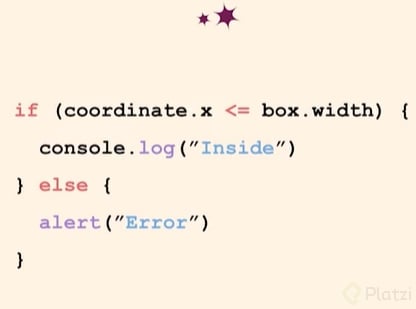
Reading the logic: In this case, use mostly English words, ignore most of the symbols. You can even swap the order of terms. For example: If the X coordinate is less than the width of the box, then log inside. Otherwise, put an alert saying “error”.
Reading the syntax, indentation, and symbols (if you’re helping somebody write this code): In that case, be careful and include every single symbol. For instance: If, open parenthesis, coordinate dot x, less or equal than, box dot width, close parenthesis, open curly bracket. Indent, console dot log, open parenthesis, open quote, inside, end quote, end parenthesis, end curly bracket. Else, open curly bracket, alert open parenthesis, open quote, error, end quote, end parenthesis, end curly bracket. With practice you can skip some of these words. You don’t need to say all the open bracket, open parenthesis, and open and end quote. You can say: console dot log, string inside alert, string error. But be very careful with which words you use to descript those specific terms.
Symbols: Space 👉🏼 Indent/indentation People like code that´s clean and easy to read, because it has been well indented to show the blocks of code. People don’t agree as to whether to use tabs or spaces or how many tabs to use. Some people use two spaces, tabs or four spaces.
( ) 👉🏼 Parentheses
{ } 👉🏼 Curly Brackets / braces
[ ] 👉🏼 Square Brackets
‘ ’ 👉🏼 Single quote
“ “ 👉🏼 double or vertical quote
👉🏼 back quote
“ ” 👉🏼 typographic or curly quotes. Used to make your text look nicer, but normally vertical quotes are used when programming.
If you work in front end you may have a designer that asks you to please use curly quotes in the text. Not in the code but in the text.
, 👉🏼 comma : 👉🏼 colon ; 👉🏼 semicolon 0 👉🏼 zero / oh! 1.75 = when using numbers: point console.log 👉🏼when it comes to electronic things: dot The text. 👉🏼 when it comes to texts: period
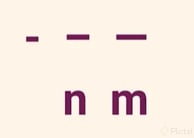
Regular dash, en dash, and em dash. There’s also en space and em space. ~ 👉🏼 tilde ! 👉🏼 exclamation point or mark @ 👉🏼 at sign
👉🏼 hash or pound
^ 👉🏼 caret /ˈkærət/, which denotes special logical operations like “or”. Or to know the control keys in a keyboard. Yep! It´s pronounced like carrot /ˈkærət/ & 👉🏼ampersand
Names of things in your code: Variables, functions, methods.
Foobar, foo, bar, baz: English words that make no sense, programmers have been using these words to denote variables that have no particular name. They’re used for temporary variables, example names or things like that. So, if you see them don’t try to make any sense of them, they’re just made-up words.
Variables that describe a term that has two words: flatcase 👉🏼 together and keep them lower case camelCase 👉🏼 together and the 2nd word has initial upper case. Javascript uses it. snake_case 👉🏼 together with an underscore in between them. Ruby and file names (in UNIX and many other places) tend to use it. kebab-case 👉🏼 together with a hyphen in between them. They look like a skewer or stick in a Shish Kebab.

Axel Rios
gracias!

Pablo Ezequiel Seitler
En Python se usa mucho rodear una palabra de doble underscore. Se pronuncia 'Dunder'
__x__ == Dunder 'x'
Ejemplo __init__ == Dunder Init

DIEGO FERNANDO SAENZ MORA
es bueno saberlo

Santiago Andres Alvarez Cuadros
__Mifflin__ ahora nunca se me olvidará jaja

Diego Fernando Velesaca Orellana
Ways to write a variable or function: flatcase: myvariable camelCase: myVariable snake_case: my_variable kebad-case: my-variable I would add the PascalCase: MyVariable.

Sebastian Delmont
ProfesorAlso, I forgot to mention "Title Case", using spaces to separate words, you know, like humans do, for titles.
Christian Isturiz
^ This symbol is called caret (When I heard the teacher I thought he said carrot 🥕)

Angel Vega
I thought the same thing

Liliana Mojica Murillo
😅😅😂😂 that's so funny! I thought he said "carat", like the diamond 💎 carats 😅😅

Agustin Erwin Sigfrido Devesa
| pipe symbol $ dollar sign (useful for PHP) % percent (useful for module operation) \ backslash (useful for paths in Windows)

Manuel Alejandro Murillo Vásquez
> greater than < smaller than >= greater or equal than <= smaller or equal than

Juan Antonio Aramburo Pasapera
A few thoughts about the indentation
Python uses 4 spaces for indent
There is a lot of controversy around whether to use tabs or spaces. I think it depends a lot on the standards of the specific language you are using if there are any. In python, there is the PEP-8 which is meant to be a style guide to writing uniform and easy to read Python code and there it says that 4 spaces must be used for indentation:
https://peps.python.org/pep-0008/#indentation
This doesn't mean that 4 spaces must always be used everywhere for any language. For example (from the same PEP-8) "Hanging indents may be indented to other than 4 spaces."
Other languages will have a different standard or no standard at all. But if you come from Python and put effort into following the PEP-8 it is likely that by default you will use 4 spaces, and that's okay, it is like the pronunciation problems that we have with English; it's just that we learned by reading and writing.
What is really important
What is really important is

Eduardo Peña Ramos
Exactly. These days, all IDEs and modern editors handle spaces/tab indentations pretty well.

Usuario anónimo
User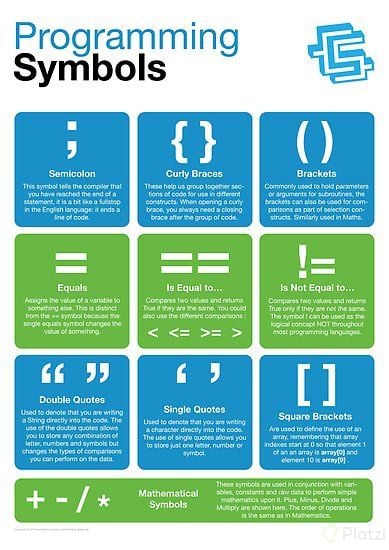

Luis Boivar
(Para los {}, usar braces y para [] se usa brackets) : pero siempre es mejor usar el curlybrackets o squarebrackets .
Variables raras y sin uso especifico:
formas de escritura en el código:

Julianny Adrianny Estrada Acosta
those people that use 4 spaces are wrong 😂
Sebastian Delmont
ProfesorI respect their right to be wrong, but yes, they are.

Rodrigo Alonso Chirinos Figallo
According to PSR (PHP Standard Recommendation) the code must use an indent of 4 spaces :)

Giuliano De Leonardis
Indent Is the space you leave the start of a line of code. You can use space or tab. Some languages like Python are very sensitive to this. 🔥 Parenthesis ( ), or sometimes parents You always just say “open parents and end parents” 🔥 Curly braces or Curly brackets { } 🔥 Square brackets [ ] 🔥 Quotes Single quote: ’ ' Double quotes: " " Back quote: Typographic quote or curly quotes: “ ” 🔥 Common characters (.) Period: at the end of a sentence. Dot: use it in object notation Point: in decimal numbers or version numbers 🔥 (+) Plus (-) Minus (*) Asterisk: which denotes multiplication. Often called “times” (/) Slash: denotes division (-) Dash or hyphen (when is used between two words) (_) Underscore (-) Regular dash (–) n dash (—) m dash (~) Tilde (!) Exclamation sign, also called “bang” (@) At sign (#) Hash, also called “pound” (^) Caret (&) Ampersand 🔥 Ways to write a variable ++flatcase++ ++camelCase++: JavaScript uses "Camel Case" ++snake_case++: Ruby uses “Snake Case” often ++kebab-case++: often doesn’t work as a variable.
Ricardo Patiño Osorio
I prefer to be wrong and use 4 spaces as indentation :P

Victor Hugo Vázquez Gómez
` Is also called backtick

Sebastián Ospino
OK, I just put this in the .vimrc so as not to be wrong
set tabstop=2
Sebastian Delmont
Profesorthis is the way

Mercedes Urbina
uuff, excellent! <3
Lizzet Camacho
Company_adminEl video y el sonido de la voz no van sincronizados !
Sorry, here I have the code ordered
for i in range(1, num+1): if num % i == 0: divisors.append(i) return divisors