
Build Reading and Writing Skills in Claude
Contenido del curso

Set up your AI tutor
Practice the four skills
Keep improving with your tutor
Recursos
Resumen
If you want to practice reading and writing with your AI English tutor, the key is creating two custom skills in Claude that adapt to your level before you start. This guide walks you through both, so you can read short texts, answer comprehension questions, and get real feedback on your writing. It is perfect for English learners building structured practice with AI.
The process reuses the same move you have already seen twice: you run the create a skill prompt, then paste the new prompt from the resource section. No guessing, no reinventing anything. The prompts are ready in both English and Spanish, and you can modify them to fit your own learning journey.
How do I set up the reading skill in Claude?
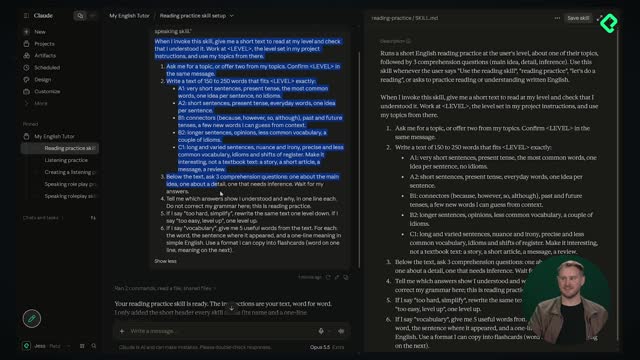
The reading skill is simple by design. Once created, it gives you a short text and checks that you understand it [00:38].
Here is what the reading prompt does step by step:
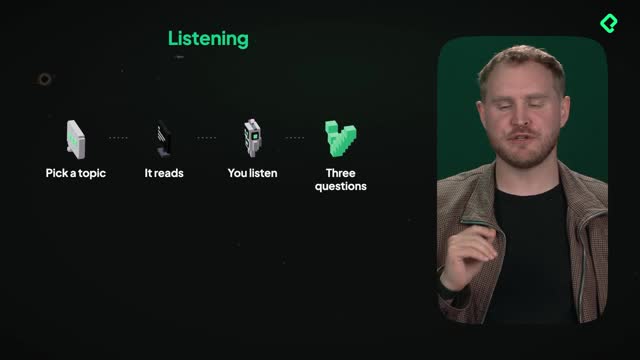
- It asks you for a topic or provides one for you.
- It writes a text of 150 to 250 words adapted to your level.
- It asks three comprehension questions after the text.
And here is the part I love: difficulty is adjustable. If the text feels too complex, you just type too hard, simplify, and it makes the next version easier [00:55]. That safety valve is baked right into the prompt.
How long should an AI reading practice text be? Around 150 to 250 words, adapted to your English level. That length is enough to build comprehension without overwhelming you.
Once you save the skill, it lives in Claude and inside your project. To run it, open a new chat in your project and type something like let's start the reading skill. Since the skill already exists, Claude knows exactly what you mean.
What happens when I answer the comprehension questions?
When I tested it with the topic travel, Claude generated a short essay called a wrong turn in Portugal and three questions to answer. After submitting my answers, it told me what I got right and wrong. I missed question two, so I typed explain, and it went deeper to help me understand [02:48].
That is the point of a tutor. It holds all the context you gave it about yourself and how it should teach, so feedback feels personal. Notice too that the answers stay short and concise, because those were the instructions. No long walls of text, just clear responses matched to your learning process.
Now it is your turn. Pick your topic, create the text, answer the questions, and tell me in the comments how your reading session went.
How do I create the writing skill for real tasks?
The writing skill works a little differently, and that difference matters. Instead of handing you topics, it asks what you need to write and for whom [04:12].
That shift makes it a real application tool. You are not practicing abstract sentences, you are drafting an actual email or document you might need. The setup is identical: create the skill, save it in Claude, and keep the prompts handy from the resource section.
When you run the writing prompt, it does three things:
- It gives you a brief with the goal of the text.
- It tells you who is going to read it.
- It suggests an idea for the length.
After you paste your draft, it tells you what to change. If you type explain, it gives you more detail on each correction.
What is the difference between the fast feedback prompt and the writing skill? Fast feedback gives quick corrections. The writing skill is more in depth, with pedagogy and context, so you learn why something is wrong, not just that it is.
This writing skill is essentially an evolution of the fast feedback skill from the first class [05:48]. You can even turn fast feedback into its own skill and use it as many times as you want. The idea is intentionality: use fast feedback when you want speed, use the writing skill when you want depth.
How do I test the writing skill with a real email?
Back in the English tutor project, I typed let's start the writing practice. The skill activated and asked what I needed to write. I answered: I need to write an email for a client about a sales proposal [06:35].
It gave me instructions for the task, I wrote the email, and it returned feedback using the writing skill. That is the full loop, from real goal to corrected draft.
Can I reuse these AI skills for other learning platforms? Yes. Once the reading and writing skills live in your project, you can apply the same tutor to other courses and content, like your Platzi courses.
Now create the writing skill, choose what you want to write about, get your feedback, and tell me in the comments what was the most common error you spotted. I would love to hear from you.