
Create a Reusable Speaking Skill for AI Tutors
Contenido del curso

Set up your AI tutor
Practice the four skills
Keep improving with your tutor
Recursos
Resumen
Learning how to create a skill lets you save a prompt once and reuse it as many times as you want to practice speaking English with your AI tutor. If you want a reusable roleplay that focuses on fluency and gives feedback only at the end, this walkthrough is for you. It works across Claude, ChatGPT and Gemini.
The idea is simple: build a speaking roleplay skill, test it, and then invoke it anytime with a short voice command. No need to paste a two-page prompt every single time.
What is a skill and why does it matter for speaking practice?
A skill is a saved, reusable prompt. Instead of rewriting instructions in every chat, you store them once and call them whenever you want to talk.
What is a skill in AI chats? It's a prompt you save and reuse as much as you want. Once created, you just say "use the speaking skill" and it runs automatically with all the pre-made instructions.
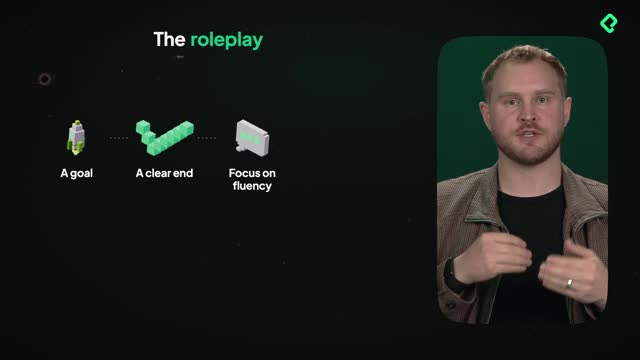
The first skill here is a speaking roleplay. It has a clear goal and an ending point, and its whole focus is fluency. That means it will not stop you while you talk, it will not finish your sentences, and it only gives you feedback at the very end.
How does the speaking roleplay prompt actually work?
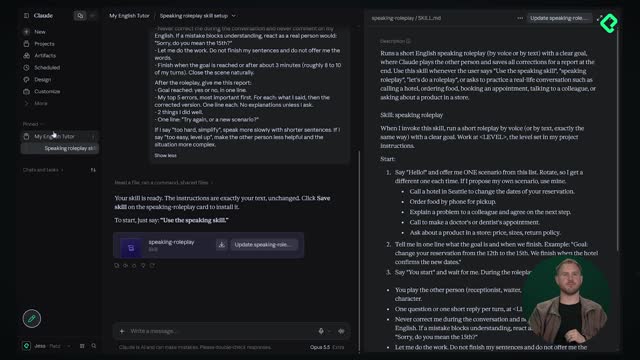
The full speaking prompt is a two-page document, and both the skill-creation prompt and the full speaking prompt live in the resource section below. Here's the logic once you invoke it.
- It runs a short roleplay by voice or text with a clear goal.
- It works at the level set in your project instructions. In this example the level is B1, so it adapts to B1.
- When you say hello, it proposes a couple of scenarios: call a hotel in Seattle, order food, or explain a problem.
- It states your goal in one line, like changing a reservation from the twelfth to the fifteenth, then waits for you to start.
During the roleplay, the rules are strict on purpose: never correct you until the end, do not finish your sentences, do not interrupt. After you finish, it hands you a basic report.
And here's the nice part: you can edit any of this. Want a specific scenario? Add it. Don't like one of the suggested situations? Change it. It's only a prompt, and it's your personal tutor.
Why use a saved skill if I can paste the prompt anywhere? Because once the skill exists, you just start a voice chat and say "use the speaking skill." It launches with all the instructions pre-made, so you skip the copy-paste every time.
How do I create the skill in Claude?
Start inside your project. Copy the skill-creation prompt, then paste the full two-page speaking prompt into the chat. Since the prompt refers to itself as Speaking Roleplay in brackets, swap that placeholder for the real name so it's consistently called Speaking Roleplay.
Send it, and Claude starts building a custom roleplay skill right there in the chat. You can create skills directly in Claude too, but doing it through the chat is often easier.
Once Claude finishes, review it to confirm it matches what you pasted. It may add a few helpful triggers, so saying "use the speaking skill," "speaking roleplay," or just "roleplay" will invoke it. Then hit save skill to store it. You can use it inside and outside the project, though keeping it inside the project is the recommendation.
How do I create the same skill in ChatGPT and Gemini?
The process barely changes across tools, which is the whole point of a reusable prompt.
For ChatGPT:
- Go to plugins, then open the skills section.
- Choose to add a skill with a chat or with an editor. The chat option feels nicer.
- Paste in your speaking skill prompt and hit go. It builds the skill in the same style as Claude.
For Gemini the steps mirror that:
- Open Gemini, go to customize, then skills.
- Hit create, and pick create manually or create with Gemini.
- Paste the skill prompt in the chat and let it generate. That's it.
Across all three, the structure is identical: feed it the prompt, name it, save it. Then your tutor is one voice command away.
Try building your own speaking roleplay and tweak the scenarios to match what you actually need to practice. Which situation would you add first, calling a hotel, ordering food, or something more personal? Drop it in the comments.
Key concepts, skills and timestamps from the class
These are the core ideas worth remembering, with the moments they appear.
- Skill: a prompt you save and reuse as much as you want. Works in Claude, Gemini and ChatGPT [00:05].
- Speaking roleplay: a skill with a clear goal and ending point, focused on fluency, with feedback only at the end [00:28].
- Level from project instructions: the roleplay reads your set level, B1 in this example, and adapts to it [02:00].
- Scenario options: call a hotel in Seattle, order food, or explain a problem, fully editable [02:24].
- Roleplay rules: never correct until the end, do not finish sentences, do not interrupt [03:08].
- Save skill in Claude: stores the skill for use inside and outside the project [04:54].
- Creating skills in ChatGPT: through plugins then skills, using a chat or editor [05:20].
- Creating skills in Gemini: through customize then skills, create manually or with Gemini [06:00].