Recursos
Resumen
Building a 7-day English practice plan with an AI skill turns scattered practice into a system that improves every time you use it. This is for English learners who want to prepare for interviews and keep their AI coach evolving based on their own progress, not a static script.
The core idea is simple: you don't just want a coach that answers questions. You want one that gets better from your own experiences. And the way to do that is by combining a reusable skill with scheduled tasks that plan, review, and improve your practice automatically.
What does the Practice Plan skill actually do?
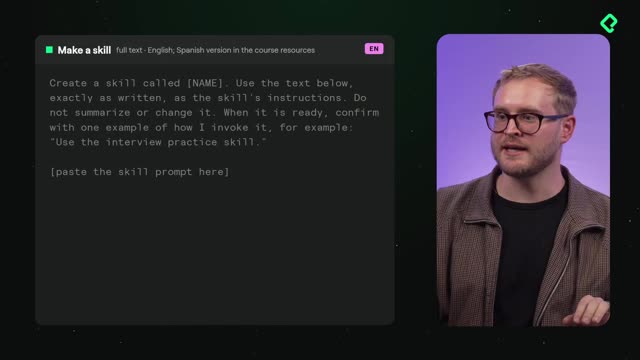
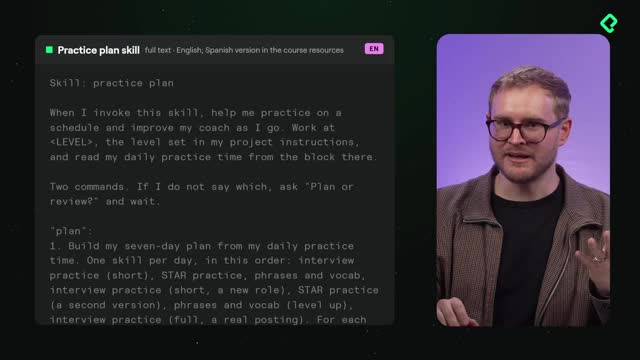
The skill you build here is called Practice Plan, and it helps you practice on a schedule. You can grab the prompt from the resource section, leave space to add the rest, and ship it the same way you set up any skill.
Once created, it builds a seven-day English practice plan based on how much time you can commit each day. Maybe that's 15 minutes a day, maybe 20. The plan adapts to your availability instead of forcing a fixed routine.
What makes it flexible is that it runs on two commands:
- plan: builds your seven days of training from scratch.
- review: looks back at the last seven days you completed.
Notice what it doesn't do. It doesn't score you, give you a placement test, or label your level. Its only job is to help you plan ahead or review what you already did [00:57].
What is the Practice Plan skill? It's a reusable AI skill that builds a 7-day English practice schedule from your daily available time and lets you plan ahead or review your last week using two commands: plan and review.
How do I schedule my interview practice automatically?
Here's where it gets interesting. Instead of opening a chat every day, you go back to the project and into Scheduled. That's how you make the practice happen without relying on willpower.
You can name this task something like your interview practice plan, and the instruction is straightforward: use the Practice Plan skill. From there you pick your model and your timing.
In this case, the choice is Opus, set to fire daily at 2:00 PM [01:36]. Every afternoon at that hour, the schedule triggers the skill and pushes you to practice. You still have the option to run the skill in a normal chat if you want to start right now, but scheduling removes the friction.
Do I have to schedule the skill to use it? No. Scheduling is optional. You can run the Practice Plan skill in a regular chat whenever you want. The daily schedule just automates the reminder so you practice consistently.
How can my AI coach keep improving from my practice?
The second scheduled task is the one that makes the whole system self-improving. You create a task called Improvement with a simple prompt: go over your last messages in the project and suggest changes to the skills based on your reactions and your progress [02:11].
This one doesn't run every day. You set it to fire weekly on Friday at 6:00 PM [02:24], the end of the week, so it can look at everything you did and recommend what to do better next time.
So the two tasks play different roles:
- Improvement reviews all your messages and suggests how to upgrade your skills.
- Interview practice plan helps you plan the next week and review the previous one.
After setting both, you have a loop. Daily practice keeps you active, and the weekly review feeds improvements back into your skills. That's how you take your entire practice and build on it so it keeps getting better instead of staying flat.
The real takeaway is the combination. A skill alone gives you structure. A schedule gives you consistency. And an improvement task turns your own reactions into fuel for a coach that evolves with you.
Now it's your turn: create the skill yourself and try it inside the project folder. Setting up the schedule is optional, but it's what makes the experience better and better every time. What's your plan to practice your interviews in English? Let me know in the resource section, and don't forget to take the exam and leave a review.