Setting up your podcast RSS feed is the step that turns your creative work into a discoverable show across streaming platforms. Here you will learn what fields to prepare, the format specifications you need, and the editorial decisions that shape how your podcast presents itself to listeners and algorithms.
What is an RSS feed and why does it matter for your podcast?
An RSS feed is essentially an XML file, and you do not need any programming background to handle it. Think of it as the digital business card of your podcast: it carries the title, episode names, descriptions, cover art, and every personality element you defined in the early stages of your project.
What is an RSS feed in podcasting? It is an XML file that stores your podcast's metadata, title, description, cover, episodes, and category, and distributes it to streaming platforms automatically.
Most of these pieces are already done if you followed the previous classes. Now you just need them organized and ready to activate your feed [00:42].
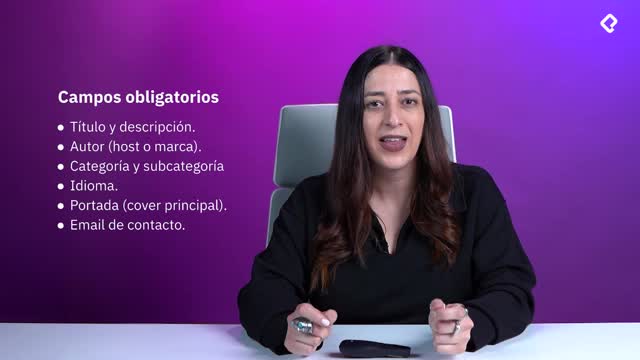
Which fields does a hosting platform require to activate your feed?
Every hosting platform asks for a similar core set of information. Having it ready saves you from going back and forth during the upload process.
- Title and description of the show and of each episode you upload.
- Author, including your name as creator and a contact email.
- Category, which is one of the strongest discovery signals available.
- Language, which helps streaming algorithms match you with the right audience segment.
- Cover art for the show, and ideally for each episode.
- Contact email, required by virtually every hosting platform.
Why should you use Apple Podcasts categories as your reference?
Apple Podcasts categories work as the industry standard. Almost every streaming platform mirrors that taxonomy to classify audio content, so picking your category there gives you the cleanest path to discovery.
Before you choose, browse Apple Podcasts and see how content is grouped: journalism, comedy, art and culture, informative, and so on. That exploration helps you land in the right bucket [02:15].
How do I categorize my podcast on Apple Podcasts?
You pick the category that best matches your concept after reviewing how Apple Podcasts already groups similar shows. That alignment improves how algorithms surface your content to new listeners.
What editorial decisions should you make before publishing?
Once the technical fields are filled, the next layer is editorial. These choices shape how your audience perceives the project from the very first tap.
Ask yourself whether you want to produce trailers, either per season or as mini teasers per episode. Then decide if you will organize your show into seasons. In my experience, subcategorizing into seasons is always worth it: it gives structure to your concept and changes how you feel even while recording, because you become part of a defined chapter of your own project [03:48].
What are the format specifications for cover art and descriptions?
This is where the assets you built earlier come into play. Each platform has minimums and maximums, but the standards are consistent enough to plan around.
Which image sizes should you use for podcast and episode covers?
- Main podcast cover: standard of 1080 x 1080 pixels, with some platforms accepting up to 3000 x 3000 pixels. Always square.
- Episode covers: standard of 1080 x 1080 pixels, square format.
- Design for dual visibility: the image must read well both as a thumbnail and at full size, with strong contrast and brand consistency.
Episode covers are not always mandatory, but I recommend building a template based on your main cover art and modifying small elements like the episode number or the guest's name. Larger productions design unique covers per episode while keeping visual uniformity [05:30].
How should you write podcast descriptions for SEO?
The character limit depends on the platform, but the rule is the same regardless of length: keep it as brief as possible and place your keywords within the first two or three lines. That distribution helps search algorithms and gives listeners an immediate reason to press play.
Where should keywords go in a podcast description? Within the first two or three lines, so search algorithms catch them quickly and listeners understand the value of the episode at a glance.
What are the most common problems when uploading episodes?
Most upload errors come from small details that are easy to fix once you know what to look for.
- Wrong image size: the platform stops the upload if your export does not match the required dimensions. A reusable template prevents this every time.
- Descriptions that are too short: platforms enforce minimum quality standards, so check the requirements before pasting your text.
- Broken or undetected feed: usually solved by running the validation step the platform requests, a quick reverification of your profile.
- Episodes not appearing: occasional platform delays. Refresh your feed, run a checklist on image, text, and metadata, and the issue typically clears.
How can you validate your RSS feed for free?
If you want to confirm everything is in order, use Cast Feed Validator. Paste your Apple Podcasts link and the tool runs a full diagnostic: server validation, category warnings, cover art alerts, description length checks, episode file specs, and website verification [08:10].
It is a free resource that flags problems before they block your distribution, and it makes troubleshooting much faster when something feels off in your feed.
With your RSS feed configured, validated, and editorially defined, the next step is distributing your show across Spotify, Apple Podcasts, and Amazon Music. Share in the comments which hosting platform you chose and what category fits your concept best.