Classifying data by criteria is one of the most useful skills you can build in Excel. With advanced logical functions like IFS, nested IF, IF with AND and IF with OR, you can turn raw numbers into clear labels, bonus calculations or risk flags, all in a single formula.
When should you use each advanced IF function in Excel?
Each variation solves a specific problem. The trick is matching the function to the logic you need.
- IFS: when you have multiple criteria evaluated in order.
- Nested IF: same idea as IFS, but compatible with older Excel versions.
- IF with AND: when several conditions must be true at the same time.
- IF with OR: when only one of several conditions needs to be true.
What is the IFS function in Excel? It's a logical function that checks several conditions in order and returns the value linked to the first one that is true. It replaces long nested IFs.
How do you build an IFS function for sales performance?
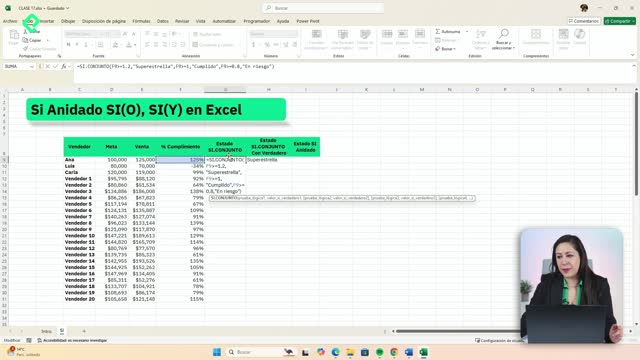
Imagine you want to classify sellers by goal completion: superstar, fulfilled or at risk. That's a textbook IFS case.
The formula follows this logic:
- If the cell is greater than or equal to 1.2 (120%), return superstar.
- If it's greater than or equal to 1 (100%), return fulfilled.
- If it's greater than or equal to 0.8 (80%), return at risk.
A logical test in Excel always uses signs like >, <, >=, <=, = or <>. When Excel asks for a logical_test, you need one of those signs in your expression.
Why does IFS return ND and how do you fix it?
If a value falls outside every condition, like -34% or 67% in a goal completion column, IFS returns #N/A. It's a calculated error, not a bug.
The cleanest fix is adding a final condition with the value TRUE and a default result, for example unfulfilled. That way, anything that didn't match earlier rules lands in that bucket.
A detail worth keeping in mind: the value_if_true doesn't have to be text. You can return a calculation, like multiplying the sales amount by a commission rate or reducing the goal by 10%.
How does a nested IF work and when is it better than IFS?
A nested IF is the classic version of the same idea. You open an IF, and inside the value_if_false you open another IF, and so on.
For the same sales example, you would write something like:
- IF cell >= 1.2, return superstar, otherwise…
- IF cell >= 1, return fulfilled, otherwise…
- IF cell >= 0.8, return at risk, otherwise unfulfilled.
When you nest, Excel colors each level differently (purple, red, black). Close every parenthesis until you return to the black one and the formula is complete.
When should I use nested IF instead of IFS? Use nested IF when you have up to three conditions or when you're working in older Excel versions that don't support IFS. For longer chains, IFS is shorter and easier to read.
In both cases, order matters. Excel evaluates conditions one by one and stops at the first one that is true.
How do you combine IF with AND for bonuses that need two conditions?
Use IF with AND when several rules must be true at the same time. A typical case: pay a higher commission only if the seller passes both a sales threshold and a tenure threshold.
The rule could be: if sales are greater than 10,000 AND months in the company are greater than 4, the seller gets a higher commission, otherwise a lower one.
The structure looks like this:
- Open IF.
- Inside the logical test, open AND with both conditions separated by a comma.
- Define value_if_true (higher commission) and value_if_false (lower commission).
Instead of returning the labels higher or lower, you can return the actual amount: multiply the sales figure by the corresponding commission rate. Remember to fix the commission cell with absolute references, since it's a constant for every row.
How does IF with OR change the result?
IF with OR triggers the value_if_true when at least one condition is met. You don't need all of them to be true.
Using the same example, the rule becomes: if sales are greater than 10,000 OR months in the company are greater than 4, the seller gets a higher commission.
The formula structure is identical to IF with AND, but you replace AND with OR. Visually, the comma between conditions now reads as an or instead of an and.
The difference in the output is significant. With AND, very few rows qualify for the higher commission because both rules must hold. With OR, many more rows qualify, since meeting one rule is enough.
What's the difference between AND and OR in Excel? AND requires every condition to be true to return TRUE. OR returns TRUE if at least one condition is true. In English versions you'll see them as AND and OR; the logic is the same in Spanish Y and O.
Which variation fits your next dataset better, IFS, nested IF, IF with AND or IF with OR? Share your use case in the comments.