Building a frontend with static mock data is a great start, but the real test comes when you connect it to a working backend. Here you will learn how to create a Bun.js HTTP server inside the same Next.js project and use Windsurf's Cascade with an external web reference to migrate mock data to a live API, all without spinning up a separate repo.
What is Bun.js and why use it for a quick API?
Bun.js is a modern runtime for executing JavaScript and TypeScript that aims to be faster and simpler than alternatives like Node.js. The idea is to bundle everything you need to build and manage projects into a single tool, cutting complexity and boosting development speed.
What is Bun.js? A modern JavaScript and TypeScript runtime that combines runtime, package manager, and bundler in one fast tool. Install it globally with the official command for Linux, Mac, or Windows.
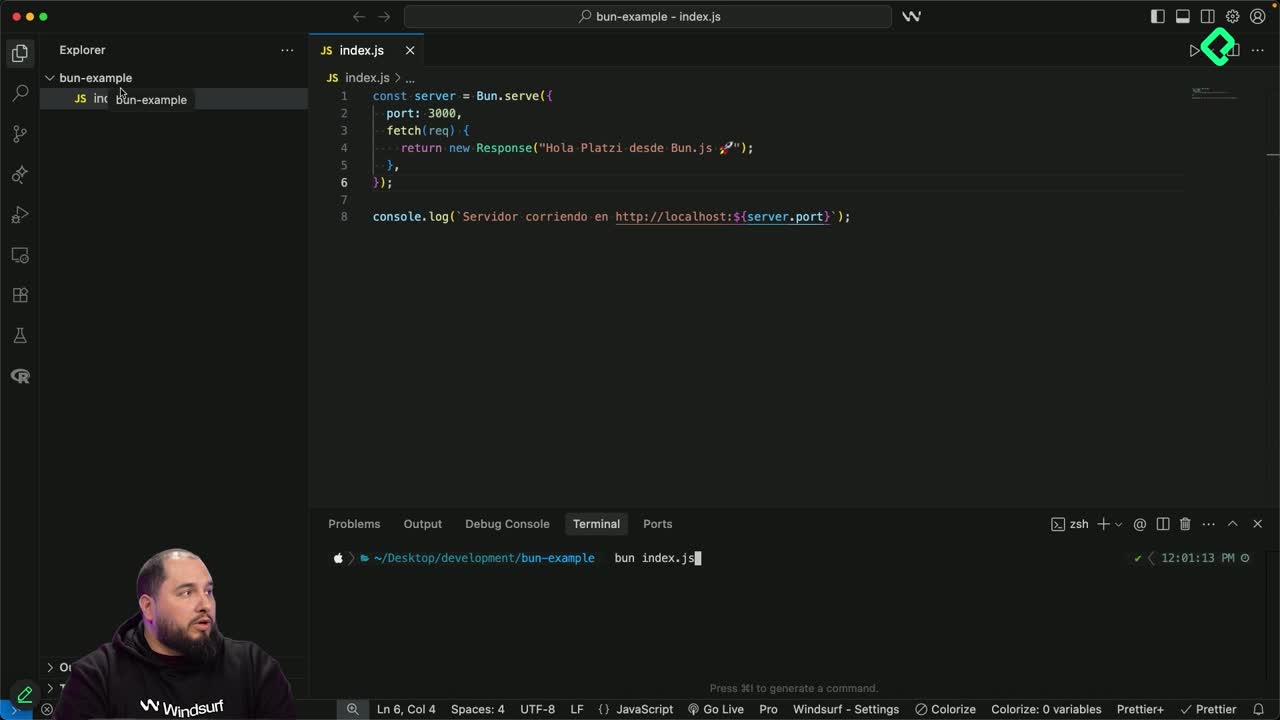
In this exercise, a minimal Bun server takes only six lines of code to spin up. Running bun index.js boots the server on port 3000 and responds with a plain message in the browser. That simplicity is exactly what makes it ideal to test how Cascade handles external references in a real workflow.
How do I add an external web reference in Cascade?
Until now, references in Cascade were local: you tagged files, functions, or specific lines using the @ symbol. The new piece here is the web reference, available from the same @ menu inside Cascade.
When you select web, you can paste a documentation link, in this case the Bun HTTP server docs, and Cascade will fetch and read it before generating code. The prompt used was direct:
Create a Bun.js server using its documentation as reference.
Expose only a GET endpoint to list all posts.
Read the posts from the existing mock file.
Do not create a separate project, no extra package.json or README.
Cascade analyzes the prompt, browses bun.com, reads the HTTP server documentation, and builds a four step to-do list: create the Bun server, extract data from the current mock, configure the GET posts endpoint, and add a script to package.json to run the server.
What did Cascade generate inside the project?
The result is two changes: a new server.ts with around 350 lines and an updated package.json with new scripts. The server.ts file includes the mock data imported as an object, a function to generate an automatic content summary, another to convert data into blog post format with slug and summary, and the Bun.serve call running on port 3001 so it does not collide with the Next.js frontend on port 3000.
It also adds a health check endpoint and three console.log lines confirming the server is running. Launching it with npm run server exposes the posts endpoint immediately, and the browser response confirms the API is live.
How do I migrate mock data to real API calls with Cascade?
With the server running, the next step is replacing every mock import in the frontend with a call to the new API. The prompt is simple: migrate the blog posts from mocks to the API response, and edit every file where posts are used so they read from the API instead.
Cascade creates a centralized api.ts file containing the types, the API base URL, and helper functions to fetch all posts, fetch one by slug, get a featured post, and list regular posts. Then it walks file by file, removing mock imports and replacing them with API calls.
Why centralize API calls in one file? Because it removes duplicated types and mock logic across pages, leaving a single source of truth that is easier to maintain and test.
The scale of the change is significant:
The blog page lost 53 mock lines and gained 9 lines for the API call.
The single blog post file dropped 302 lines and added only 21.
A new Markdown file called API Migration was generated as documentation.
During the process, Cascade flagged a corrupted file mid edit and asked permission to rewrite it from scratch, which improved the final structure and removed duplicated code. It also paused several times asking whether to continue, a normal behavior in Cascade when tasks are long or involve commands to execute.
How do I run the frontend and the Bun server with one command?
Running two terminals gets old fast. The fix lives in package.json: combine both servers under a single script.
Cascade already added a server script that runs bun server.ts. Next.js comes with its default dev script. By adding a third entry, for example dev:full, you can chain both so they boot together. Now npm run dev:full starts the Bun server on port 3001 and the Next.js frontend on port 3000 in one shot.
To confirm the data really comes from the API, you can edit the first post title in server.ts, change it to Platzi, restart with npm run dev:full, and refresh the browser. The new title appears, proof that the mock is gone and everything flows from a single source.
Key takeaways from working with external references in Cascade
A few concepts and skills stand out from this workflow:
External web reference in Cascade: tagging documentation URLs through the @ menu so Cascade reads real docs before coding.
Bun.serve and HTTP endpoints: setting up a GET endpoint and a health check in a few lines.
Mock to API migration pattern: centralizing fetch logic in an api.ts file to remove duplication across pages.
Combined npm scripts: chaining commands in package.json to run multiple services with one instruction.
Cascade documentation output: the auto generated API Migration Markdown that tracks every modified file.
You do not have to use Bun. You could rely on the Next.js internal API, Deno, Node, Python, or Java. The point is that Cascade can drive the migration for you as long as you give it a clear prompt and a solid reference.
Have you tried Bun.js before, or did this migration push you to test it for the first time? Drop your experience in the comments.