Contenido del curso



Módulo 2: Gestión del alcance y aliados de un proyectos




Módulo 3: Gestión del Cronograma de un proyecto
- 11

How Project Schedule Management Works
03:02 min - 12

Dependencias entre actividades para cronogramas de proyecto
06:46 min - 13

Effort vs Duration: The PERT Method
05:49 min - 14

Ruta crítica y cronograma con diagrama de Gantt
05:58 min - 15
PERT and ClickUp for Project Scheduling
Viendo ahora - 16

Técnicas de compresión de cronogramas: fast tracking y crashing
09:03 min
Módulo 4: Planificación y Presupuesto de Costos
- 17

Gestión de costos en proyectos: procesos del PMBOK y control
04:23 min - 18

Tres métodos para estimar costos de proyectos con precisión
07:34 min - 19

Presupuestos de proyecto con reservas y curva S para control financiero
09:55 min - 20
Building a Project Budget Baseline With S-Curve
07:15 min - 21

Why Low Spending Can Hide Project Failure
11:58 min - 22

WSJF and ROI to Prioritize Projects
06:58 min
Módulo 5: Siguientes Pasos

PERT and ClickUp for Project Scheduling
Resumen
Building a realistic project schedule starts with turning your work breakdown structure into a sequenced list of activities, then estimating duration with PERT and visualizing everything in a tool like ClickUp. This approach helps project managers, team leads and anyone running a multi-task initiative keep dates, dependencies and resources under control without losing the big picture.
How do you turn a WBS into a sequenced activity list?
The starting point is your Work Breakdown Structure (WBS) and its work packages. From there, you break each package into concrete activities and define when each one starts, when it ends and how long it takes.
Sequencing matters because not every task runs in a straight line. Some activities can move in parallel and others must wait for a predecessor to finish.
Think about a project to build a drone with a companion app. While the hardware team assembles the drone, the software team can develop the application at the same time. Both streams meet at a testing milestone, and that intersection is exactly what sequencing helps you see.
What is a predecessor activity? It is a task that must be completed (or started) before another one can begin. Defining predecessors is what lets you spot which work can run in parallel and which cannot.
How do you calculate activity duration with PERT?
Duration is not a guess. You estimate it with your team using three scenarios for each work package: optimistic, most likely and pessimistic. Then you apply the PERT formula.
The formula is: (optimistic + 4 × most likely + pessimistic) / 6. That weighted average gives you a realistic expected duration instead of a number pulled from thin air.
Imagine the conceptual design of the drone:
- Optimistic: 8 days.
- Most likely: 10 days.
- Pessimistic: 15 days.
Applying PERT: (8 + 4×10 + 15) / 6 = 10.5 days. That is the expected duration you take to your schedule.
Once you have the duration, you add the resource factor. If a person is dedicated 80% of their time to the project, that percentage becomes the factor of use and lets you calculate the real expected effort in person-days.
How do I estimate effort if my team is not full-time on the project? Multiply the expected duration by the dedication percentage of each resource. A 10-day task with someone at 80% dedication equals 8 person-days of effort.
Why use a spreadsheet before jumping into software?
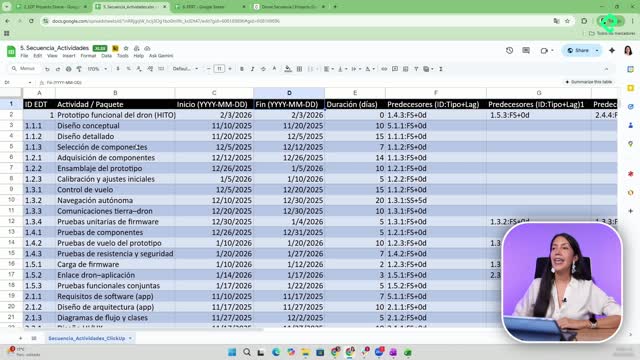
Before opening any tool, build a simple table with your activities, work packages, start date, end date and duration. This becomes your reference and the base file you will import later.
That Excel table is also your baseline: the version of the schedule you compare against as the project evolves. Without a baseline, you cannot tell if you are ahead, on track or behind.
Useful columns to include:
- Task name.
- Description (you can pull this from the WBS dictionary).
- Assigned person.
- Start date.
- Due date.
- Estimated duration.
How do you build a project schedule in ClickUp?
ClickUp is a free tool with enough features in its free tier to manage scope and schedule for most projects. Its main advantage is versatility: you import your spreadsheet, map columns to fields and the platform builds the structure for you.
When you upload the file, ClickUp pulls in your work packages, dates and durations. From there you can group smaller packages under bigger deliverables and start organizing the project hierarchy.
Which views help you visualize the schedule?
ClickUp offers several views, and each one answers a different question:
- List view: shows every activity with its dates and assignees, ideal for quick edits.
- Gantt chart: displays the timeline with bars per activity, so you see overlaps, parallel work and the full duration at a glance.
- Calendar view: places tasks on specific days, perfect to check what should be happening today or this week.
The Gantt chart is especially useful once the project is running. If you are in December and the plan said you should be testing the app, one look at the Gantt tells you whether you are on schedule or drifting.
How do you use these views to control progress?
The calendar view answers a daily question: what should I be working on today? The Gantt answers a strategic one: am I ahead or behind on the overall plan?
Together they support change control on the schedule. When something shifts, you adjust the dates in one place and every view updates, which makes it much easier to renegotiate deadlines and reassign resources.
What if you prefer not to use ClickUp?
ClickUp is a recommendation, not an obligation. You can run the same process in Excel by drawing the Gantt manually, or use any other free project management tool that supports tasks, dates and dependencies.
The trade-off is time. Excel works, but maintaining dependencies and visualizations by hand takes more effort than letting a tool do it for you.
Whichever tool you pick, the logic stays the same: WBS, activity list, PERT estimation, sequencing with predecessors, baseline schedule and a visual layer on top. Share in the comments which tool you are using to manage your project schedule.