Working with a coding agent is all about context, and that's exactly what the Model Context Protocol (MCP) was designed to deliver. Anthropic created MCP as the standard way to give a language model extended context and capabilities beyond what it was originally trained for. Claude Code makes it simple to plug in MCP servers and use them inside your daily workflow as a developer.
In the next sections you'll see how to install three MCP servers that genuinely change how you build software: Playwright for browser automation, Notion for product documentation, and Linear for task management.
What is MCP and how does Claude Code manage it?
MCP is the open protocol Anthropic built so models can pull in external context and trigger actions through a consistent interface. Claude Code handles MCP entirely from the command line.
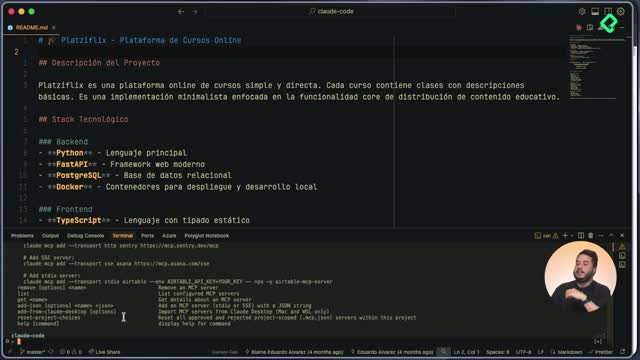
If you run claude mcp help you'll see every option available: adding servers, listing them, removing them, or even serving your own. There are two main ways to add an MCP server. The first is importing them from the Claude desktop app, since Claude is also a chat interface where you can configure MCPs. The second is the add command directly in the terminal.
What types of MCP transports exist? Three: HTTP, Server-Sent Events (SSE), and standard input-output (stdio). Each server picks one, but all of them integrate the same way into Claude Code.
An MCP server is built from three pieces: tools, resources, and prompts. That's why Claude asks for permission the first time it tries to use a capability, like navigating to a URL or fetching a document.
How do I install the Playwright MCP for browser automation?
The Playwright MCP lets the model open a real browser and navigate websites on your behalf [02:30]. You grab the install command from the Playwright docs (the Claude Code section), paste it into the terminal, hit enter, and confirm with claude mcp list. The status check will mark Playwright as connected.
Once inside Claude, the /mcp command shows every available server. To see Playwright in action, ask Claude something like "using the Playwright MCP, visit this site" and paste a local URL such as your localhost course list.
Claude will request permission to use the navigation tool. Approve it for the session and a browser window opens, fully managed by the MCP. From there you can ask it to:
- Scroll the page automatically.
- Capture screenshots and use them as visual context.
- Record videos of the interaction.
- Read console errors, like missing images that fail to load.
This is huge for functional testing. The model takes a screenshot, describes what it sees (branding, main content, accessibility structure), and decides what to improve, all without you touching the browser.
How does Playwright pass visual context to the model?
When you ask Claude to scroll and describe the page, Playwright triggers the scroll action, waits a couple of seconds, then captures the rendered state. That image is fed back as context, so the model reasons over what's actually on screen instead of guessing from code alone.
How do I connect Notion as a documentation source?
The Notion MCP brings product documentation straight into your coding session [08:45]. Think about a PM or designer writing a feature spec: instead of copying and pasting, you let Claude read it directly.
You can find the install command either in the Notion MCP docs or in the Claude Code MCP list. Notion uses HTTP transport. Paste the command, run claude mcp list to confirm the connection, and then handle authentication.
Unlike Playwright, Notion needs an authenticated session. Inside Claude run /mcp, pick Notion, click authenticate, and a browser tab opens with your workspace list. Approve the URL that Claude Code generated and the session is linked.
How do I read a Notion page from Claude Code? Copy the share link of the page and tell Claude "use the Notion MCP to fetch the documentation at this link". Claude requests permission, pulls the page ID, and returns a JSON object with the title and content.
With that, you can compare a feature spec, like a ratings component description, against what's actually rendered through Playwright, closing the loop between expectation and implementation.
How do I use the Linear MCP to manage tasks?
Linear is a task management tool widely used in the industry, and its MCP lets Claude read and update your tickets [13:20]. The install command lives in Linear's MCP docs, and in this case the transport is Server-Sent Events instead of HTTP, which proves how flexible Claude Code is across different MCP types.
Paste the install command, re-enter the conversation, and authenticate Linear the same way you did with Notion. A browser window asks you to approve Claude Code's access to your workspace.
Once connected, you can prompt: "using the Linear MCP, check which tasks are assigned to me". Claude requests permission to fetch your issues and returns the list. From there you can create, update, or close tickets directly from the terminal.
What does a complete MCP workflow look like?
The real power shows up when you chain the three servers:
- Pull the feature spec from Notion as context.
- Use Claude Code with subagents to build a full implementation plan.
- Create the tickets in Linear so the team tracks progress.
- Validate the result with Playwright, capturing screenshots and console errors.
That's the shift MCP brings: a developer's job isn't only writing code, it's analyzing what to build, planning how to build it, and verifying it works. MCP servers were designed to extend the capabilities of language models exactly for that.
Which MCP servers have you tried, and in which scenarios did they save you the most time? Share your setup in the comments.