F-string Format Specifiers in Python
Contenido del curso


Calidad y Profesionalismo del Código
Manejo de Datos y Recursos



Optimización y Pruebas

Creación de Aplicaciones de Consola
- 19

UV: Faster Python Dependency Management
07:17 min - 20

How Python Modules Keep Your Code Organized
07:14 min - 21
Organizing Python Code Into Packages
09:06 min - 22
Función enumerate en Python para indexar listas automáticamente
09:31 min - 23
Filtrado de listas con filter en Python
11:44 min - 24
Función map para calcular tiempo de lectura en Python
08:59 min - 25
Conexión de OpenAI API con variables de entorno en Python
11:17 min
F-string Format Specifiers in Python
Resumen
Python f-strings let you format text with surgical precision: thousands separators, decimal rounding, leading zeros, aligned columns and human readable dates. If you write Python and want cleaner output for users, logs or quick debugging, mastering format specifiers is the next step after learning f-string basics.
Format modifiers live after a colon inside the curly braces of an f-string, like {variable:modifier}. That tiny piece of syntax unlocks most of the formatting power Python offers.
How do you format numbers with thousands and decimal separators?
When you display money, stock prices or any large number, raw output is hard to read. F-strings fix that with two simple modifiers.
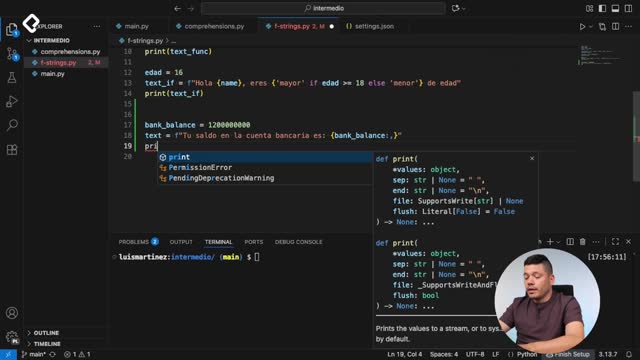
For a bank_balance variable holding a big number, you can write f"Your bank balance is {bank_balance:,}" and the comma acts as a thousands separator [0:30]. The number suddenly looks like something a human would read on a receipt.
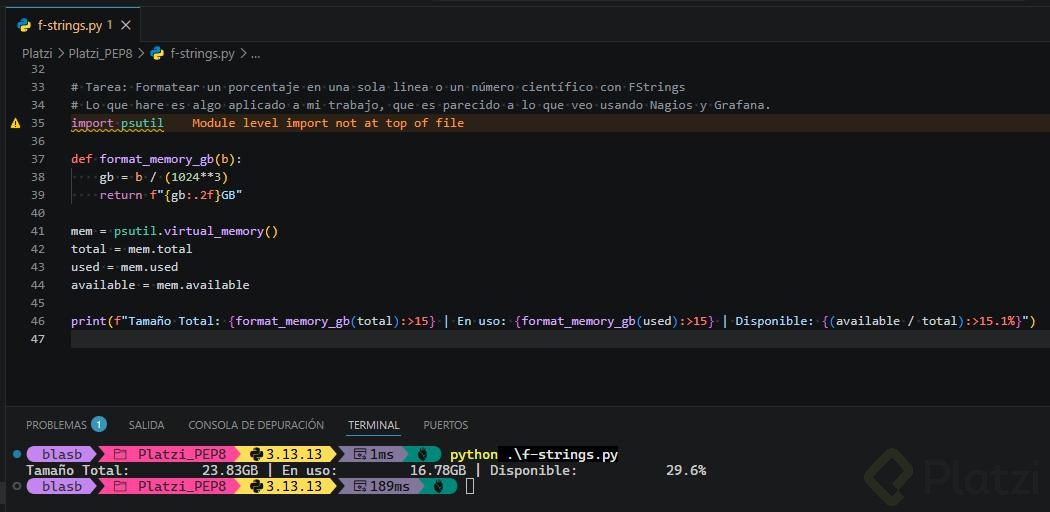
For decimals, the dot plus a digit and the letter f controls precision. With a stock_price, writing {stock_price:.1f} keeps one decimal, while {stock_price:.2f} keeps two and rounds automatically [1:10]. So a value like 1.41 will round to 1.4 with one decimal, and stay 1.41 with two.
What does
:.2fmean in an f-string? It tells Python to format the number as a float with exactly two decimal places, rounding when needed. Useful for prices, percentages and any value where precision matters.
How do you add leading zeros to an ID in Python?
IDs often need a fixed length: 0001 looks more professional than 1 in a user interface or a database export.
With a user_id equal to 1, the expression {user_id:03d} returns 001, and {user_id:04d} returns 0001 [2:15]. The number after the colon defines the total width, and d indicates an integer.
A detail worth remembering: if the value already exceeds that width, Python does not cut it. A user_id of 100 with :04d simply prints 0100, and a larger number prints as is. The format specifier sets a minimum width, never a maximum.
How do you align text and build tables with f-strings?
Aligning columns is where f-strings start to feel like a real layout tool. You decide the width and the direction with <, > or ^.
{product:<15}aligns the value to the left within 15 characters.{product:>15}aligns the value to the right within 15 characters.- Combining both lets you place a product name on the left and a price on the right, perfect for a price list you want to sum visually.
In the demo, a product called laptop with a price of 1000 dollars is printed alongside a duplicated line using \n to simulate a small table [4:00]. Switching < and > changes which column hugs which side, and the columns line up cleanly even when product names have different lengths.
How do I right align a number in Python? Use
{value:>10}inside an f-string, where 10 is the column width. The number will sit on the right edge of that space, ideal for stacking prices in a table.
How do you format dates with f-strings in Python?
Dates are one of the most common reasons developers reach for format specifiers. Python returns ISO format by default, which is precise but not friendly.
First, you import the class with from datetime import datetime and create a date like datetime(2024, 12, 5, 10, 10) [5:30]. Without a modifier, printing it shows the raw ISO string.
With format codes after the colon you can pull specific parts of the date:
%Areturns the full weekday name, like Thursday.%dreturns the day number.- A combined pattern can render
Thursday, December 5, 2024 at 10:10 a.m.directly from the same datetime object [6:40].
This matters because in development you often present dates to users around the world, and a readable format builds trust faster than 2024-12-05T10:10:00.
What other format specifiers does Python offer?
Beyond numbers, alignment and dates, Python has a long catalog of format specifiers. Two worth exploring on your own:
- Percentage formatting, which multiplies by 100 and adds the
%symbol. - Scientific notation, useful for very large or very small numbers in data analysis.
A practical bonus: f-strings also work great for debugging. Dropping variables inside a formatted string while you trace an issue helps you spot wrong values much faster than reading raw print output.
Try writing one line that formats a percentage and another that formats a number in scientific notation, then share both in the comments so others can compare approaches.