
F-strings vs format() in Python
Contenido del curso


Calidad y Profesionalismo del Código
Manejo de Datos y Recursos



Optimización y Pruebas


Creación de Aplicaciones de Consola
- 19

UV: Faster Python Dependency Management
07:17 min - 20

How Python Modules Keep Your Code Organized
07:14 min - 21
Organizing Python Code Into Packages
09:06 min - 22
Función enumerate en Python para indexar listas automáticamente
09:31 min - 23
Filtrado de listas con filter en Python
11:44 min - 24
Función map para calcular tiempo de lectura en Python
08:59 min - 25

Conexión de OpenAI API con variables de entorno en Python
11:17 min
F-strings vs format() in Python
Resumen
Formatting and printing strings is one of the most common tasks in any programming language, and Python offers a clean, fast way to do it through f-strings. If you are learning Python and want cleaner, more readable output, mastering this feature will save you time and reduce errors in your code.
What are Python f-strings and when can you use them?
F-strings are a string formatting method introduced in Python 3.6. To use them, you need to confirm your Python version supports the feature. In the example shown, Python 3.13 is installed, which is fully compatible [00:34].
The syntax is simple: place an f right before the opening quotes, then wrap any variable or expression inside curly braces {}.
python name = "Ana" greeting = f"Hola, {name}" print(greeting)
Output: Hola, Ana
What is an f-string in Python? It's a string literal prefixed with
fthat lets you embed variables and expressions directly inside curly braces, evaluated at runtime.
A quick warning: if your editor has Ruff or a similar linter configured, adding an f without using any variable inside will trigger an automatic fix that removes the prefix [01:25].
Why choose f-strings over format() in Python?
Before f-strings, the standard approach was the .format() method. Compare both styles:
python
With format()
greeting = "Hola, {}".format(name)
With f-string
greeting = f"Hola, {name}"
Reading the f-string version, you immediately understand what's happening. With .format(), when texts get long, the variables end up far from where they're inserted, making the code harder to follow.
There are two main advantages worth highlighting:
- Readability: variables appear inline, exactly where they belong.
- Performance: recent Python versions have optimized f-string evaluation, making your code run faster than with older formatting methods.
How to embed expressions, functions and conditionals inside f-strings?
The curly braces in an f-string are not limited to variables. You can run almost any valid Python expression inside them.
Can I do math operations inside an f-string?
Yes, arithmetic works directly. You can calculate values without creating extra variables:
python calculation = f"La suma es {1 + 1}" print(calculation)
Output: La suma es 2
A more practical example uses a birth year to calculate age inline [03:15]:
python name = "Ana" birth_year = 2020 result = f"Hola {name}, tu edad es {2025 - birth_year} años" print(result)
Output: Hola Ana, tu edad es 5 años
Doing the calculation in the same line keeps the logic close to the output, which makes the code less error prone.
Can I call functions or methods inside f-strings?
Absolutely. You can invoke any string method or function. A common case is transforming text to uppercase using .upper():
python function = f"Hola {name.upper()}" print(function)
Output: Hola ANA
Your editor will even autocomplete the method, because it recognizes the variable as a string [04:20].
How do I use conditionals inside an f-string?
F-strings support inline if/else expressions, perfect for switching between singular and plural forms or showing different messages based on a value:
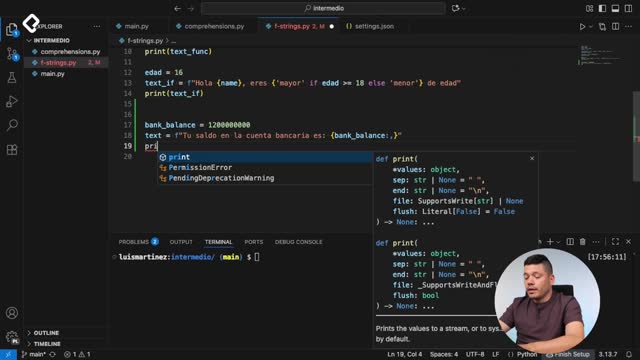
python name = "Ana" age = 20 message = f"Hola {name}, eres {'mayor' if age >= 18 else 'menor'} de edad" print(message)
Output: Hola Ana, eres mayor de edad
If you change age to 16, the same line prints Hola Ana, eres menor de edad. This pattern is great for validating how many elements exist and adapting the wording accordingly [05:40].
Can f-strings replace .format() completely? In most cases, yes. They are more readable, faster, and support the same expressions. Use
.format()only when working with templates defined separately from the data.
What else can you do with f-strings in Python?
Beyond variables, math, methods and conditionals, f-strings also let you access dictionary elements and display their values directly. That opens the door to cleaner data rendering without intermediate variables.
The next step in the learning path is advanced formatting, where the colon operator : lets you control decimal places, padding, alignment and number formats inside the same braces.
What other Python expressions have you tried inside an f-string? Share your examples in the comments and let's compare approaches.