
Adding Habits and Streaks With React Native State
Contenido del curso


Módulo 2: Construcción de la Interfaz de Usuario
- 5
Using const, let, and Conditionals in JSX
10:35 min - 6
Reusable Components with Props in React Native
14:49 min - 7
Conditional Styles With StyleSheet in React Native
11:24 min - 8
Dark Mode Theming in React Native Apps
13:07 min - 9
Making React Native Dynamic with useState
12:12 min - 10
Adding Habits and Streaks With React Native State
Viendo ahora - 11
Pressable vs TouchableOpacity in React Native
09:36 min
Módulo 3: Interactividad y Manejo de Datos
- 12
ScrollView vs FlatList in a Habits Carousel
10:50 min - 13
Diferencias entre ScrollView y FlatList para listas grandes
09:47 min - 14
Instalación de Async Storage para persistencia de datos en React Native
14:54 min - 15
Persisting Habits with AsyncStorage Context
12:07 min - 16
Persisting Habits with AsyncStorage and Context
13:19 min - 17
Confetti Animation With a Fake API Service
11:58 min - 18
Cómo crear una ExploreCard específica para iOS y Android
09:47 min - 19
Explore Tab Carousel With FlatList
12:49 min - 20
AI Avatar Generator with AsyncStorage
12:32 min - 21
Camera and Gallery Access in React Native
16:01 min
Módulo 4: Visualización de Listas y Contenido
Recursos
Resumen
Building a habit tracker in React Native means giving life to your UI through state. In this walkthrough you'll learn how to add new habits dynamically, increase their streak counter, and mark them as complete using useState, useCallback, and the TextInput component. It's a hands on lesson for anyone learning mobile development with React Native who wants their app to feel real.
What does the toggle habit function do in React Native?
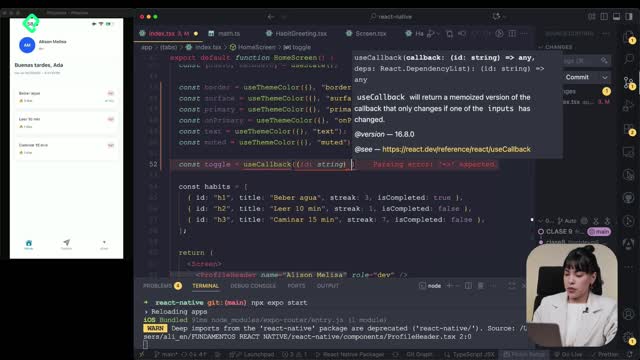
The first piece of logic you'll build lets you tap a habit card and either complete it or undo it. The trick is to use useCallback and pass an id of type string as a parameter so React knows exactly which habit to update.
Inside setItems, you take the previous state with prev and run a .map() to iterate every habit. If the current habit's id does not match the one tapped, you simply return it untouched. If it matches, you flip the isComplete flag and adjust the streak.
What is useCallback used for here? It memoizes the function so it doesn't get recreated on every render, which keeps your habit list performant when you tap cards repeatedly.
How do I prevent the streak from going below zero?
When the habit becomes complete, you add one to the streak. When it goes back to incomplete, you subtract one, but you wrap it in Math.max(0, streak - 1). That way the counter never drops into negative territory, no matter how many times you toggle [02:15].
This small detail is the difference between an app that feels polished and one that breaks under edge cases.
How to add new habits with TextInput and useState
The second function, addHabit, also lives inside a useCallback, but this one takes no parameters. It reads the title from a separate useState called nuevo, which stores whatever the user is typing.
The flow goes like this:
- Check if the title exists. If it's empty, return early and do nothing.
- Spread the previous items array to keep all existing habits.
- Push a new habit object with a unique
id, the title,streak: 0,isComplete: false, andpriority: 'low'. - Reset
setNuevoback to an empty string so the input clears.
The unique id is generated by concatenating the letter h with Date.now(), a JavaScript built in that returns the current timestamp in milliseconds. Quick, reliable, and good enough for local state.
How do I generate a unique id in React Native without a library? Use
'h' + Date.now(). It returns the current timestamp, which is unique enough for client side lists.
Why use TextInput from React Native and not another component?
The TextInput component is the official input field for React Native apps. You must import it from react-native, not from any other UI library, otherwise the behavior breaks.
Its key props are:
value: bound to thenuevostate.onChangeText: connected tosetNuevoso every keystroke updates state.placeholder: a hint string like Editar to show users what to type.onSubmitEditing: triggers theaddHabitfunction when the user submits.
Notice that setNuevo goes inside curly braces, not quotes, because it's a JavaScript variable reference, not a string.
How do I render the habit list and connect everything?
Once the input and the add function are in place, you map over initialState instead of a static array. Each habit card receives its key, title, streak, isComplete, and priority as props.
You also pass the toggle function inside an arrow function so you can forward the id parameter:
jsx onPress={() => toggleHabit(habit.id)}
Inside setItems during creation, you must spread the previous list and include the new habit. Forgetting to spread prev would wipe out every habit already on screen.
What styles help organize the input and button?
A View wraps the TextInput and a Pressable button labeled Añadir. The styling combines a StyleSheet object with theme variables coming from useThemeColor, which handles backgrounds, border colors, and text colors dynamically.
The layout uses flexbox with a row direction, plus borders for both the input and the button. You merge both sources by passing an array to the style prop:
jsx style={[styles.input, { backgroundColor: theme.background, color: theme.text }]}
This pattern keeps your component theme aware while preserving structural styles.
What concepts power this habit tracker?
A few ideas do the heavy lifting throughout the implementation:
- useCallback [00:48]: memoizes functions like
toggleHabitandaddHabitto avoid unnecessary re renders. - useState [03:20]: holds both the items array and the
nuevoinput value as separate pieces of state. - Spread operator with map [01:30]: lets you update one item in an array without mutating the rest.
- Math.max [02:15]: guards the streak from going negative.
- Date.now() [04:10]: generates a quick unique identifier for new habits.
- TextInput [05:25]: the React Native primitive for capturing user text.
- Pressable [06:40]: a flexible touch handler used for the Añadir button and the habit cards.
With these pieces wired together, tapping a habit increases its streak and marks it complete, while typing into the input and pressing Añadir pushes a new habit into the list. The app finally feels alive.
Try it yourself: add a habit like sacar a Naná, tap it, and watch the streak climb. What habit will you track first? Share it in the comments.