Contenido del curso
Conceptos basicos de MCP
- 5
Four Core Blocks of Every MCP Server
05:47 min - 6
Building an MCP Client That Talks to Your Server
07:18 min - 7
Adding an LLM to Your MCP Client
11:38 min - 8
STDIO vs SSE in MCP Servers
05:44 min - 9
LLM Connected to a Local MCP Server
11:14 min - 10
Testing MCP Servers Without a Browser
08:53 min - 11

Deploying an MCP Server to Azure Container Apps
09:39 min - 12
Using MCP Servers in VS Code Agent Mode
09:52 min
MCP avanzado
- 13
Query Azure Resources Directly From VS Code
06:46 min - 14
Herramientas avanzadas de MCP para optimizar servidores y seguridad
03:53 min - 15
GPT-4 Reading Local Files via MCP Server
14:09 min - 16
Image Brightness Analysis with MCP and NumPy
09:48 min - 17
How MCP Agents Remember Conversations
05:01 min - 18
Enrutamiento de herramientas con MCP Server
09:19 min
Integrando tu MCP con un agente
Adding News, Products and Q&A Tools to MCP

Resumen
Building an MCP server that goes beyond basic math operations means tapping into real web data, and SERP API offers a catalog of endpoints that fits perfectly for that job. You'll see how to plug news, product, and Q&A search into your MCP server, plus a markdown resource that auto documents your tools, all using the same parameter structure to keep the code clean.
Why use SERP API endpoints inside an MCP server?
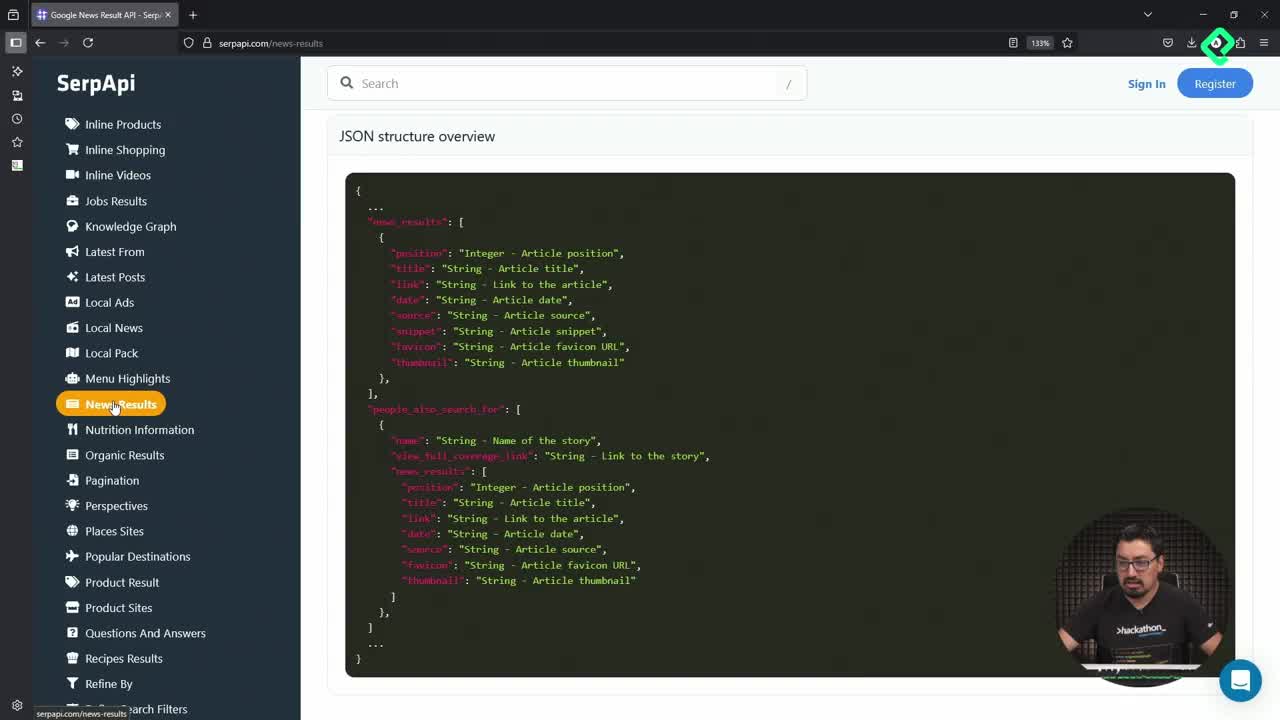
SERP API exposes far more than Google web results. There are discussions, forums, shopping results, news feeds and knowledge graph queries you can borrow to enrich an MCP server. Instead of hitting each API directly from a client, you wrap them as MCP tools so any compatible LLM can call them with a consistent contract.
What is an MCP server? It's a service that exposes tools and resources to a language model through the Model Context Protocol, so the model can run searches, fetch data or generate documents on demand.
The practical win is comfort. If you already use Feedly or dev.io style readers to track news, an MCP tool that pulls fresh articles into your LLM workflow saves clicks and centralizes context.
How do you add a news search tool to your MCP server?
The news tool follows the same shape as the previous Google search tool: a query, a number of results, and a context object. The context stores the query, then the helper make_serpapi_request runs the call and returns structured data.
When articles come back, you format each one with:
- The source and date, which matter for credibility.
- The link to the original article.
- A short summary so the LLM can decide what to read deeper.
If no articles match, the tool returns a clean empty state instead of breaking the flow.
How does product search reuse the same pattern?
Product search is almost a copy paste of the news tool. Same query, same result count, same context handling. The only twist is that the parameters target the shopping intent endpoint inside SERP API.
Results come formatted with title, price and link. If nothing shows up, the exception path returns a friendly message. The lesson here is that once you nail the first tool, the rest are variations on the same skeleton.
How does the Q&A tool work with a knowledge graph?
Q&A is the trickiest of the four because it returns direct answers, not lists. You send a question, SERP API checks its knowledge graph, and you get back a structured response that needs more careful formatting.
Why is Q&A harder than web search? Because answers vary in length and topic. Some need long text, others short snippets, so the tool applies conditional formatting before returning the result.
The handler covers three branches: a successful answer with the right format, an empty result when no answer exists, and an error path when the request fails. Same structure as the other tools, just with extra logic on the formatting side.
How can an MCP resource generate its own documentation?
Beyond tools, MCP supports resources. A resource named README can return a markdown file describing what the server does and which tools it exposes.
The content explains that the server integrates web search with an LLM through SERP API, then lists every available tool. This means your MCP server ships its own documentation, so users connecting through a client can read how to call each method without leaving the protocol.
What does the inspector show once everything is wired up?
Running the MCP inspector against the updated server reveals the full tool catalog. No more just add, subtract and multiply. Now you see news search, general search, product search and Q&A.
A quick test run looks like this:
- News Search with query GitHub: returns five articles with headline, source and date.
- General Search with query GitHub: returns the github.com link and related web results.
- Product Search with query Surface Laptop: returns items priced at $469, $859 and $1,300 with their shopping links.
The product results show up as no link in some fields, a hint that the formatter still needs refinement before going to production.
What's next after finishing the MCP server?
With the four tools and the README resource in place, the server is ready to leave the local machine. The next moves are clear:
- Publish the server inside a container app for remote access.
- Connect it to Visual Studio Code as an MCP client.
- Run SERP API searches from inside your editor without writing direct API calls.
This turns SERP API into a native capability of your coding environment, mediated by your own MCP server. Tell me in the comments which SERP API endpoint you'd wrap first as an MCP tool.